Line on top VS "Underline"
-
Hi Armin or anyone else ;)
I wondering how to put the "underline" on top on the active menu (only) not links, I'm ok with the classic underline at the bottom for the links ;)
Here the page without underline "pink" only the word
https://calvez-calvez.com/category/personal-worksHere an exemple I did on a page with the pink line :
https://calvez-calvez.com/cc-introIt's as CSS custom to add ?
I have an other question.
Is it possible to put the image at the right with a margin (2%) for the "hover option" instead in the center like here :
https://calvez-calvez.com/cc-introThank a lot for your help !
Yannick
-
Dear @calvez_calvez
Let me know if this is what you were looking for :)
Within "Lay Options - Custom CSS & HTML".

Add this code to "Custom CSS" and save.
nav.laynav.primary .current-menu-item a {
    text-decoration: overline !important;
}
It should leave you with this example:

Regarding your second question:
The 2% isn't correct but just to understand if this is the general idea of what you were looking for?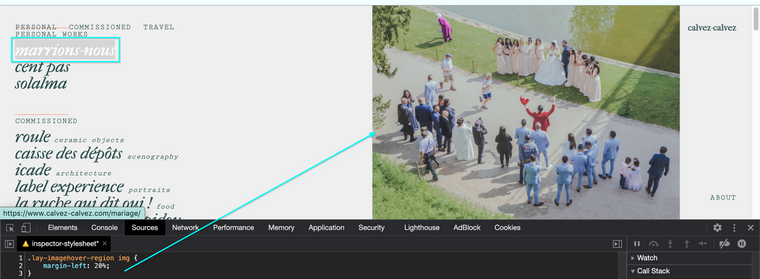
.lay-imagehover-region img {
    margin-left: 20%;
}
Thank you for using Lay Theme and let me know how you go,
Best wishes
Richard -
Thank you very much Richard !
Best regards,
Yannick
-

Hello! It looks like you're interested in this conversation, but you don't have an account yet.
Getting fed up of having to scroll through the same posts each visit? When you register for an account, you'll always come back to exactly where you were before, and choose to be notified of new replies (either via email, or push notification). You'll also be able to save bookmarks and upvote posts to show your appreciation to other community members.
With your input, this post could be even better 💗
Register Login