Random color mouseover
-
-
Dear Ana @banana
It is possible :)
This will require some basic knowledge of Javascript/jQuery:
https://laytheme.com/documentation.html#custom-javascript
Which you would be adding into the Custom <head> content within "Lay Option - Custom CSS & HTML" :

Add the following code and it will target all the Links on your page <a> on hover they will be a random colour:
<script>
window.laytheme.on("newpageshown", function(layoutObj, type, obj){

    var origColor = jQuery("a").css("color");

    jQuery( "a" ).mouseover(function() {
    jQuery(this).css("color",getRandomColor());
    });

    jQuery( "a" ).mouseout(function() {
    jQuery(this).css("color", origColor);
    });

    function getRandomColor () {
     var letters = '0123456789ABCDEF'.split('');
     var color = '#';
     for (var i = 0; i < 6; i++) {
         color += letters[Math.floor(Math.random() * 16)];
     }
     return color;
        }
});

</script>
In this Code there are 3
jQuery( "a" )You can change the 'a' to target what text you wish within your webpage. To do so we can use the Google Inspect tool:
Right click on the element you wish to be a random colour and choose 'inspect'.
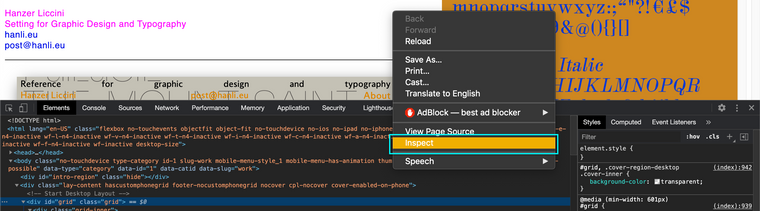
This will bring up a list of attributes associated with the element, for example here this menu text i have:

it has a class called:
.menu-item-67I could change the
jQuery( "a" )to:
jQuery( ".menu-item-67" )And now this particular menu item would be a random colour on hover.
I hope this helps you Ana and have a wonderful day, thank you for using Lay Theme and Good Luck! :)
Best
Richard

Hello! It looks like you're interested in this conversation, but you don't have an account yet.
Getting fed up of having to scroll through the same posts each visit? When you register for an account, you'll always come back to exactly where you were before, and choose to be notified of new replies (either via email, or push notification). You'll also be able to save bookmarks and upvote posts to show your appreciation to other community members.
With your input, this post could be even better 💗
Register Login