Using mix-blend-mode on text containers
-
Hello everyone,
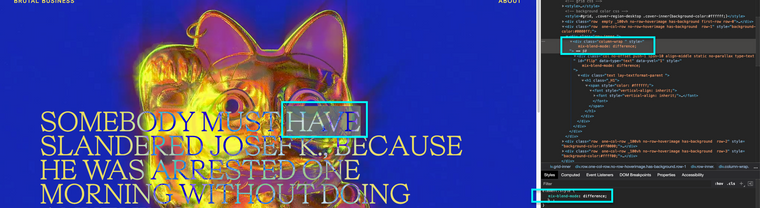
I am currently playing around with CSS mix-blend-mode for future use, however it's not working when applied to text containers - while it works with the site title and menu as demonstrated here: https://brutalo.biz/
This is the CSS code I am using:
.static {
	mix-blend-mode: difference !important;
	position: fixed !important;
  top: 35% !important;
  left: 20% !important;
  transform: translate(-25%, -25%)!important;
}

.blend {
	mix-blend-mode: difference !important;
}
The custom classes are then applied to the text containers, but nothing happens, neither on the video nor the blue background. I tried applying #fff in the text formats, the font editor etc. but also, nothing changes. I wonder if I'm just targeting the wrong divs / classes ?
As always, thank you for any input. xx
-
-
Hi @arminunruh - Is there a way to apply mix-blend-mode: difference; to a "Project index"? I am trying to follow this but it doesn't seem to work...
https://alvarodoze.com/try-copy-2/
Thank you so much -
no i think that doesnt work as i replied in the other subject
-
Is just that when you use the "project index" + "image hover" with the full screen it becomes really hard to read making it not accessible especially if the text is dark and the image is dark too... Do you think there is a way around or that you could work on making it possible?... 🙏🙏 I would really much appreciate it.
-
no i think i cant make it possible :/
-
Okeey.... 😮💨
It is technically impossible or do you think if I hire someone with this expertise can make it work? -
yea i think technically not possible
-
Ok thanks!




Hello! It looks like you're interested in this conversation, but you don't have an account yet.
Getting fed up of having to scroll through the same posts each visit? When you register for an account, you'll always come back to exactly where you were before, and choose to be notified of new replies (either via email, or push notification). You'll also be able to save bookmarks and upvote posts to show your appreciation to other community members.
With your input, this post could be even better 💗
Register Login