Skip to content
  • Recent
  • Tags
  • Popular
  • Users
  • Search
Skins
  • Light
  • Brite
  • Cerulean
  • Cosmo
  • Flatly
  • Journal
  • Litera
  • Lumen
  • Lux
  • Materia
  • Minty
  • Morph
  • Pulse
  • Sandstone
  • Simplex
  • Sketchy
  • Spacelab
  • United
  • Yeti
  • Zephyr
  • Dark
  • Cyborg
  • Darkly
  • Quartz
  • Slate
  • Solar
  • Superhero
  • Vapor

  • Default (No Skin)
  • No Skin
Collapse

Lay Theme Forum

  1. Home
  2. General Discussion
  3. Bug when setting a text link in a text file
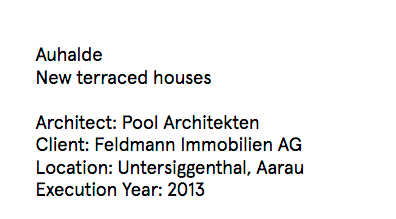
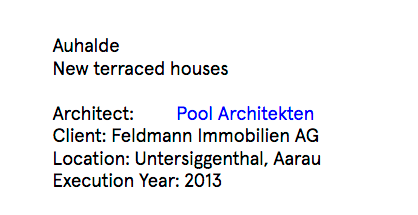
Bug when setting a text link in a text file

Scheduled Pinned Locked Moved General Discussion
11 Posts 3 Posters 1.4k Views 1 Watching
  • Oldest to Newest
  • Newest to Oldest
  • Most Votes
Reply
  • Reply as topic
Log in to reply
This topic has been deleted. Only users with topic management privileges can see it.
  • RichardR
    RichardR
    Richard
    Global Moderator
    wrote on last edited by Richard
    #2

    Dear Peter @Bastion

    It has something to do with the properties of the "._description" class, does this recall something for you?

    The links are given a text-indent of :2em :
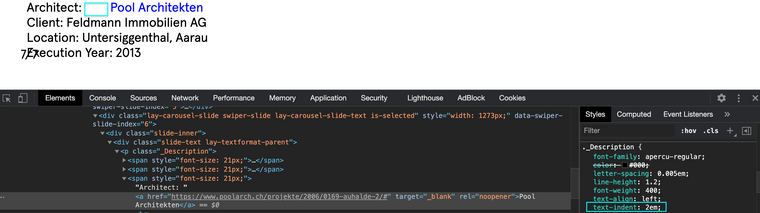
    Screen Shot 2020-11-06 at 2.50.22 PM.png

    And then with this indent removed we have the correct spacing:
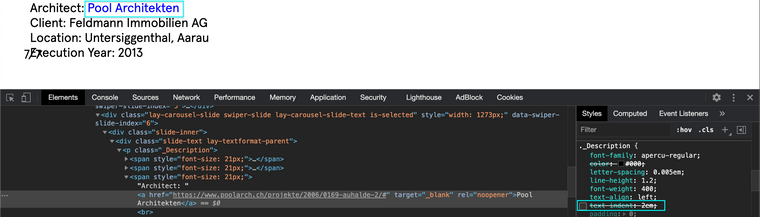
    Screen Shot 2020-11-06 at 2.50.29 PM.png

    However you say this only occured after the last update?

    Let me know and best wishes
    Richard

    1 Reply Last reply
    0
    • B
      B
      Bastion
      wrote on last edited by
      #3

      Hi Richard,

      well, the problem showed up a year ago with an update. But maybe I am wrong ...

      I would like to fix it the way you're showing. But how do I get to the menu you're showing? I can't get there on the normal user front-end. I can't program. I am just a simple user.
      Could you indicate me the path?

      Best
      Peter

      1 Reply Last reply
      0
      • RichardR
        RichardR
        Richard
        Global Moderator
        wrote on last edited by
        #4

        Dear Peter @Bastion

        Sure :) Apologies that i didnt help you properly in the last answer.

        If you add the following code:

        p._Description {
            text-indent:0em;
        }
        

        To the ' Custom CSS ' area that you can find in 'Lay Options - Custom CSS & HTML'

        Screen Shot 2020-09-14 at 2.51.54 PM.png

        And let me know how you go! :)

        Best
        Richard

        1 Reply Last reply
        0
        • B
          B
          Bastion
          wrote on last edited by
          #5

          Hi Richard,

          for the indent:
          not easy for me. I copy pasted the Custom CSS in the CSS area under 'Custom head content'. Nothing happened. As far as I know CSS you just have to paste it, no?

          Best
          Peter

          arminunruhA 1 Reply Last reply
          0
          • B
            B
            Bastion
            wrote on last edited by
            #6

            Ah, I just found the 'Save' Button at the bottom of the CCS section. So I copied and saved, but nothing changed ...

            1 Reply Last reply
            0
            • RichardR
              RichardR
              Richard
              Global Moderator
              wrote on last edited by
              #7

              @Bastion

              Could you please try:

              p._Description {
                  text-indent:0em !important;
              }
              

              And let me know, However i understand that if this is a Bug it needs to be solved properly!

              If the problem still persists could you please send your website address, /wp-admin/ username and password and a link to this topic to info@laytheme.com?
              and hope to get it sorted as soon as possible :)

              Thank you for your patience and apologies for the inconvenience

              Best
              Richard

              1 Reply Last reply
              0
              • B
                B
                Bastion
                wrote on last edited by
                #8

                Hi Richard,

                for the indent: also the new CCS didn't work.
                I'll send you all informations via email.

                Best
                Peter

                1 Reply Last reply
                0
                • B Bastion

                  Hi Richard,

                  for the indent:
                  not easy for me. I copy pasted the Custom CSS in the CSS area under 'Custom head content'. Nothing happened. As far as I know CSS you just have to paste it, no?

                  Best
                  Peter

                  arminunruhA
                  arminunruhA
                  arminunruh
                  Global Moderator
                  wrote on last edited by
                  #9

                  @Bastion said in Bug when setting a text link in a text file:

                  'Custom head content'.

                  No @Bastion you need to put the CSS in "Custom CSS"
                  not in "Custom head content"

                  Also you could just go to "lay options" -> "Textformats" and search for the Format "Descriptions" and set the indent to 0

                  1 Reply Last reply
                  0
                  • B
                    B
                    Bastion
                    wrote on last edited by
                    #10

                    Great! This one is fixed. Thanks a lot!

                    1 Reply Last reply
                    0
                    • RichardR
                      RichardR
                      Richard
                      Global Moderator
                      wrote on last edited by
                      #11

                      Dear @Bastion

                      My Screenshot was misleading, sorry!

                      Best
                      Richard

                      1 Reply Last reply
                      0

                      Hello! It looks like you're interested in this conversation, but you don't have an account yet.

                      Getting fed up of having to scroll through the same posts each visit? When you register for an account, you'll always come back to exactly where you were before, and choose to be notified of new replies (either via email, or push notification). You'll also be able to save bookmarks and upvote posts to show your appreciation to other community members.

                      With your input, this post could be even better 💗

                      Register Login
                      Reply
                      • Reply as topic
                      Log in to reply
                      • Oldest to Newest
                      • Newest to Oldest
                      • Most Votes


                      Online Users
                      A
                      Anna_S
                      Forgot your key, lost your files, need a previous Lay Theme or Addon version? Go to www.laykeymanager.com
                      laytheme.com
                      • Login

                      • Don't have an account? Register

                      • Login or register to search.
                      • First post
                        Last post
                      0
                      • Recent
                      • Tags
                      • Popular
                      • Users
                      • Search

