hover menue
-
hi there, i wonder if its it possible to have a hoverable (toggle?) menue like on this website:
www.markues.net
/ my intention is acctually to create a menue that is the reversal of the menue on the page above, where it reveals once you clicked on sth like a dash / point etc.thank you for helping out!
-
Dear @hanna
I hope i can help you at least in the right direction :)
The Menu is always there, its just hiding, however it is hidden out of the view of the user ( to the right of the viewport/browser window )
When you hover over the Menu items, A class gets added to the opening <html>. The class 'visible---nav'
( Note: you could also add the class to the opening <body> tag ):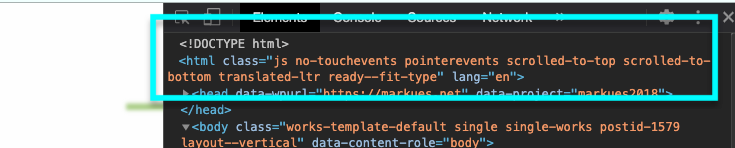
On Hover:

When this class gets added, along with it comes some new CSS to be applied to the Menu - " transform:translateX() "
This forces it Left across the screen and into view. The smooth slide is achieved through a CSS 'transition'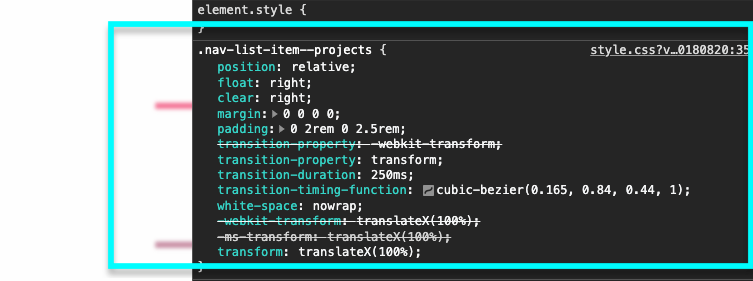
On hover:

You would be able to achieve this by adding Custom Code within 'Lay-Options - Custom CSS & HTML'
Some links to help:
CSS: Transform
https://www.w3schools.com/cssref/css3_pr_transform.aspCSS Transition:
https://www.w3schools.com/css/css3_transitions.aspOn Hover - AddClass ( the CSS way ):
https://css-tricks.com/snippets/jquery/addingremoving-class-on-hover/On Hover - AddClass ( the JS way ):
https://stackoverflow.com/questions/4358964/jquery-hover-addclass-problemYou will need some basic knowledge of CSS or JS to achieve this, here on the Lay Theme Website we have some help on the subject:
https://laytheme.com/documentation.html#custom-css-styling
Javascript added to Lay Theme must first be wrapped in a 'Newpage event' and the common ($) symbol must be changed to 'jQuery' :
https://laytheme.com/documentation.html#custom-javascriptHere is a link to a thread with a similar subject:
http://laythemeforum.com/topic/5995/burger-menu-in-desktop-view/2I hope this helps & have a wonderful day! :)
Best wishes
Richard -
-

Hello! It looks like you're interested in this conversation, but you don't have an account yet.
Getting fed up of having to scroll through the same posts each visit? When you register for an account, you'll always come back to exactly where you were before, and choose to be notified of new replies (either via email, or push notification). You'll also be able to save bookmarks and upvote posts to show your appreciation to other community members.
With your input, this post could be even better 💗
Register Login