Category Filter position
-
-
Dear @XLD
Yeah! :) now i gotcha
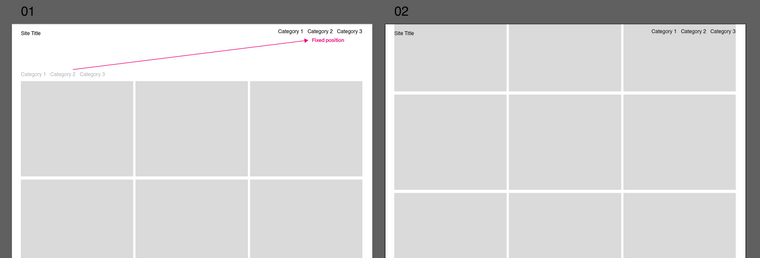
With some custom CSS we can target the filter titles like this and change to fixed position:
._Default_no_spaces.lay-thumbnailgrid-filter {
    position:fixed;
    top:0;
    right:0;
    margin-top:20px;
    margin-right:20px;
}
Maybe you wish to use 'padding' instead of margins ;)
Let me know how you go & best wishes for 2021!
Sincerely
Richard -
Dear @XLD
Yeah! :) now i gotcha
With some custom CSS we can target the filter titles like this and change to fixed position:
._Default_no_spaces.lay-thumbnailgrid-filter {
    position:fixed;
    top:0;
    right:0;
    margin-top:20px;
    margin-right:20px;
}
Maybe you wish to use 'padding' instead of margins ;)
Let me know how you go & best wishes for 2021!
Sincerely
Richard -
-
Hi @Richard-K ,
thanks for this helpful line of code. I had the same issue but am still not able to fix the category filter above my menu. I added the
z-index: 100 !important;and but the filter is still behind the menu bar.
Could you please help me?
Thanks a lot,
Paul -
Dear @paulstolle
Happy to help :)
Could you post a link to the page with Category filter in question & i can have a better understandingTalk soon & have a wonderful day!
Sincerely
Richard -
This post is deleted!
-
Dear @paulstolle
Depending on your design needs,
You have a background colour set for your Navbar:.navbar {
background-color: rgba(255,255,255,1);
}Here with it removed we have all menu's visible:
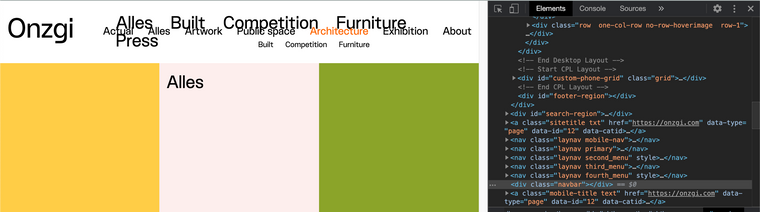
settings can be altered in Customizing ▸ Menu Style >
Menu BarThe font-size likely needs adjusting for your design as well
Talk soon :)
Richard -
Thanks a lot, @Richard-K.
The only problem is that I need the white navbar. There will be more projects in future so while scrolling the fixed menu should be on top of a white background. How can I deal with that? Should I build a div block with white background and z-index to simulate the navbar and lay it between menu items and content?
I'm just wondering if thumbnail grid and grid filter are stack on the same layer so that I can't put the filter above the navbar … Do you know why the simple z-index is not working?
Would be happy to hear from you!
All the best,
Paul -
Dear @paulstolle
Yes it is a bit odd...
Setting the z-index of the navigation also works but will likely slip behind the Grid then, (unless you place grid into 'negative' z-index).navbar{ z-index:0; }This also lets the Filter menu through - My thoughts are that the problem is related to how "background-color" operates in relation to z-index, but still not 100% sure.
Given the fixed nature of the Menus - a white <div> box is a quick solution and the navigation is basically that anyway:
<div class="navbar"></div>If that solution works for you, im sure it will take less time that playing with z-indexes :)
Hope this has helped, apologies if not,
Sincerely
Richard -
Hi @Richard-K
This z-index is driving me crazy … BUT, I finally found a way to solve my problem:
I built a link area with HTML on the bottom of each site. The menubar has to be nested inside of the div container, otherwise it would overlay everything else.
<div class="submenu site_menu">
    <ul>
        <li><a href="https://onzgi.com/exhibition/" class="_Submenu"><span>All</span></a></li>
    </ul>
    <div class="menubar"></div>
</div>
The main problem was the stacking context of my site. Therefore the z-index was not working as I aspected.
Maybe it's not the sexiest solution but it's definitely working well. Cheers.
All the best
Paul -
Dear Paul @paulstolle
Thanks for the update - just happy that its working and the frustration is over! :)
Best
Richard -
M marcos referenced this topic on
-
T Toby referenced this topic on
-
D dcc referenced this topic on


Hello! It looks like you're interested in this conversation, but you don't have an account yet.
Getting fed up of having to scroll through the same posts each visit? When you register for an account, you'll always come back to exactly where you were before, and choose to be notified of new replies (either via email, or push notification). You'll also be able to save bookmarks and upvote posts to show your appreciation to other community members.
With your input, this post could be even better 💗
Register Login