Skip to content
  • Recent
  • Tags
  • Popular
  • Users
  • Search
Skins
  • Light
  • Brite
  • Cerulean
  • Cosmo
  • Flatly
  • Journal
  • Litera
  • Lumen
  • Lux
  • Materia
  • Minty
  • Morph
  • Pulse
  • Sandstone
  • Simplex
  • Sketchy
  • Spacelab
  • United
  • Yeti
  • Zephyr
  • Dark
  • Cyborg
  • Darkly
  • Quartz
  • Slate
  • Solar
  • Superhero
  • Vapor

  • Default (No Skin)
  • No Skin
Collapse

Lay Theme Forum

  1. Home
  2. General Discussion
  3. Fullscreen carousel doubt

Fullscreen carousel doubt

Scheduled Pinned Locked Moved General Discussion
6 Posts 4 Posters 1.4k Views 1 Watching
  • Oldest to Newest
  • Newest to Oldest
  • Most Votes
Reply
  • Reply as topic
Log in to reply
This topic has been deleted. Only users with topic management privileges can see it.
  • E
    E
    ellepi
    wrote on last edited by
    #1

    Hello Guys,
    maybe this is a stupid answer, but i try :)
    My website (www.lorenzoperrotta.org.uk) use a full screen carousel, but i don't like that when i resizing or visualize on tablet, the result is the resize image with a black part down, so I would in any case the site is fullscreen, maybe by cutting like this ivypark.com.
    Does anyone know how to do it?
    I hope I have explained it well, thank you and have a great week end!
    :)

    L

    1 Reply Last reply
    0
    • mariusjopenM
      mariusjopenM
      mariusjopen
      Global Moderator
      wrote on last edited by
      #2

      Hi Elle!

      I would play around with this:

      .row.one-col-row {
          padding: 0px;
      }
      
      .row-inner {
          padding: 0px !IMPORTANT;
      }
      
      .lay-carousel-wrap {
          width: 100vw !important;
          height: 100vh;
      }


      The solution is not 100% but you can get the idea.

      I hope that helps. Let me know if you face trouble!

      Best!

      Marius

      www.mariusjopen.world

      1 Reply Last reply
      0
      • L
        L
        lauramas
        wrote on last edited by
        #3

        Hello!
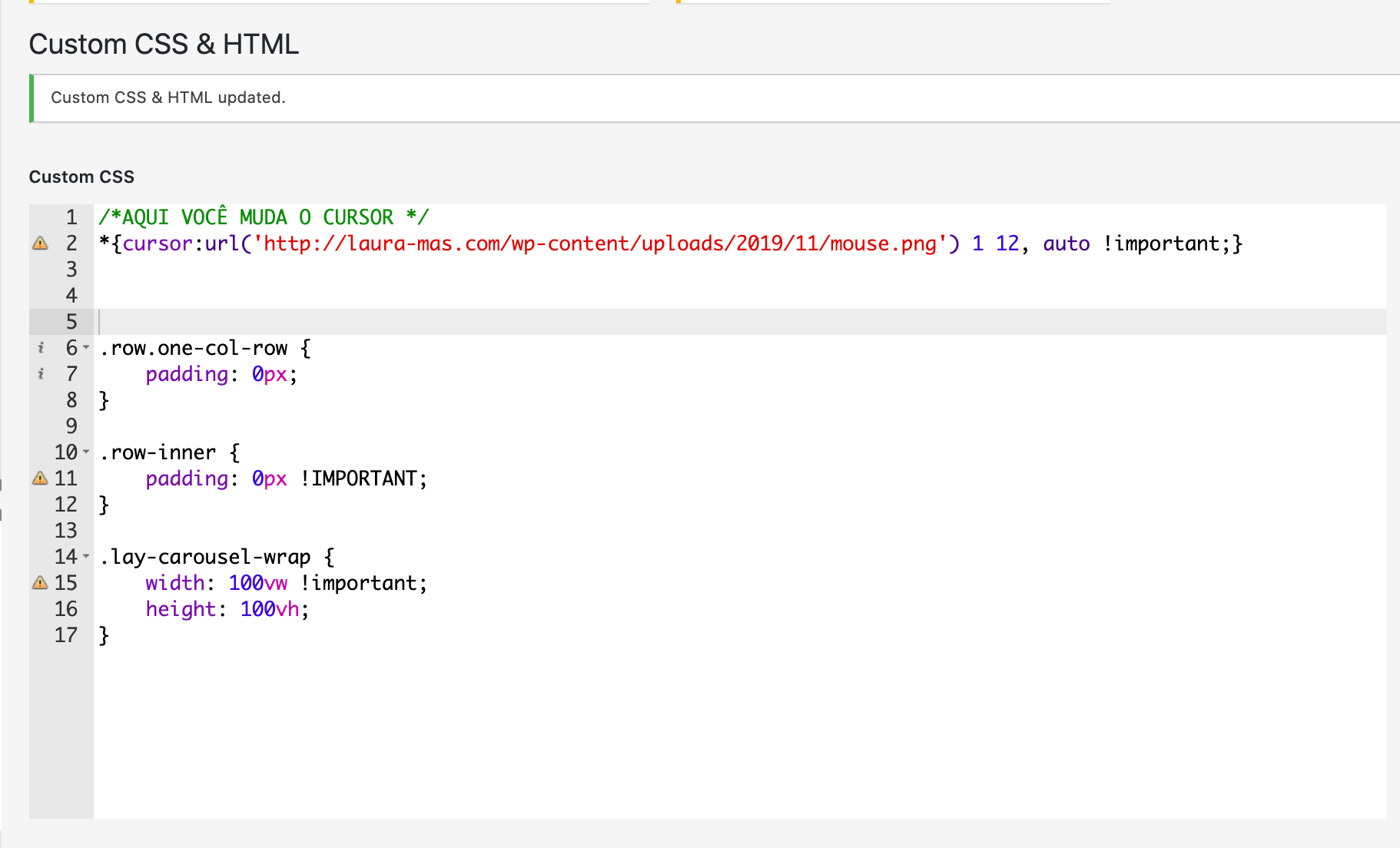
        I would like to know where i need to copy+ paste this code for it to work?

        I used it here, does that make sense? I tried pasting it everywhere else but it isn't working for some reason, not sure if i need to add anything else to the code?

        Thank you! :)

        Screenshot 2021-04-26 at 20.26.44.png

        1 Reply Last reply
        0
        • RichardR
          RichardR
          Richard
          Global Moderator
          wrote on last edited by
          #4

          Dear Laura

          @lauramas

          Yes this is correct :)
          If you want to see the CSS being applied to your site - you can also add the code via:

          Customize > CSS

          (note: they are the same input field, but one allows you to see the changes live - remember to click 'publish' when done )

          Best wishes Laura 🌸
          Richard

          1 Reply Last reply
          0
          • L
            L
            lauramas
            wrote on last edited by lauramas
            #5

            Hi Richard,

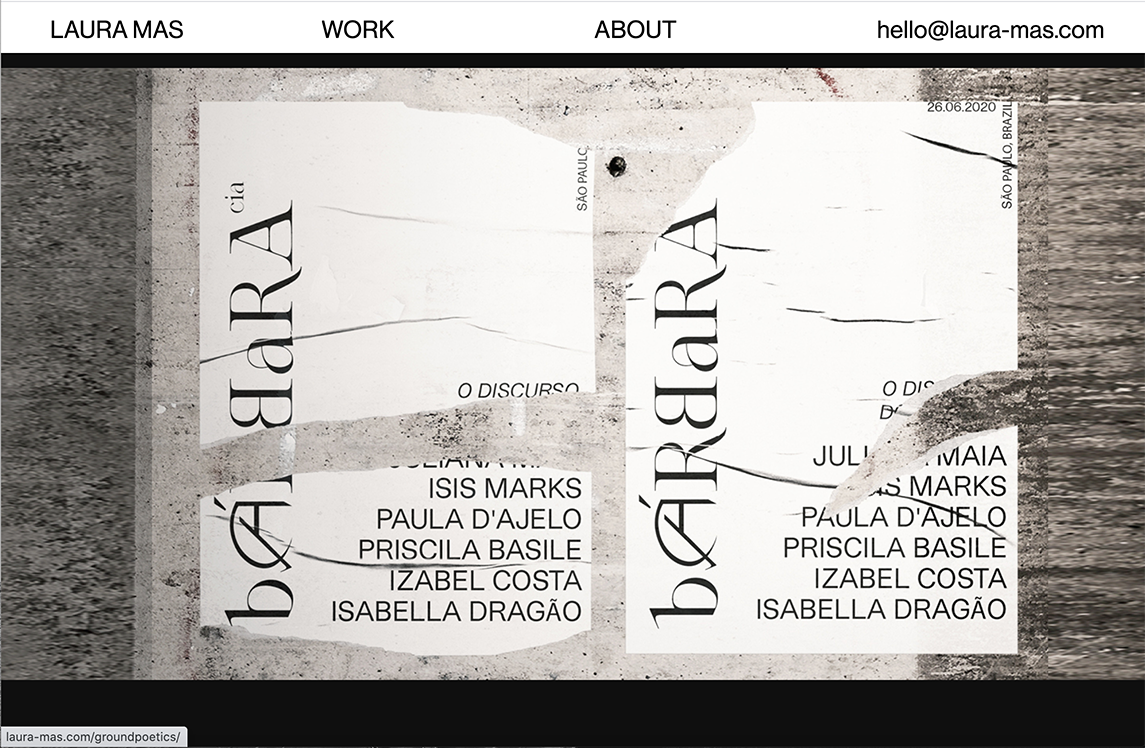
            That's precisely what I've done but it unfortunately doesn't work. :/ As you can see on the screenshot below, whenever I change the ratioof the page, the image is not fullscreen, but cropped. :/ Any ideas why?

            Screenshot 2021-04-27 at 17.06.40.png

            1 Reply Last reply
            0
            • RichardR
              RichardR
              Richard
              Global Moderator
              wrote on last edited by
              #6

              Dear Laura

              @lauramas

              I apologise for such delay - Do you still have issue with the copped images?


              Talk soon & have a wonderful day 🌼

              Richard
              1 Reply Last reply
              0

              Hello! It looks like you're interested in this conversation, but you don't have an account yet.

              Getting fed up of having to scroll through the same posts each visit? When you register for an account, you'll always come back to exactly where you were before, and choose to be notified of new replies (either via email, or push notification). You'll also be able to save bookmarks and upvote posts to show your appreciation to other community members.

              With your input, this post could be even better 💗

              Register Login
              Reply
              • Reply as topic
              Log in to reply
              • Oldest to Newest
              • Newest to Oldest
              • Most Votes


              Online Users
              I
              itsbadjujuju
              Forgot your key, lost your files, need a previous Lay Theme or Addon version? Go to www.laykeymanager.com
              laytheme.com
              • Login

              • Don't have an account? Register

              • Login or register to search.
              • First post
                Last post
              0
              • Recent
              • Tags
              • Popular
              • Users
              • Search