Skip to content
  • Recent
  • Tags
  • Popular
  • Users
  • Search
Skins
  • Light
  • Brite
  • Cerulean
  • Cosmo
  • Flatly
  • Journal
  • Litera
  • Lumen
  • Lux
  • Materia
  • Minty
  • Morph
  • Pulse
  • Sandstone
  • Simplex
  • Sketchy
  • Spacelab
  • United
  • Yeti
  • Zephyr
  • Dark
  • Cyborg
  • Darkly
  • Quartz
  • Slate
  • Solar
  • Superhero
  • Vapor

  • Default (No Skin)
  • No Skin
Collapse

Lay Theme Forum

  1. Home
  2. General Discussion
  3. Image hover Fade Transition Speed

Image hover Fade Transition Speed

Scheduled Pinned Locked Moved General Discussion
8 Posts 5 Posters 1.5k Views
  • Oldest to Newest
  • Newest to Oldest
  • Most Votes
Reply
  • Reply as topic
Log in to reply
This topic has been deleted. Only users with topic management privileges can see it.
  • FWF
    FWF
    FW
    wrote on last edited by
    #1

    Hey,
    I would like to know if there’s is a way to adjust the fade transition speed of the new Image Hover Add-on?
    Is there a css selector for this?

    Many thanks in advance

    1 Reply Last reply
    0
    • RichardR
      RichardR
      Richard
      Global Moderator
      wrote on last edited by
      #2

      Dear @FW

      Let me know if this suits you!
      Targeting the Image-hover region with Custom CSS, which can be added to "Custom CSS & HTML" in "Lay Options"

      Screen Shot 2020-09-03 at 5.44.07 PM.png

      img.lay-image-responsive.setsizes.h100.loaded {
          transition: all 8s ease 0s !important;
      }
      

      You of course will play with the exact style of transition you wish, i had set mine to 8s to exaggerate the effect, you may need to tweak this to your liking but i hope it sets you in the right direction,
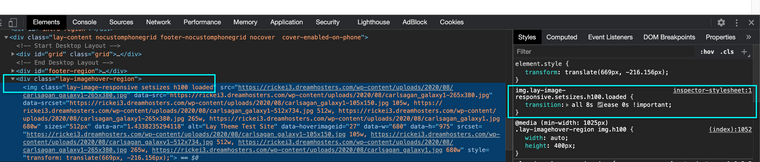
      Screen Shot 2020-09-03 at 5.39.31 PM.png

      This had my Image-hover fading in "very slowly"

      All the best & let me know
      Good luck on your Lay Theme Journey

      Sincerely
      Richard

      1 Reply Last reply
      0
      • FWF
        FWF
        FW
        wrote on last edited by
        #3

        Thank you so much and sorry for my late reply!

        1 Reply Last reply
        0
        • RichardR
          RichardR
          Richard
          Global Moderator
          wrote on last edited by
          #4

          Dear @FW

          No worries! best of luck as always feel free to ask if you have any further questions :)

          Sincerely
          Richard

          1 Reply Last reply
          0
          • S
            S
            spontans
            wrote on last edited by
            #5

            Is it possible also to slow down the speed of fading on mouse out?

            1 Reply Last reply
            0
            • RichardR
              RichardR
              Richard
              Global Moderator
              wrote on last edited by
              #6

              Dear @spontans

              Sorry its been a while since this thread,
              The following CSS is what controls the transition speed of the Imagehover, Mouse-in & Mouse-out:

              .lay-imagehover-region.transition {
                  transition: opacity 1000ms ease;
              }


              I have set it to 1000ms instead of the default 200ms.


              Hope this helps
              Richard
              1 Reply Last reply
              0
              • R
                R
                Remco van Dun
                wrote on last edited by
                #7
                This post is deleted!
                1 Reply Last reply
                0
                • StarcS
                  StarcS
                  Starc
                  wrote on last edited by Starc
                  #8

                  @Richard Hi Richard, i think there is no .lay-image-responsive.setsizes.h100.loaded in the actual version of imagehover.
                  Can u help me please?

                  1 Reply Last reply
                  0

                  Hello! It looks like you're interested in this conversation, but you don't have an account yet.

                  Getting fed up of having to scroll through the same posts each visit? When you register for an account, you'll always come back to exactly where you were before, and choose to be notified of new replies (either via email, or push notification). You'll also be able to save bookmarks and upvote posts to show your appreciation to other community members.

                  With your input, this post could be even better 💗

                  Register Login
                  Reply
                  • Reply as topic
                  Log in to reply
                  • Oldest to Newest
                  • Newest to Oldest
                  • Most Votes


                  Online Users
                  A
                  Anna_S
                  Forgot your key, lost your files, need a previous Lay Theme or Addon version? Go to www.laykeymanager.com
                  laytheme.com
                  • Login

                  • Don't have an account? Register

                  • Login or register to search.
                  • First post
                    Last post
                  0
                  • Recent
                  • Tags
                  • Popular
                  • Users
                  • Search