Hide columns
-
Dear everyone,
I need your help because I cannot find a solution.
So, here is my website and as you can see, in the project "section" there are 4 columns (project, field, place, and year). The problem is that I would like to hide the 3 columns (field, place, and year) on the mobile version.
To do that I added on the custom CSS for mobile this code:.column-wrap:nth-child(2) { display: none}but it doesn't work, I know it's just for the second column but neither for that one is working.
So, can anyone please suggest me something else?
Thanks
-
-
-
Dear @rioma7
The website link provided does not work, could you please re upload 🔍
Best wishes & talk soon
Richard
-
-
Dear @rioma7
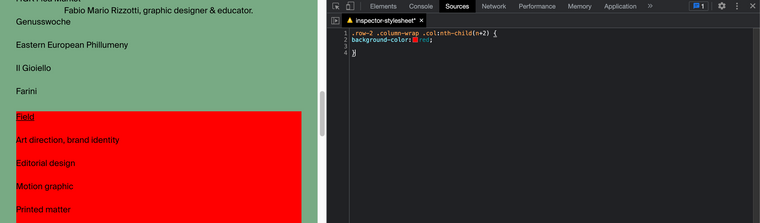
.row-2 .column-wrap .col:nth-child(n+2) {
background-color:red;
}
Best wishes! ✅🌝
Richard

Hello! It looks like you're interested in this conversation, but you don't have an account yet.
Getting fed up of having to scroll through the same posts each visit? When you register for an account, you'll always come back to exactly where you were before, and choose to be notified of new replies (either via email, or push notification). You'll also be able to save bookmarks and upvote posts to show your appreciation to other community members.
With your input, this post could be even better 💗
Register Login