Woo Commerce Additional Variation Images plugin works with Lay?
-
Hi,
as seen in another thread (http://laythemeforum.com/topic/6827/variable-product-images/2)
variation images don't automatically change.But if I use this plugin, would it work?
or is it not compatible with lay?
https://docs.woocommerce.com/document/woocommerce-additional-variation-images/best,
V -
Dear @Villads
I personally have not tested this plugin with Lay Theme and therefore do not know if it will work. I see because it's a paid annual subscription it would be risky.
My opinion would be to wait for Variable images to work with future updates, sorry that i cannot be of further help on this one 🌝
Sincerely
Richard
-
-
Also,
as I understand it, it is only possible to have a dropdown selector for product variations, is that correct?
Have tried different not working plugins for other button types for product variations.
Is this a possibility coming also? or could I develop a work around?
Thanks again
V -
Dear @Villads
" it is only possible to have a dropdown selector for product variations"
As far as i can know yes, , the Attributes and Variations are the only way of creating dropdown menu's for the variables area on the product page:
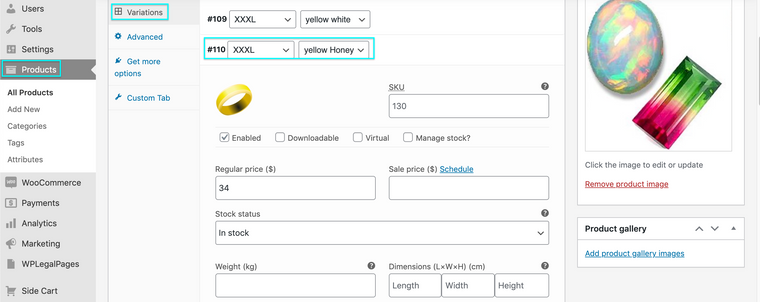
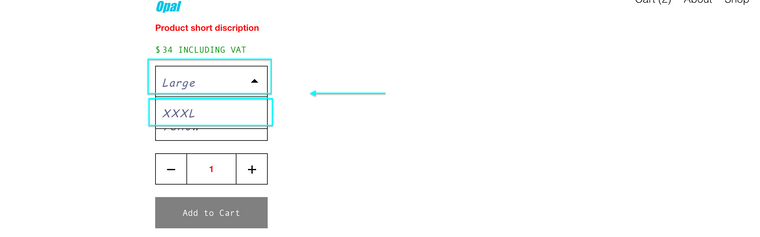
What other information did you want in these dropdown menu's?
"Have tried different not working plugins for other button types for product variations."
I dont yet understand this one sorry. Could you provide any more context please 🔍
Sorry for such delay, and best wishes, thank you for supporting Lay Theme 🌝
Richard

Hello! It looks like you're interested in this conversation, but you don't have an account yet.
Getting fed up of having to scroll through the same posts each visit? When you register for an account, you'll always come back to exactly where you were before, and choose to be notified of new replies (either via email, or push notification). You'll also be able to save bookmarks and upvote posts to show your appreciation to other community members.
With your input, this post could be even better 💗
Register Login