Plugins
-
-
Dear @Prisma
You can easily embed a map into Lay Theme:
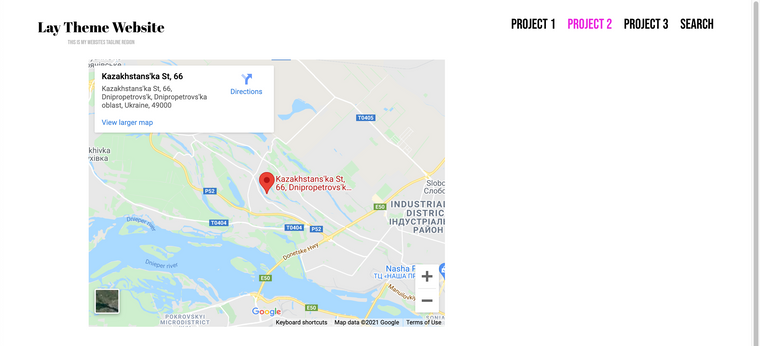
Set up a location on google maps using > share > embed a map > :
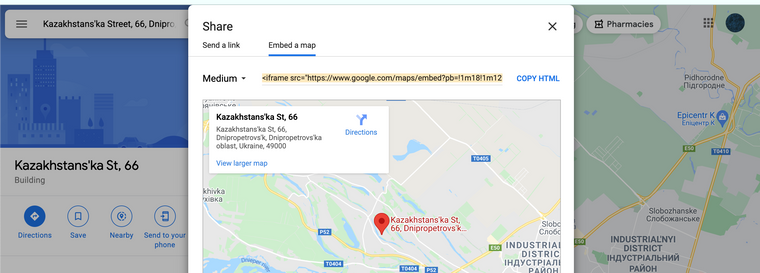
Then copy the <iframe> code (copy HTML) E.g:
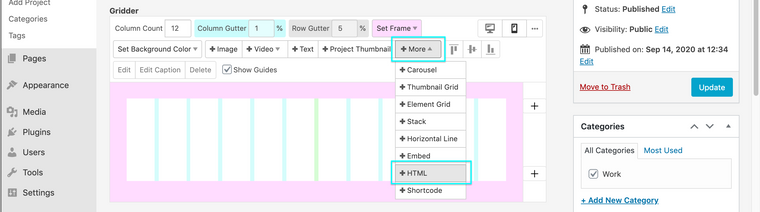
<iframe src="https://www.google.com/maps/embed?pb=!1m18!1m12!1m3!1d63854.80905848804!2d34.94620422693764!3d48.53756525034115!2m3!1f0!2f0!3f0!3m2!1i1024!2i768!4f13.1!3m3!1m2!1s0x40d95f63d310829f%3A0x22b8b9568bd53eda!2sKazakhstans'ka%20St%2C%2066%2C%20Dnipropetrovs'k%2C%20Dnipropetrovs'ka%20oblast%2C%20Ukraine%2C%2049000!5e0!3m2!1sen!2snz!4v1635278921309!5m2!1sen!2snz" width="600" height="450" style="border:0;" allowfullscreen="" loading="lazy"></iframe>You can then add this code into Lay Theme via > Gridder > +More +HTML:
As for embedding this into a contact form with Lay Theme, i am unsure - you will need to do some testing with free plugins first to see.
Best wishes & have a wonderful day ✨
Richard

Hello! It looks like you're interested in this conversation, but you don't have an account yet.
Getting fed up of having to scroll through the same posts each visit? When you register for an account, you'll always come back to exactly where you were before, and choose to be notified of new replies (either via email, or push notification). You'll also be able to save bookmarks and upvote posts to show your appreciation to other community members.
With your input, this post could be even better 💗
Register Login