Alt Costum Mouse Cursor
-
HI there,
Just wanted to ask, if its possible to add an alternative Custom Mouse Cursor, for Desktop, because I use black arrows for 'Previous' and 'Next' in Carousel at the moment, but sometimes the images are black, and the arrows are non-visible.
I found that the 'Previous/Next Buttons' have a similar option, and I thought maybe will be good to have this option for Mouse Cursor.
Thanks,
-
HI there,
Just wanted to ask, if its possible to add an alternative Custom Mouse Cursor, for Desktop, because I use black arrows for 'Previous' and 'Next' in Carousel at the moment, but sometimes the images are black, and the arrows are non-visible.
I found that the 'Previous/Next Buttons' have a similar option, and I thought maybe will be good to have this option for Mouse Cursor.
Thanks,
-
Dear @pandeli
"if its possible to add an alternative Custom Mouse Cursor, for Desktop... I think, is 'a must' option."
Ive added this to the development notes! ✅
You can add your own custom cursor with the following code:
cursor: url(insert-your-desired-cursor-url-here), auto;The code can be inserted into either > Lay Options > Custom CSS & HTML > Custom CSS
Or : within > Customizer > CSS
You can find out the URL needed from your Media Library
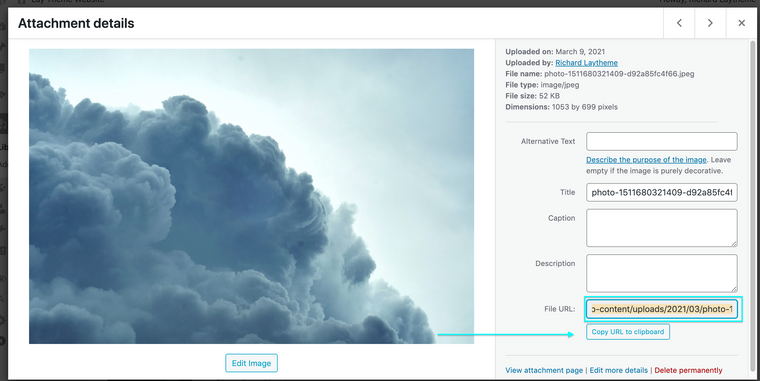
When viewing a media items details in the media library the 'File Url" at the bottom right. You can copy this URL and paste it into the above code, so an example from the above image would be:
cursor: url(https://rickei3.dreamhosters.com/wp-content/uploads/2021/03/photo-1511680321409-d92a85fc4f66.jpeg), auto;Please note that a Custom Cursor should maintain a certain pixel dimension. Images used for a custom cursor that are above a certain pixel (e.g Firefox- 128px x 128px )will not work properly.
Best wishes @pandeli & have a wonderful day 🌻
Richard
-
Dear @pandeli
"if its possible to add an alternative Custom Mouse Cursor, for Desktop... I think, is 'a must' option."
Ive added this to the development notes! ✅
You can add your own custom cursor with the following code:
cursor: url(insert-your-desired-cursor-url-here), auto;The code can be inserted into either > Lay Options > Custom CSS & HTML > Custom CSS
Or : within > Customizer > CSS
You can find out the URL needed from your Media Library
When viewing a media items details in the media library the 'File Url" at the bottom right. You can copy this URL and paste it into the above code, so an example from the above image would be:
cursor: url(https://rickei3.dreamhosters.com/wp-content/uploads/2021/03/photo-1511680321409-d92a85fc4f66.jpeg), auto;Please note that a Custom Cursor should maintain a certain pixel dimension. Images used for a custom cursor that are above a certain pixel (e.g Firefox- 128px x 128px )will not work properly.
Best wishes @pandeli & have a wonderful day 🌻
Richard


Hello! It looks like you're interested in this conversation, but you don't have an account yet.
Getting fed up of having to scroll through the same posts each visit? When you register for an account, you'll always come back to exactly where you were before, and choose to be notified of new replies (either via email, or push notification). You'll also be able to save bookmarks and upvote posts to show your appreciation to other community members.
With your input, this post could be even better 💗
Register Login