Adding site title within mobile menu
-
Hi,
Is it possible to add my logo SVG to the inside of my mobile burger menu? I’d like to align the headings to the left of page and place my logo in top left in the same place as it is on the site header. I’m sure there’s a way with css. Any help would be greatly appreciated.
Garrod
-
-
-
-
Dear @Garrod
If it suits your design, you could make use of the Mobile site title already built in and place an image. Then with CSS you would only need to push it to the right a bit:
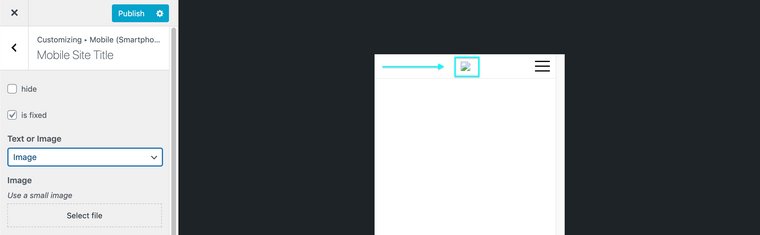
If interesting in further custom coding then you can add the image into your website via HTML and then position it correctly.
https://www.w3schools.com/tags/tag_img.asp
You can get the
srcof your image/svg from the media library where you have uploaded your image/svg. When viewing an image in more detail you can copy the URL file path in the bottom right corner: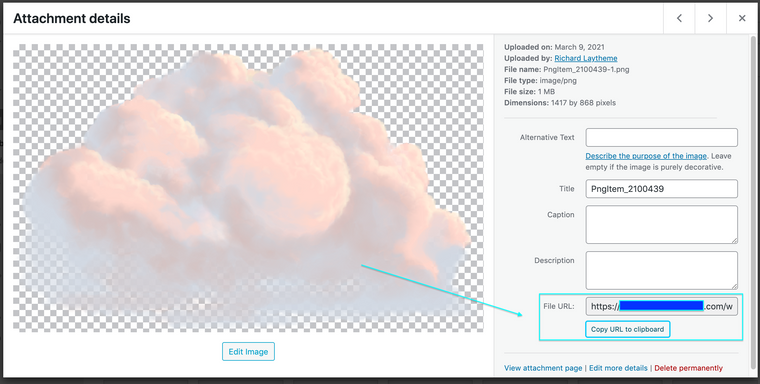
Hope this helps you in the right direction & best wishes ✨
Richard
-
Dear @Garrod
If it suits your design, you could make use of the Mobile site title already built in and place an image. Then with CSS you would only need to push it to the right a bit:
If interesting in further custom coding then you can add the image into your website via HTML and then position it correctly.
https://www.w3schools.com/tags/tag_img.asp
You can get the
srcof your image/svg from the media library where you have uploaded your image/svg. When viewing an image in more detail you can copy the URL file path in the bottom right corner:
Hope this helps you in the right direction & best wishes ✨
Richard
-
Dear @Garrod
If it suits your design, you could make use of the Mobile site title already built in and place an image. Then with CSS you would only need to push it to the right a bit:
If interesting in further custom coding then you can add the image into your website via HTML and then position it correctly.
https://www.w3schools.com/tags/tag_img.asp
You can get the
srcof your image/svg from the media library where you have uploaded your image/svg. When viewing an image in more detail you can copy the URL file path in the bottom right corner:
Hope this helps you in the right direction & best wishes ✨
Richard
-


Hello! It looks like you're interested in this conversation, but you don't have an account yet.
Getting fed up of having to scroll through the same posts each visit? When you register for an account, you'll always come back to exactly where you were before, and choose to be notified of new replies (either via email, or push notification). You'll also be able to save bookmarks and upvote posts to show your appreciation to other community members.
With your input, this post could be even better 💗
Register Login