Skip to content
  • Recent
  • Tags
  • Popular
  • Users
  • Search
Skins
  • Light
  • Brite
  • Cerulean
  • Cosmo
  • Flatly
  • Journal
  • Litera
  • Lumen
  • Lux
  • Materia
  • Minty
  • Morph
  • Pulse
  • Sandstone
  • Simplex
  • Sketchy
  • Spacelab
  • United
  • Yeti
  • Zephyr
  • Dark
  • Cyborg
  • Darkly
  • Quartz
  • Slate
  • Solar
  • Superhero
  • Vapor

  • Default (No Skin)
  • No Skin
Collapse

Lay Theme Forum

  1. Home
  2. General Discussion
  3. Ergonomics of the menue side bar on tigny screens
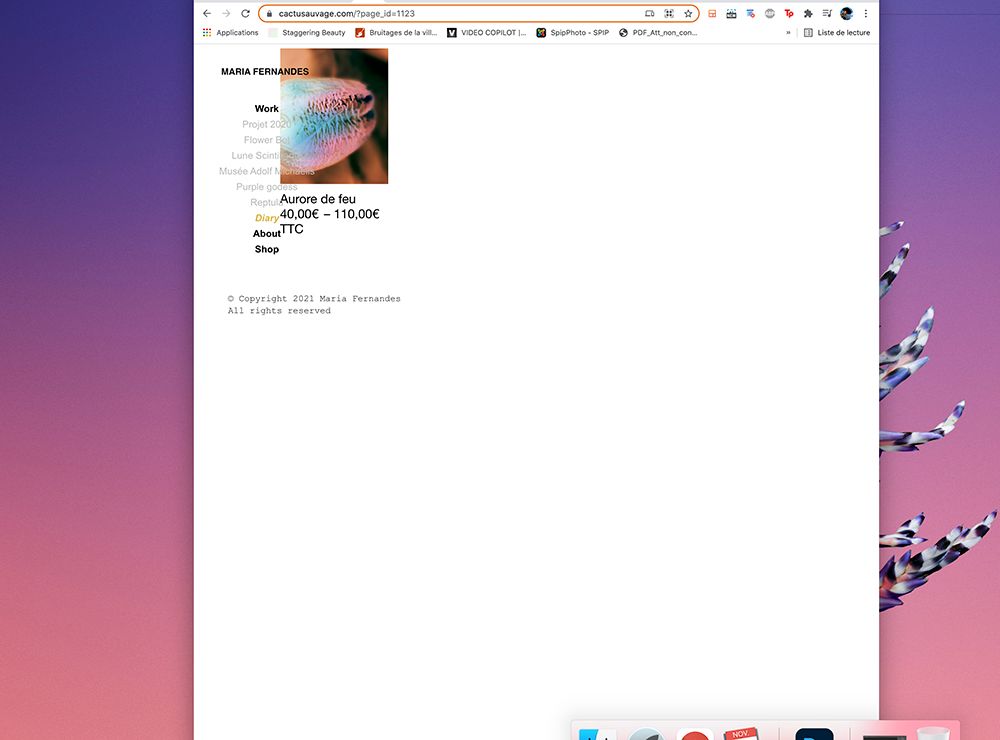
Ergonomics of the menue side bar on tigny screens

Scheduled Pinned Locked Moved General Discussion
11 Posts 3 Posters 1.5k Views 1 Watching
  • Oldest to Newest
  • Newest to Oldest
  • Most Votes
Reply
  • Reply as topic
Log in to reply
This topic has been deleted. Only users with topic management privileges can see it.
  • RichardR
    RichardR
    Richard
    Global Moderator
    wrote on last edited by
    #2

    Dear @cactusauvage

    Thank you for bringing this to attention, currently your page is in Maintenance mode:

    Screen Shot 2021-11-16 at 11.42.48 AM.png

    Is there anyway i could have a closer look without disrupting your workflow? I will also forward this to Armin for his knowledge ✅


    Talk soon & best wishes 🌝
    Richard
    1 Reply Last reply
    0
    • cactusauvageC
      cactusauvageC
      cactusauvage
      wrote on last edited by
      #3

      Hello @Richard ! Thank you for your respond

      The website is now accessible : https://cactusauvage.com/

      Thank you :)

      1 Reply Last reply
      0
      • arminunruhA
        arminunruhA
        arminunruh
        Global Moderator
        wrote on last edited by
        #4

        oh yes let me think about it!

        I think i need to code something for lay theme to make this work properly!

        cactusauvageC 1 Reply Last reply
        0
        • arminunruhA arminunruh

          oh yes let me think about it!

          I think i need to code something for lay theme to make this work properly!

          cactusauvageC
          cactusauvageC
          cactusauvage
          wrote on last edited by
          #5

          @arminunruh cool, very excited to see the results, merci 🙏🏽

          1 Reply Last reply
          1
          • cactusauvageC
            cactusauvageC
            cactusauvage
            wrote on last edited by
            #6

            @arminunruh I plan to launch my shop as soon as possible this week, is there a way or another quick solution to fix the menu ? thank you a lot :)

            Maria

            1 Reply Last reply
            0
            • cactusauvageC
              cactusauvageC
              cactusauvage
              wrote on last edited by
              #7

              hhheyyy, the forum is dead :( ?

              1 Reply Last reply
              0
              • RichardR
                RichardR
                Richard
                Global Moderator
                wrote on last edited by
                #8

                Dear Maria

                @cactusauvage

                the forum is dead?

                Never! 🌝I've created a test page to see how i can help while Armin thinks about better solutions:

                Screen Shot 2021-11-29 at 11.18.08 AM.png

                What kind of fix would suit your design? the Menu having a slight background so the text stands out better? or you would prefer the menu never overlaps the images at all.

                Talk soon Maria, sorry for delay - the Fourm is not dead 🌼

                1 Reply Last reply
                0
                • arminunruhA
                  arminunruhA
                  arminunruh
                  Global Moderator
                  wrote on last edited by
                  #9

                  hey everybody,

                  so i will work on making it possible to be able to set a frame left and a frame right independent of one another

                  then you'd be able to set a frame left of lets say 200 pixels and then there'd always be enough space

                  for now Maria needed to change her menu to be horizontal until this feature is released

                  1 Reply Last reply
                  1
                  • arminunruhA
                    arminunruhA
                    arminunruh
                    Global Moderator
                    wrote on last edited by arminunruh
                    #10

                    Hey

                    please update lay theme,
                    then go to lay options -> gridder defaults

                    for "frame left, right in" set "px"
                    for "frame left" set a value like: 250
                    for "frame right" set a value like: 20

                    then at the bottom select "apply gridder defaults to desktop grids"

                    and hit "save"

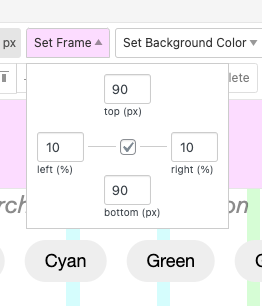
                    now when you're in the gridder your frame left is set differently than your frame right and since it is set in px, there's always enough space for your menu to the left, even if you resize your browser.

                    this pic just shows the new controls but you'd have different values
                    Screenshot 2021-12-07 at 09.26.28.png

                    1 Reply Last reply
                    1
                    • RichardR
                      RichardR
                      Richard
                      Global Moderator
                      wrote on last edited by Richard
                      #11

                      Awesome Armin!
                      @cactusauvage ⭐️

                      1 Reply Last reply
                      0

                      Hello! It looks like you're interested in this conversation, but you don't have an account yet.

                      Getting fed up of having to scroll through the same posts each visit? When you register for an account, you'll always come back to exactly where you were before, and choose to be notified of new replies (either via email, or push notification). You'll also be able to save bookmarks and upvote posts to show your appreciation to other community members.

                      With your input, this post could be even better 💗

                      Register Login
                      Reply
                      • Reply as topic
                      Log in to reply
                      • Oldest to Newest
                      • Newest to Oldest
                      • Most Votes


                      Online Users
                      Forgot your key, lost your files, need a previous Lay Theme or Addon version? Go to www.laykeymanager.com
                      laytheme.com
                      • Login

                      • Don't have an account? Register

                      • Login or register to search.
                      • First post
                        Last post
                      0
                      • Recent
                      • Tags
                      • Popular
                      • Users
                      • Search