How to target only the “Projects” in a jQuery function?
-
Hey everybody!
I wish you all a happy and fulfilling year 2022!
I'm currently designing a website for a brand and I've got some trouble to understand how I can apply this function bellow to all the “projects” BUT not all the pages… It's basically a function that hide/show the nav and site title on mousemove, as you can see. I have the feeling that it is simple and yet, I didn't manage to find the way.
I would appreciate the help here! :)
Cheers,
window.laytheme.on("newpageshown", function(layoutObj, type, obj) { let idleTimer = null; let idleState = false; function hideNav(time) { clearTimeout(idleTimer); if (idleState == true) { jQuery(".sitetitle").removeClass("inactive"); jQuery(".laynav").removeClass("inactive"); } idleState = false; idleTimer = setTimeout(function() { jQuery(".sitetitle").addClass("inactive"); jQuery(".laynav").addClass("inactive"); idleState = true; }, time); } hideNav(3000); jQuery(window).mousemove(function(){ hideNav(3000); }); }); -
Dear @TYLM
It's possible to apply code based on if it's a project. Here on the documentation page: https://laytheme.com/documentation.html#custom-javascript
If needed, you can use the following code to find out the Project's information via Console Log:
<script>
window.laytheme.on("newpageshown", function(layoutObj, type, obj){
	console.log("layoutObj", layoutObj);
	console.log("type", type);
	console.log("obj", obj);
});
</script>
E.g:
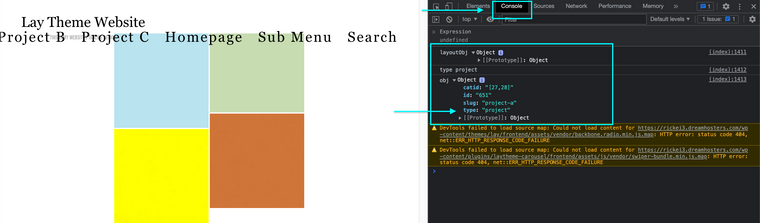
You can use the following code to say " If the "type" is a "project" then do the following (console log "fantastic!"):
<script>
window.laytheme.on("newpageshown", function(layoutObj, type, obj){
	if(type == "project"){
		console.log("fantastic!");
	}
});
</script>
Result for Project:

Result for Page (no console log):

Your above code would be place within the 'If' statement.
Hope this helps @TYLM & have a wonderful start to 2022! 🌝
Richard
-
-

Hello! It looks like you're interested in this conversation, but you don't have an account yet.
Getting fed up of having to scroll through the same posts each visit? When you register for an account, you'll always come back to exactly where you were before, and choose to be notified of new replies (either via email, or push notification). You'll also be able to save bookmarks and upvote posts to show your appreciation to other community members.
With your input, this post could be even better 💗
Register Login