L-ESP
-
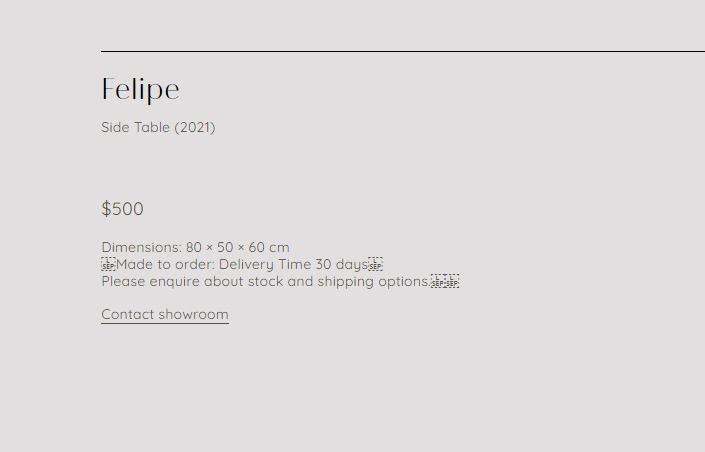
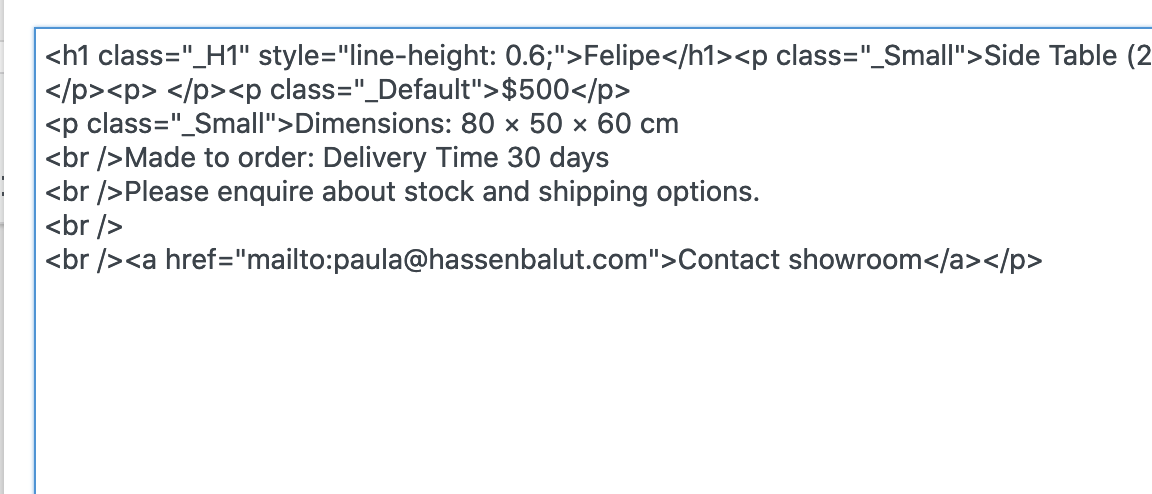
I'm encountering the following issue: A weird L-SEP character [U+2028 or HTML entity code 
 / which is a kind of newline character (not actually supposed to be displayed) is appearing on Chrome (on PC). Any ideas how to solve it?
(@cschm-tz had the same issue about a year ago)
-
-
Dear @marcos
Are you able to post a link to your website. The solution posted in the previous thread:
https://stackoverflow.com/questions/41555397/strange-symbol-shows-up-on-website-l-sep
Does this work for you as a solution?
Best wishes
Richard

Hello! It looks like you're interested in this conversation, but you don't have an account yet.
Getting fed up of having to scroll through the same posts each visit? When you register for an account, you'll always come back to exactly where you were before, and choose to be notified of new replies (either via email, or push notification). You'll also be able to save bookmarks and upvote posts to show your appreciation to other community members.
With your input, this post could be even better 💗
Register Login