Change colour of sitetitle/menu on Carousel if a slide is a video
-
Hi!
I've been looking in the forum for infos on how to change the sitetitle & menu color on a fullscreen carousel slide displaying a video and not an image. I've got both slides with image and slides with videos in my carousels. But the lisibilty of the black nav is “damaged” on some videos…
I would like to simply invert my nav and title from black to white. But I don't know how to target only slides with html5 video and how to bind a click event every time I change slide with the navigation arrows.
I hope my explanation was clear enough :)
Thanks in advance for your help and work!
Théo
-
-
Dear Théo
@TYLM
Regardless of a Fullscreen Slider with Video, the
site-titleshould still be targeted the same way?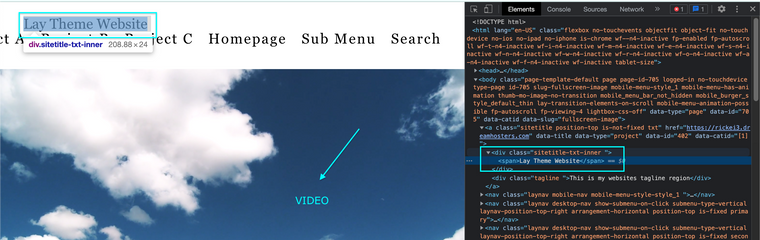
Are you able to post a link to your website, or using localhost?
Talk soon & best wishes
Richard
@Richard Thanks for your answer,
Small correction: I am using Carousels and not Fullscreen Sliders. What do you mean by “the site-title should still be targeted the same way?”?
The elements that should be targeted are:
sitetitle,laynav,lay-carousel-sink-parentandflickity-prev-next-button. I would like all these elements to be white instead of black when on a video. Applying to them a class with afilter:invert(1);could be a good and simple solution in that situation I guess?It's a website for a client, so not yet public – password protected at the moment. Can I send you the link and password in a private chat?
You'll see right away the design problem with the black elements on the video for that matter.
-
Dear @TYLM
Ah! I understand now thanks. I cant do the Custom Coding myself but can set you in the right direction 🌝
The Carousel slides have class names, for example a Carousel with a video slide has the class
lay-carousel-slide-html5video.
When a slide comes into view it get's the class added
is-selected. Great! we can use these!So you would need some code saying:
Check for Element with class
lay-carousel-slide-html5videoIF the class
is-selectedis added
then: (Change some CSS of thenav)Here are a few links from a quick search:
https://stackoverflow.com/questions/9599818/jquery-detect-class-changes/19477326
https://developer.mozilla.org/en-US/docs/Web/API/MutationObserver
Hope this helps @TYLM & have a wonderful day
Richard
-
Dear @TYLM
Ah! I understand now thanks. I cant do the Custom Coding myself but can set you in the right direction 🌝
The Carousel slides have class names, for example a Carousel with a video slide has the class
lay-carousel-slide-html5video.When a slide comes into view it get's the class added
is-selected. Great! we can use these!So you would need some code saying:
Check for Element with class
lay-carousel-slide-html5videoIF the class
is-selectedis added
then: (Change some CSS of thenav)Here are a few links from a quick search:
https://stackoverflow.com/questions/9599818/jquery-detect-class-changes/19477326
https://developer.mozilla.org/en-US/docs/Web/API/MutationObserver
Hope this helps @TYLM & have a wonderful day
Richard
Thanks to the links you sent me, I manage to make a custom code that works great on desktop! 🔥🙏
But it doesn't work on mobile tho… The elements don't switch back when
.lay-carousel-slide-html5videohas NOTis-selectedas a class. Do you know what could cause that difference of behavior? It looks like when on mobile, every time I change slide, it still detects ais-selectedclass.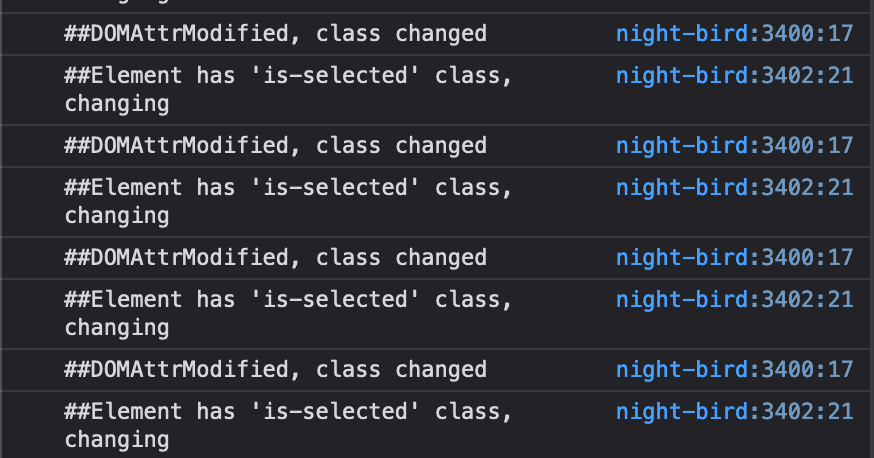
Here's my code – it may not be the cleanest code but, as I said, it works perfectly on desktop:
window.laytheme.on("newpageshown", function(layoutObj, type, obj) {
var videoSlide = jQuery(".lay-carousel").find(".lay-carousel-slide-html5video").first();

videoSlide.on("DOMAttrModified", function (e) {
    if (e.originalEvent.attrName === "class") {
        console.log("##DOMAttrModified, class changed");
        if (jQuery(this).hasClass("is-selected")) {
            console.log("##Element has 'is-selected' class, changing");
            jQuery("body").addClass('black-bg');
            jQuery(".lay-carousel-sink-parent").addClass('negative');
            jQuery(".sitetitle img").addClass('negative');
            jQuery(".mobile-title").addClass('negative');
            jQuery("._Menu").addClass('negative');
            jQuery(".flickity-prev-next-button").addClass('negative');
            jQuery(".lay-mobile-icons-wrap").addClass('negative');
        }else{
            jQuery("body").removeClass('black-bg');
            jQuery(".lay-carousel-sink-parent").removeClass('negative');
            jQuery(".sitetitle img").removeClass('negative');
            jQuery(".mobile-title").removeClass('negative');
            jQuery("._Menu").removeClass('negative');
            jQuery(".flickity-prev-next-button").removeClass('negative');
            jQuery(".lay-mobile-icons-wrap").removeClass('negative');
        }
    }
});
});
Thanks again @Richard !
-
-
Dear @TYLM
Unsure sorry, Unless somewhere is specified the code works within the
gridbut on mobile the Gridder iscustom-phone-grid
Best
Richard

Hello! It looks like you're interested in this conversation, but you don't have an account yet.
Getting fed up of having to scroll through the same posts each visit? When you register for an account, you'll always come back to exactly where you were before, and choose to be notified of new replies (either via email, or push notification). You'll also be able to save bookmarks and upvote posts to show your appreciation to other community members.
With your input, this post could be even better 💗
Register Login