Blurry images on phone version
-
The carrousel shows blurry images only on a phone but not in responsive mode on the desktop.
I've tried the Regenerate Thumbanils plugin and it's doesn't help.
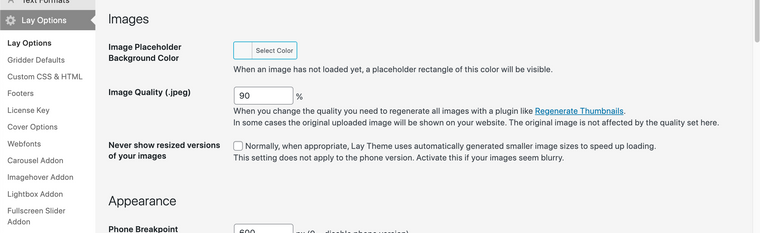
Also checked the Never show resized versions of your images and it's doesn't help also.
Any idea how to fix? Thanks in advance!
-
-
Up! same problem here : https://www.benoitlefeuvre.com/ile-her/
Thank in advance :) -
-
@Richard
The quality of the images is 100% with option to never show resized images activated. The quality of the images in mobile is only problematic for carousels, if you then go to the home (from your phone not from the browser) you can see the difference. -
Dear @craigfeldspar
I see in the "never show resized versions setting":
"Normally, when appropriate, Lay Theme uses automatically generated smaller image sizes to speed up loading.
This setting does not apply to the phone version. Activate this if your images seem blurry."This is probably due to loading speeds on mobile devices.
talk soon
Richard

Hello! It looks like you're interested in this conversation, but you don't have an account yet.
Getting fed up of having to scroll through the same posts each visit? When you register for an account, you'll always come back to exactly where you were before, and choose to be notified of new replies (either via email, or push notification). You'll also be able to save bookmarks and upvote posts to show your appreciation to other community members.
With your input, this post could be even better 💗
Register Login