Skip to content

Installation Problems

Did you follow the steps in "How to Install" and "Troubleshooting" but still have problems? And your webhost support could not help you either? Ask here.

306 Topics 1.1k Posts
  • error: Incompatible archive

    Pinned
    7
    1
    0 Votes
    7 Posts
    1k Views
    R
    Thank you Armin
  • 0 Votes
    3 Posts
    35 Views
    arminunruhA
    can you please use PHP 8? this error happens because you use PHP 7. unfortunately i cant make this part of the code PHP 7 compatible, because then, everybody who uses php 8 will get a warning message.. in your webhost control panel you should be able to make your server use php 8. any php 8 version works
  • can't update

    4
    2
    0 Votes
    4 Posts
    126 Views
    arminunruhA
    Don't worry about it!! It's easy to forget with all of the settings that Lay Theme has.
  • webside content gone

    2
    0 Votes
    2 Posts
    68 Views
    arminunruhA
    https://neljaphotography.com but your website has content no? Can you please send: a link to this forum topic your website address /wp-admin/ username and password to: info@laytheme.com can u install a backup plugin like "updraft plus" and configure it to make backups of your website every few weeks?
  • This topic is deleted!

    1
    0 Votes
    1 Posts
    3 Views
    No one has replied
  • Problem with lay theme: The style sheet is missing.

    3
    0 Votes
    3 Posts
    2k Views
    N
    @arminunruh thanks! It's work
  • The stylesheet is missing.

    3
    0 Votes
    3 Posts
    1k Views
    D
    All good, thanks a lot!
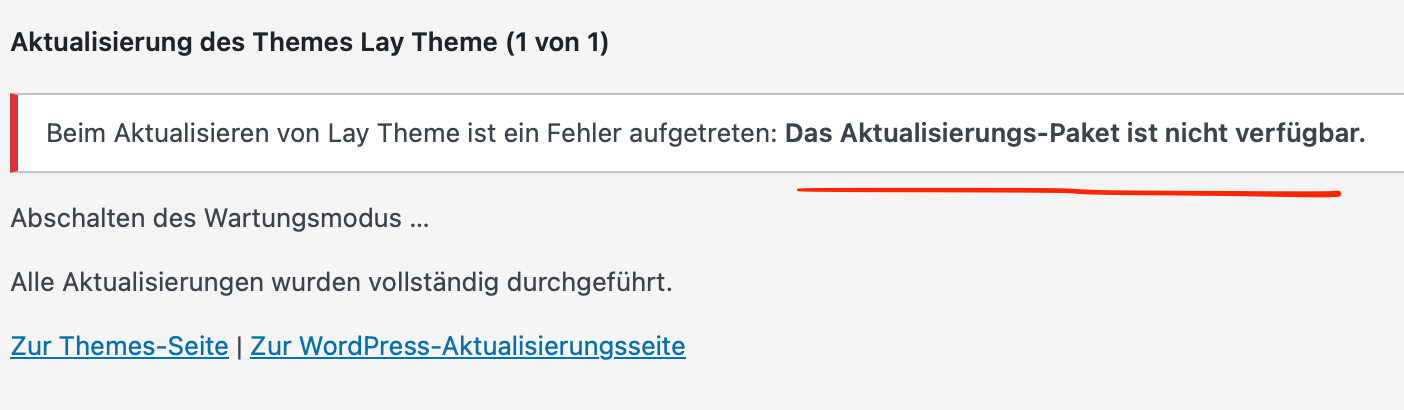
  • An error occurred while updating Lay Theme: Update package not available.

    2
    0 Votes
    2 Posts
    871 Views
    arminunruhA
    [image: 1756213205264-48f7fbec-cdfb-4c9f-8d10-5361711743d3-image.png] for me it worked you can just download the zip and use that https://kernl-file-uploads.s3.amazonaws.com/uploads/25-08-2025/06-18-56/lay.zip install in appearance - themes - upload theme
  • error

    4
    0 Votes
    4 Posts
    1k Views
    V
    thanks! we fixed it
  • 0 Votes
    3 Posts
    1k Views
    L
    solved! Thanks for the quick reply
  • cant get ride of noindex tag

    8
    0 Votes
    8 Posts
    1k Views
    arminunruhA
    well there was a request to have noindex on pages that are footers and pages that are page overlays. and it seems that i did it wrong :O :/ i think it wont be re-added no you can keep yoast!
  • expired domain. Can't deactivate licence anymore

    2
    0 Votes
    2 Posts
    1k Views
    arminunruhA
    just write me info@laytheme.com with key
  • backend doesn`t show my categorie gridder anymore

    2
    0 Votes
    2 Posts
    941 Views
    arminunruhA
    i cant see the screenshot! can you send your website address, /wp-admin/ username and password and a link to this topic to info@laytheme.com?
  • project index not working on retargeted domain

    4
    0 Votes
    4 Posts
    1k Views
    arminunruhA
    hey can you configure your domain jacobsboot.com to redirect to .be so that it doesnt show .com anymore
  • temporary use on subdomain

    3
    0 Votes
    3 Posts
    979 Views
    L
    Will do, thanks!
  • Carousel add-on does not show up under gridder + more tab

    4
    1
    0 Votes
    4 Posts
    994 Views
    arminunruhA
    ok great!
  • Mistake

    2
    0 Votes
    2 Posts
    939 Views
    arminunruhA
    yes of course im sending a refund now!
  • license problem

    3
    0 Votes
    3 Posts
    1k Views
    L
    thank you so much
  • single project and project editor doesn't show up

    3
    0 Votes
    3 Posts
    974 Views
    arminunruhA
    maybe u did a mistake when you migrated. i hope you still got the export / the files you created to do the migration?
  • google analytics problem

    2
    0 Votes
    2 Posts
    980 Views
    arminunruhA
    oh hey! i think google changed the code, will have to look at this

I also code custom websites or custom Lay features.
šŸ’æ Email me here: šŸ’æ
info@laytheme.com

Our Web Development company: 100k.studio

Want to tip me? https://www.paypal.com/paypalme/arminunruh

Before you post:
  1. When using a WordPress Cache plugin, disable it or clear your cache.
  2. Update Lay Theme and all Lay Theme Addons
  3. Disable all Plugins
  4. Go to Lay Options → Custom CSS & HTML, click "Turn Off All Custom Code", click "Save Changes"

This often solves issues you might run into

When you post:
  1. Post a link to where the problem is
  2. Does the problem happen on Chrome, Firefox, Safari or iPhone or Android?
  3. If the problem is difficult to explain, post screenshots / link to a video to explain it
Online Users
Forgot your key, lost your files, need a previous Lay Theme or Addon version? Go to www.laykeymanager.com