add social media buttons to mobile menu
-
hi dear Lay Theme team
For the phone layout of the website https://www.johannapaerli.ch/journal
I would like to add the social media buttons (for now placed with css as a fixed element on every page) to the mobile menu, so they only show up when you open the menu-layer.ist there a possibility to do this?
writing a css code that hides them on all pages also makes them disappear on the mobile menu, so I guess I would need some extra code to make them remaining visible in the menu.Thanks for your help!
Best,
Florine -
Dear Florine
@florine
This may not be the most graceful way to do it, but maybe it works for you 🌝
The following code clones your social-media group and adds it after the last menu element "uber mich"
jQuery('#handyrow').clone().insertAfter('#menu-item-388');Result:
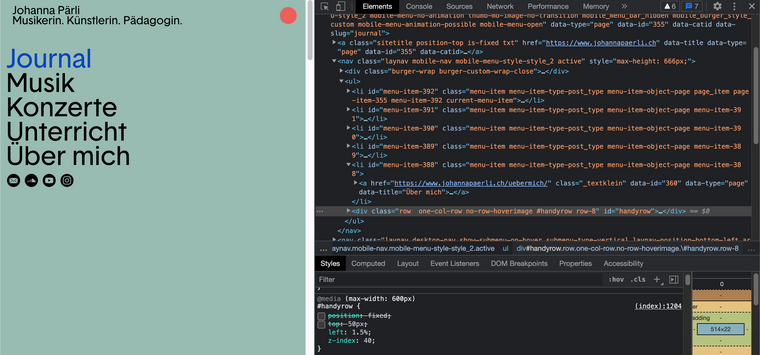
There would need to be some changes to the handyrow css:
.mobile-nav #handyrow {
        position: initial;
        top: 0;
        left: 1.5%;
        z-index: 40;
}
You can specify it only to apply to the
handy-rowwithin the menu by adding.mobile-navbeforehand.Hopefully if this isn't exactly whats needed it still helps you in the right direction Florine ⭐️
best wishes
Richard

Hello! It looks like you're interested in this conversation, but you don't have an account yet.
Getting fed up of having to scroll through the same posts each visit? When you register for an account, you'll always come back to exactly where you were before, and choose to be notified of new replies (either via email, or push notification). You'll also be able to save bookmarks and upvote posts to show your appreciation to other community members.
With your input, this post could be even better 💗
Register Login