Background images hovering link, images on hover
-
Hi everyone,
I hope my Problem can be solved.
At my starting-page for my filmmaking portfolio I want to show different projects, being represented by the background image (full screen). As the image-hover plugin from lay theme already gets quite close to what I want to achieve, there is still some little things that won‘t work. As soon as I move the cursor away, obviously the standard background image appears and the image hover full screen is gone. I want to keep the full screen backgroundimage which was lastly hovered, before hovering a fresh one.To better understand, please head over to my website.
https://simonabele.de/en/Thanks a lot for your help and have a great day.
Simon -
Dear Simon
@Simonabele
This will take some custom coding but it's a worthy pursuit & good idea 🌝
The main thing is to understand how the images appear and then mimic that but slightly differently.
There is thelay-imagehover-region. This is the parent container that holds all the images waiting behind the scenes.The images and the container have an opacity of zero -
opacity:0;When you hover or 'mouseover' a project link the class
showis added to the image hover region as well as the image that relates to that link.You can see this behaviour here:
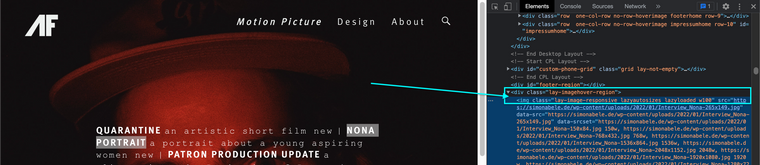
And now when 'mouseover':
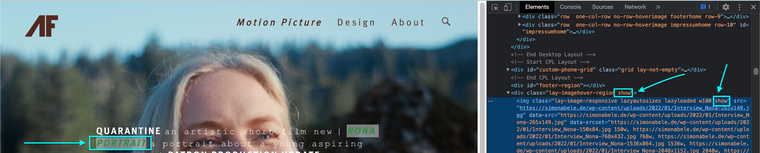
When the class
showis added to these elements it comes with new CSS instructions.This CSS:
.lay-imagehover-region img {
    opacity: 0 !important;
    position: fixed;
    pointer-events: none;
    top: 0;
    left: 0;
}
Changes to:
.lay-imagehover-region img.show {
    opacity: 1 !important;
    position: fixed;
    pointer-events: none;
    top: 0;
    left: 0;
}
Notice the opacity change to 1 (invisible to visible) & the class 'show' added to the CSS selections.
So to breakdown - On mouseover add 'show' and when you remove the mouse - remove the class
showFor you to achieve your result you need to say:
On mouseover add "show" without the "remove show". 🌝
Just remember you dont need the
removeClassfunction.
Best wishes
Richard
-
Dear Simon
@Simonabele
This will take some custom coding but it's a worthy pursuit & good idea 🌝
The main thing is to understand how the images appear and then mimic that but slightly differently.
There is thelay-imagehover-region. This is the parent container that holds all the images waiting behind the scenes.The images and the container have an opacity of zero -
opacity:0;When you hover or 'mouseover' a project link the class
showis added to the image hover region as well as the image that relates to that link.You can see this behaviour here:
And now when 'mouseover':
When the class
showis added to these elements it comes with new CSS instructions.This CSS:
.lay-imagehover-region img {
    opacity: 0 !important;
    position: fixed;
    pointer-events: none;
    top: 0;
    left: 0;
}
Changes to:
.lay-imagehover-region img.show {
    opacity: 1 !important;
    position: fixed;
    pointer-events: none;
    top: 0;
    left: 0;
}
Notice the opacity change to 1 (invisible to visible) & the class 'show' added to the CSS selections.
So to breakdown - On mouseover add 'show' and when you remove the mouse - remove the class
showFor you to achieve your result you need to say:
On mouseover add "show" without the "remove show". 🌝
Just remember you dont need the
removeClassfunction.
Best wishes
Richard
@Richard said in Background images hovering link, images on hover:
.lay-imagehover-region img
Thanks a lot, Richard !
I really got to understand the image-hover plugin.When trying to customize via custom css&html I did not get that lucky yet.
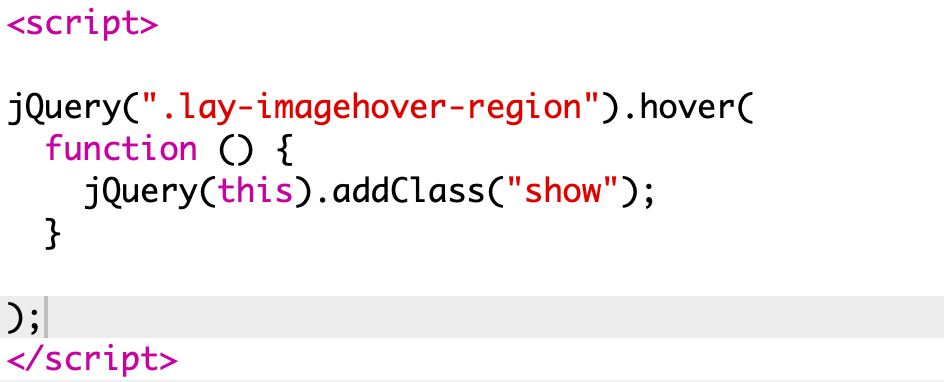
As you said I removed the "removeClass" function within jQuery and tried to implement "addClass" --> show.
What am I doing wrong though.
Bets regards,
Simon -
Dear Simon
@Simonabele
Sorry that i wont be able to go into custom coding deeper with you at the moment, but you are doing awesome 🌝
The class show must also be added to the correct image in the container as well, it also has an opacity:0.
You might also want to just work with the current code native to Lay Theme and stop it's remove class from the source.
( not really meant to suggest this but changing source code...)
best
Richard

Hello! It looks like you're interested in this conversation, but you don't have an account yet.
Getting fed up of having to scroll through the same posts each visit? When you register for an account, you'll always come back to exactly where you were before, and choose to be notified of new replies (either via email, or push notification). You'll also be able to save bookmarks and upvote posts to show your appreciation to other community members.
With your input, this post could be even better 💗
Register Login