Skip to content
  • Recent
  • Tags
  • Popular
  • Users
  • Search
Skins
  • Light
  • Brite
  • Cerulean
  • Cosmo
  • Flatly
  • Journal
  • Litera
  • Lumen
  • Lux
  • Materia
  • Minty
  • Morph
  • Pulse
  • Sandstone
  • Simplex
  • Sketchy
  • Spacelab
  • United
  • Yeti
  • Zephyr
  • Dark
  • Cyborg
  • Darkly
  • Quartz
  • Slate
  • Solar
  • Superhero
  • Vapor

  • Default (No Skin)
  • No Skin
Collapse

Lay Theme Forum

  1. Home
  2. General Discussion
  3. Layout max-width

Layout max-width

Scheduled Pinned Locked Moved General Discussion
15 Posts 5 Posters 4.4k Views 3 Watching
  • Oldest to Newest
  • Newest to Oldest
  • Most Votes
Reply
  • Reply as topic
Log in to reply
This topic has been deleted. Only users with topic management privileges can see it.
  • arminunruhA
    arminunruhA
    arminunruh
    Global Moderator
    wrote on last edited by
    #5

    Right now thats not possible no :/
    will write that down and code it as a feature one day!

    1 Reply Last reply
    0
    • M
      M
      MAN
      wrote on last edited by
      #6

      That would be great... Is it possible for the moment to trick it with some CSS? I'd really appreciate it!

      1 Reply Last reply
      0
      • arminunruhA
        arminunruhA
        arminunruh
        Global Moderator
        wrote on last edited by
        #7

        Hey MAN, nah this one's not really easy to do with a quick css fix :/

        1 Reply Last reply
        0
        • M
          M
          MAN
          wrote on last edited by
          #8

          Hey Armin,

          I saw you added this feature, but it seems not to work properly. If, for example, my title and my layout had a 2% left space, once it gets the max width the new value override the title's left space data, and they show unaligned...

          Thanks

          1 Reply Last reply
          0
          • arminunruhA
            arminunruhA
            arminunruh
            Global Moderator
            wrote on last edited by
            #9

            hey MAN for me it works but yea maybe there is a bug.

            What is your website address? Which browser are you using?

            1 Reply Last reply
            0
            • H
              H
              hellllo
              wrote on last edited by hellllo
              #10

              Hey Armin,

              i just read that there is a feature to fix the header-width when using

              #main-region {
              max-width: 1200px;
              }

              It doesn’t seem to work with my Chrome. Or did i get sth wrong?
              Thanks!

              1 Reply Last reply
              0
              • arminunruhA
                arminunruhA
                arminunruh
                Global Moderator
                wrote on last edited by
                #11

                hey hellllo!

                In "lay options" -> "misc options" there u have these two options:
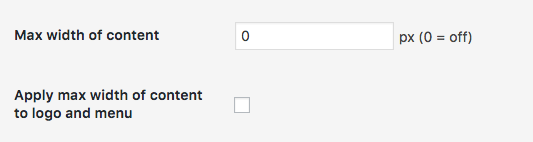
                Screen Shot 2016-08-27 at 11.07.08.png

                Did you use these two options? Meaning did you enter "1200" in the "Max width of content" field and checked "Apply max width of content to logo and menu"?
                Can I have a link to your website to see the problem?

                H E 2 Replies Last reply
                0
                • arminunruhA arminunruh

                  hey hellllo!

                  In "lay options" -> "misc options" there u have these two options:
                  Screen Shot 2016-08-27 at 11.07.08.png

                  Did you use these two options? Meaning did you enter "1200" in the "Max width of content" field and checked "Apply max width of content to logo and menu"?
                  Can I have a link to your website to see the problem?

                  H
                  H
                  hellllo
                  wrote on last edited by
                  #12

                  @arminunruh

                  hey armin,

                  i just found out why it didn't work.
                  the max-width somehow messed up with the margins of title image menu bar and gridder defaults ( it was all put to 2%). The contend scaled in the right way but the menu bar didn’t – it was still stuck at the 2%.

                  I put everything to zero.
                  Now it’s neatly aligned left an right and the max-width is applied correctly.

                  thanksalot
                  you are doing great work!

                  1 Reply Last reply
                  0
                  • arminunruhA
                    arminunruhA
                    arminunruh
                    Global Moderator
                    wrote on last edited by
                    #13

                    ah yea, now i see it. the problem is the max-width includes the left and right frame of the layout :/
                    hmmm i need to fix this

                    1 Reply Last reply
                    0
                    • arminunruhA arminunruh

                      hey hellllo!

                      In "lay options" -> "misc options" there u have these two options:
                      Screen Shot 2016-08-27 at 11.07.08.png

                      Did you use these two options? Meaning did you enter "1200" in the "Max width of content" field and checked "Apply max width of content to logo and menu"?
                      Can I have a link to your website to see the problem?

                      E
                      E
                      ERSI19
                      wrote on last edited by
                      #14

                      @arminunruh hi armin, is this possibility to define the max. width still in the new version 5.2.4 I can´t find it and tried also put the code #main-region {
                      max-width: 1200px;
                      margin-left: auto;
                      margin-right: auto;
                      }

                      to CSS without success. thanks

                      1 Reply Last reply
                      0
                      • arminunruhA
                        arminunruhA
                        arminunruh
                        Global Moderator
                        wrote on last edited by
                        #15

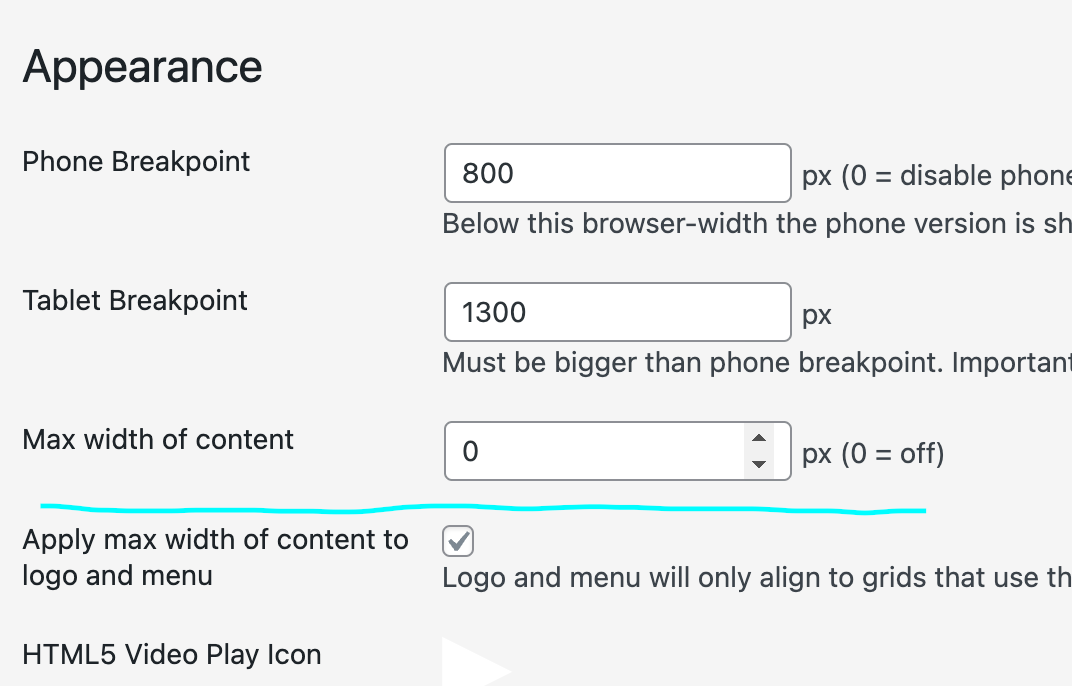
                        its in lay optionsScreenshot 2023-02-10 at 14.14.25.png

                        1 Reply Last reply
                        0

                        Hello! It looks like you're interested in this conversation, but you don't have an account yet.

                        Getting fed up of having to scroll through the same posts each visit? When you register for an account, you'll always come back to exactly where you were before, and choose to be notified of new replies (either via email, or push notification). You'll also be able to save bookmarks and upvote posts to show your appreciation to other community members.

                        With your input, this post could be even better 💗

                        Register Login
                        Reply
                        • Reply as topic
                        Log in to reply
                        • Oldest to Newest
                        • Newest to Oldest
                        • Most Votes


                        Online Users
                        Forgot your key, lost your files, need a previous Lay Theme or Addon version? Go to www.laykeymanager.com
                        laytheme.com
                        • Login

                        • Don't have an account? Register

                        • Login or register to search.
                        • First post
                          Last post
                        0
                        • Recent
                        • Tags
                        • Popular
                        • Users
                        • Search