Integrate mapbox map
-
Hi there,
I want to integrate a mapbox map into a page.I have tried a lot but I can't get it done.
Here is the way I tried to do it.
(here is also a simple instruction from mapbox: https://www.mapbox.com/install/javascript/cdn-install/)In the custom head area I copied this:
<script src='https://api.mapbox.com/mapbox-gl-js/v2.9.1/mapbox-gl.js'></script>
<link href='https://api.mapbox.com/mapbox-gl-js/v2.9.1/mapbox-gl.css' rel='stylesheet' />

<script>
  mapboxgl.accessToken = 'YOUR_MAPBOX_ACCESS_TOKEN';
  var map = new mapboxgl.Map({
    container: 'map',
    style: 'mapbox://styles/mapbox/streets-v11'
  });
</script>
In the specific page where the map should show up, I inserted a html with the following:
<div id='map' style='width: 400px; height: 300px;'></div>Thats it, but nothing will appear on the site.
––––
When I insert the Div into the custom head area it works, but then the map is globaly on every page.I think this should be not too complicated.
If anybody can help I would be very happy.Thanks
-
insert this:
<script>
  mapboxgl.accessToken = 'YOUR_MAPBOX_ACCESS_TOKEN';
  var map = new mapboxgl.Map({
    container: 'map',
    style: 'mapbox://styles/mapbox/streets-v11'
  });
</script>
into "html at bottom"
-
insert this:
<script>
  mapboxgl.accessToken = 'YOUR_MAPBOX_ACCESS_TOKEN';
  var map = new mapboxgl.Map({
    container: 'map',
    style: 'mapbox://styles/mapbox/streets-v11'
  });
</script>
into "html at bottom"
Hi @arminunruh,
thanks for the answer.I changed the code, but didn't work.
I have the feeling the problem is the div which I insert into the certain page. Here is a picture how I did it.
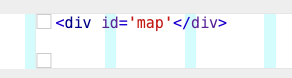
The interesting part is, when I put all the code I posted above into the custom head area (also the "div id=map ...") then the map appears. But on every page and always ...
-
well the div markup is wrong too
<div id="map"></div>
u're missing a >
why don't u try and do it exactly like they did in the tutorial?
they didnt put all of the javascript in the <head>.they put part of it after the <div id="map"></div>
if u do so make sure to activate compatibility mode in lay options (all the way at the bottom)
-
well the div markup is wrong too
<div id="map"></div>
u're missing a >
why don't u try and do it exactly like they did in the tutorial?
they didnt put all of the javascript in the <head>.they put part of it after the <div id="map"></div>
if u do so make sure to activate compatibility mode in lay options (all the way at the bottom)


Hello! It looks like you're interested in this conversation, but you don't have an account yet.
Getting fed up of having to scroll through the same posts each visit? When you register for an account, you'll always come back to exactly where you were before, and choose to be notified of new replies (either via email, or push notification). You'll also be able to save bookmarks and upvote posts to show your appreciation to other community members.
With your input, this post could be even better 💗
Register Login