Skip to content
  • Recent
  • Tags
  • Popular
  • Users
  • Search
Skins
  • Light
  • Brite
  • Cerulean
  • Cosmo
  • Flatly
  • Journal
  • Litera
  • Lumen
  • Lux
  • Materia
  • Minty
  • Morph
  • Pulse
  • Sandstone
  • Simplex
  • Sketchy
  • Spacelab
  • United
  • Yeti
  • Zephyr
  • Dark
  • Cyborg
  • Darkly
  • Quartz
  • Slate
  • Solar
  • Superhero
  • Vapor

  • Default (No Skin)
  • No Skin
Collapse

Lay Theme Forum

  1. Home
  2. General Discussion
  3. setting doesn't show up (Favicon, Cursor)

setting doesn't show up (Favicon, Cursor)

Scheduled Pinned Locked Moved General Discussion
9 Posts 3 Posters 1.2k Views 2 Watching
  • Oldest to Newest
  • Newest to Oldest
  • Most Votes
Reply
  • Reply as topic
Log in to reply
This topic has been deleted. Only users with topic management privileges can see it.
  • T
    T
    TBl
    wrote on last edited by
    #1

    Hi everyone, for some reason the favicon and a cursor is not showing up on my website. In the settings, I can see the changed favicon and also cursor, but it does not change on the website. I already checked updates but making updates didn't solve it. can you help?

    1 Reply Last reply
    0
    • arminunruhA
      arminunruhA
      arminunruh
      Global Moderator
      wrote on last edited by
      #2

      Post a link to where the problem is if possible, please <3

      favicons can take a while to show up

      your cursor image file might be too big?
      T 1 Reply Last reply
      0
      • arminunruhA arminunruh

        Post a link to where the problem is if possible, please <3

        favicons can take a while to show up

        your cursor image file might be too big?

        T
        T
        TBl
        wrote on last edited by
        #3

        @arminunruh

        Bildschirmfoto 2023-07-05 um 09.52.55.png

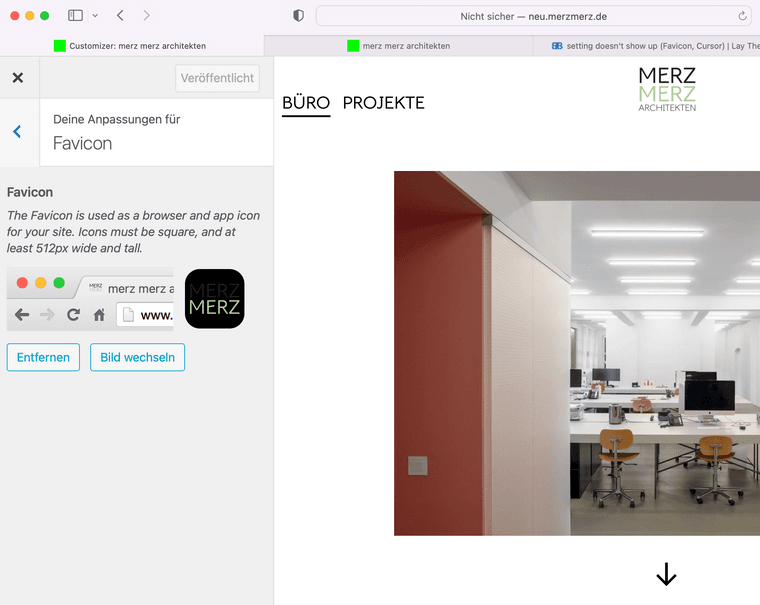
        on the left you can see the uploaded favicon file. But in the tabs above, there is still the old version (green square). I changed it quite a while ago, maybe some weeks ago.
        Bildschirmfoto 2023-07-05 um 10.13.17.png

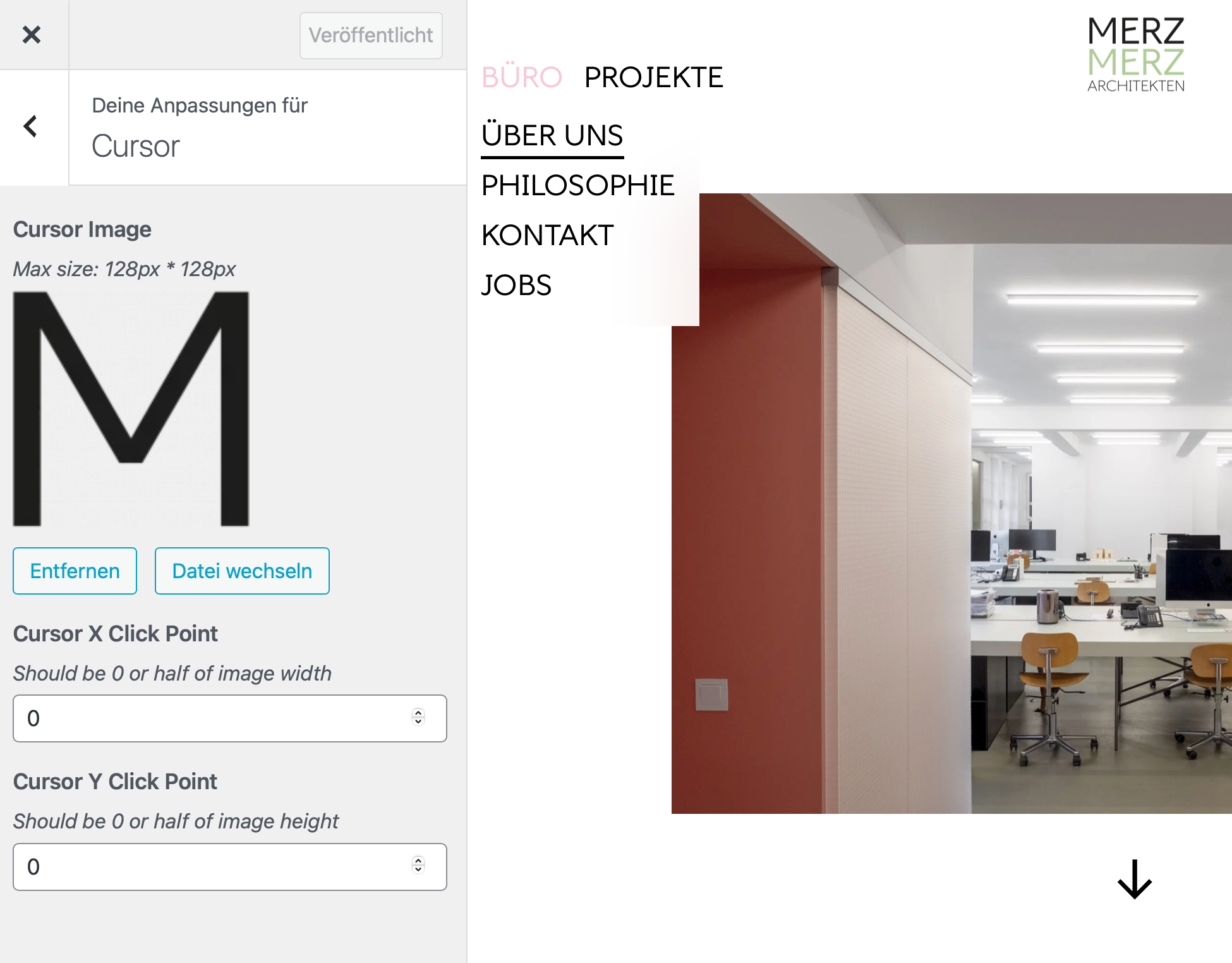
        This is the cursor image ("M"). The file size should be okay, it is 100 by 100 px. But it is still showing a hand cursor. Do I have to set something where it says "0" right now?

        T 1 Reply Last reply
        0
        • arminunruhA
          arminunruhA
          arminunruh
          Global Moderator
          wrote on last edited by
          #4

          @TBl said in setting doesn't show up (Favicon, Cursor):

          on the left you can see the uploaded favicon file. But in the tabs above, there is still the old version (green square). I changed it quite a while ago, maybe some weeks ago.

          some browsers take a really long time to update their favicons

          you can also check on your ftp if maybe u uploaded the green icon file and delete it. maybe it overrides the favicon you set in wordpress

          i would like to take a look at the website but it is password protected

          T 2 Replies Last reply
          0
          • arminunruhA arminunruh

            @TBl said in setting doesn't show up (Favicon, Cursor):

            on the left you can see the uploaded favicon file. But in the tabs above, there is still the old version (green square). I changed it quite a while ago, maybe some weeks ago.

            some browsers take a really long time to update their favicons

            you can also check on your ftp if maybe u uploaded the green icon file and delete it. maybe it overrides the favicon you set in wordpress

            i would like to take a look at the website but it is password protected

            T
            T
            TBl
            wrote on last edited by
            #5
            This post is deleted!
            1 Reply Last reply
            0
            • arminunruhA arminunruh

              @TBl said in setting doesn't show up (Favicon, Cursor):

              on the left you can see the uploaded favicon file. But in the tabs above, there is still the old version (green square). I changed it quite a while ago, maybe some weeks ago.

              some browsers take a really long time to update their favicons

              you can also check on your ftp if maybe u uploaded the green icon file and delete it. maybe it overrides the favicon you set in wordpress

              i would like to take a look at the website but it is password protected

              T
              T
              TBl
              wrote on last edited by
              #6

              @arminunruh new Favicon is there now. Maybe the browser really took a long time to change it

              1 Reply Last reply
              1
              • T TBl

                @arminunruh

                Bildschirmfoto 2023-07-05 um 09.52.55.png

                on the left you can see the uploaded favicon file. But in the tabs above, there is still the old version (green square). I changed it quite a while ago, maybe some weeks ago.

                Bildschirmfoto 2023-07-05 um 10.13.17.png

                This is the cursor image ("M"). The file size should be okay, it is 100 by 100 px. But it is still showing a hand cursor. Do I have to set something where it says "0" right now?

                T
                T
                TBl
                wrote on last edited by
                #7

                @TBl hey @arminunruh can I come back to you with the cursor topic? I am not sure what the problem is that the cursor does not change. Also tried css
                body{
                cursor: url('https://merzmerz.de/wp-content/uploads/2023/05/2023-03-24_Logo_tbl.png') 4 12, pointer;
                }

                maybe you have an idea. Thanks!

                F 1 Reply Last reply
                0
                • T TBl

                  @TBl hey @arminunruh can I come back to you with the cursor topic? I am not sure what the problem is that the cursor does not change. Also tried css
                  body{
                  cursor: url('https://merzmerz.de/wp-content/uploads/2023/05/2023-03-24_Logo_tbl.png') 4 12, pointer;
                  }

                  maybe you have an idea. Thanks!

                  F
                  F
                  felix_rabe
                  wrote on last edited by felix_rabe
                  #8

                  @TBl did you use a max 128x128px image? If it's bigger it won't work. The image in the url you posted is way too big.

                  1 Reply Last reply
                  0
                  • T
                    T
                    TBl
                    wrote on last edited by
                    #9

                    @felix_rabe thank you. I found the mistake by my side :)

                    1 Reply Last reply
                    0

                    Hello! It looks like you're interested in this conversation, but you don't have an account yet.

                    Getting fed up of having to scroll through the same posts each visit? When you register for an account, you'll always come back to exactly where you were before, and choose to be notified of new replies (either via email, or push notification). You'll also be able to save bookmarks and upvote posts to show your appreciation to other community members.

                    With your input, this post could be even better 💗

                    Register Login
                    Reply
                    • Reply as topic
                    Log in to reply
                    • Oldest to Newest
                    • Newest to Oldest
                    • Most Votes


                    Online Users
                    Forgot your key, lost your files, need a previous Lay Theme or Addon version? Go to www.laykeymanager.com
                    laytheme.com
                    • Login

                    • Don't have an account? Register

                    • Login or register to search.
                    • First post
                      Last post
                    0
                    • Recent
                    • Tags
                    • Popular
                    • Users
                    • Search