sit carousel captions at bottom of page
-
hey there, i was trying things out yesterday, i haven't gotten it to work yet
-
ok i found the reason why it doesn't work
i used
.col {
will-change: transform, opacity;
}in lay theme's css to improve some animation performance, but this leads to position fixed not working
i'll release an update now
-
and then use this css
.lay-carousel-sink-parent { position: fixed; bottom: 2px; left: 2px; overflow: hidden; } .lay-captions-inner{ overflow: hidden; } -
and then use this css
.lay-carousel-sink-parent { position: fixed; bottom: 2px; left: 2px; overflow: hidden; } .lay-captions-inner{ overflow: hidden; }@arminunruh thanks, it's so close! they are sitting nicely at the bottom now but the button is now duplicated on the right hand side which hides the slide numbers?
-
.lay-carousel-sink-parent {
    position: fixed;
    bottom: 2px;
    left: 2px;
right: 2px;

}
.lay-captions-inner{

}
.single-caption{
overflow: hidden;
}
might work like this!
-
.lay-carousel-sink-parent {
    position: fixed;
    bottom: 2px;
    left: 2px;
right: 2px;

}
.lay-captions-inner{

}
.single-caption{
overflow: hidden;
}
might work like this!
@arminunruh thanks armin but still the same!
-
ok mmh
can you send your website address, /wp-admin/ username and password and a link to this topic to info@laytheme.com?
-
ok mmh
can you send your website address, /wp-admin/ username and password and a link to this topic to info@laytheme.com?
@arminunruh Thanks Armin. Email sent.
-
alright so it works if you set the left and right frame of the page that the carousel is in to the same values as
left: x: , right:X ;
i set it to 20px here
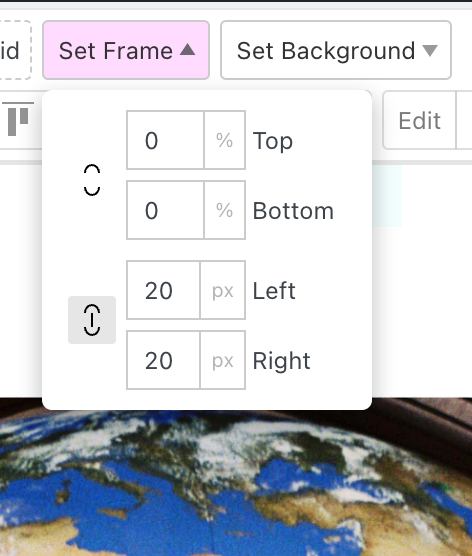
and
here:.lay-carousel-sink-parent { position: fixed; bottom: 2px; left: 20px; right: 20px; } .lay-captions-inner{ } .single-caption{ overflow: hidden; } -
alright so it works if you set the left and right frame of the page that the carousel is in to the same values as
left: x: , right:X ;
i set it to 20px here
and
here:.lay-carousel-sink-parent { position: fixed; bottom: 2px; left: 20px; right: 20px; } .lay-captions-inner{ } .single-caption{ overflow: hidden; }@arminunruh thanks Armin, really appreciate it!
-
 A arminunruh referenced this topic on
Hello! It looks like you're interested in this conversation, but you don't have an account yet.
Getting fed up of having to scroll through the same posts each visit? When you register for an account, you'll always come back to exactly where you were before, and choose to be notified of new replies (either via email, or push notification). You'll also be able to save bookmarks and upvote posts to show your appreciation to other community members.
With your input, this post could be even better 💗
Register Login