Project as pop-up
-
Hi everyone,
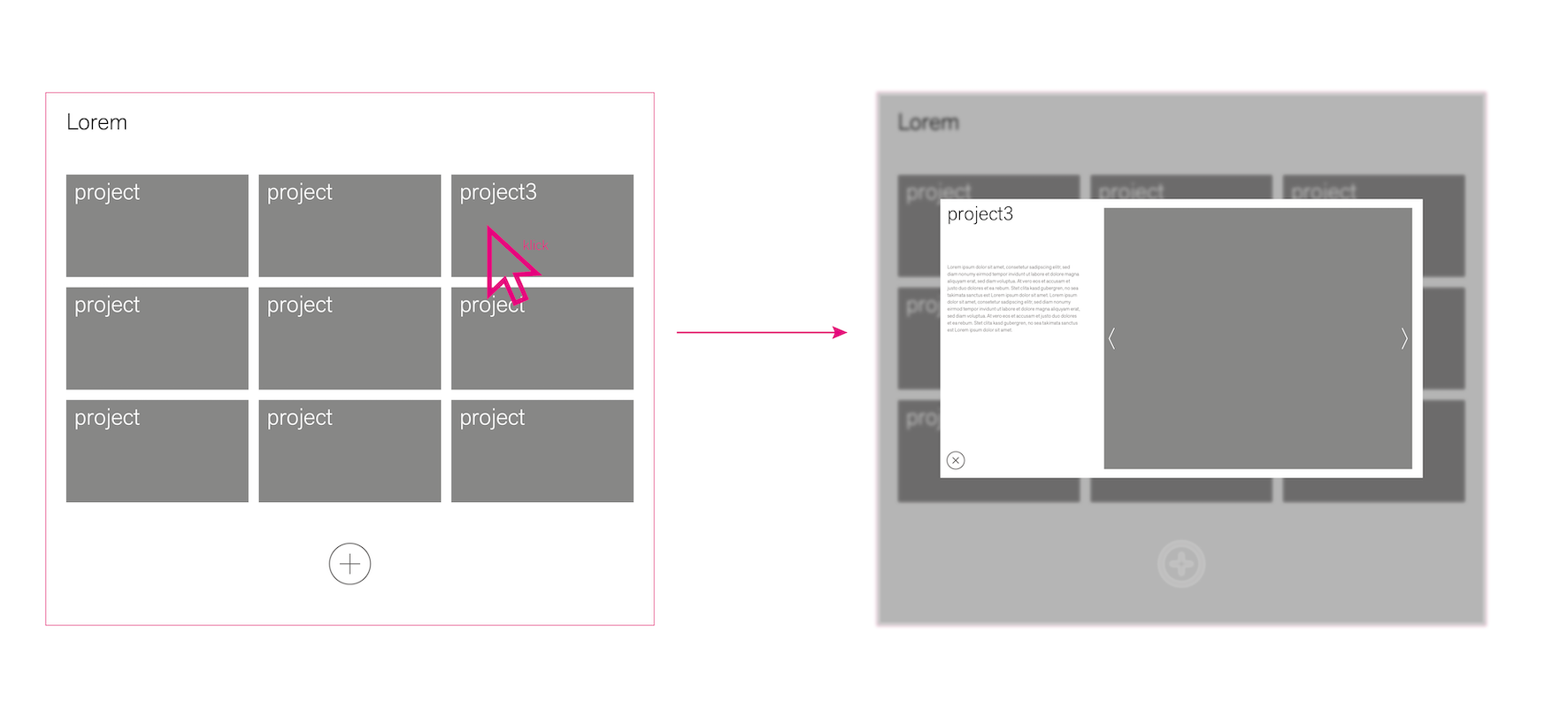
I'm currently working on designing a one-pager using Laytheme, and I'm looking to implement a specific functionality. I want users to be able to click on an image and have a popup window open (similar to a lightbox). Ideally, I'd like to create a page or project that appears as a popup overlaying the main page when clicked.
I've attempted to illustrate what I'm aiming for in a small sketch.
Has anyone here attempted something similar or knows of a straightforward solution or additional plugin to achieve this within Laytheme? Any guidance or recommendations would be greatly appreciated!Thanks in advance for your help!
-
hey its not really possible i think!
-
This post is deleted!
-
Okay, with some GPT assistance and my limited knowledge, I've found a workaround. It's working quite okay for now. The problem is that the carousel plugin doesn't load directly but only after clicking on it. Perhaps someone can come up with a solution within my makeshift workaround to fix that.
I have solved it using a custom HTML element and some CSS and JavaScript. Here is the webpage where I am testing it and the individual code blocks.
html:
<div class="project-thumbnail" onclick="toggleOverlay('overlayID', true)">
  <img src="http://johannes-haeffner.de/wp-content/uploads/2024/03/ARU-bilder-2594-1.jpg" alt="Projekt Thumbnail">
</div>

<div id="overlayID" class="overlay" style="display:none;">
  <iframe src="http://johannes-haeffner.de/popup-test-loading-page/" frameborder="0"></iframe>
</div>
css
.overlay {
  display: none;
  position: fixed;
  top: 50%;
  left: 50%;
  transform: translate(-50%, -50%);
  width: 40%;
  height: 40%;
  background-color: white;
  z-index: 1000;
  overflow-y: auto;
  box-shadow: 0 4px 6px rgba(0,0,0,0.1);
}

.overlay iframe {
  width: 100%;
  height: 100%;
}

body.blur-background {
  overflow: hidden;
}


.overlay button {
  position: absolute;
  top: -30px;
  right: 0;
  z-index: 1001;
}


body.id-930 a.sitetitle {
    display: none;
}


body.id-930 a.overlay-burger {
    display: none;
}
java
<script> document.addEventListener('DOMContentLoaded', function () { function toggleOverlay(show) { var overlay = document.getElementById('overlayID'); if (show) { overlay.style.display = 'block'; document.body.classList.add('blur-background'); } else { overlay.style.display = 'none'; document.body.classList.remove('blur-background'); } } document.querySelector('.project-thumbnail').addEventListener('click', function(e) { e.stopPropagation(); // Verhindert das Auslösen des document click Event Listeners toggleOverlay(true); }); document.addEventListener('click', function(e) { var overlay = document.getElementById('overlayID'); if (overlay.style.display === 'block' && !overlay.contains(e.target)) { toggleOverlay(false); } }); document.getElementById('overlayID').addEventListener('click', function(e) { e.stopPropagation(); }); }); </script> -

it shows this error in the console
u can try the fade carousel instead of the swipe carousel
and then in the js that opens the popup include:if (typeof window.layCarouselFadeCarousel != 'undefined' && typeof window.layCarouselFadeCarousel.loadFirstLazyImage != 'undefined') { window.layCarouselFadeCarousel.loadFirstLazyImage(jQuery(this)) }the jQuery(this) here needs to target the container the carousel is a child of. So you'd change that to jQuery(overlay)
put that code after
if (show)in the toggleOverlay function
function toggleOverlay(show) {or try disabling lazyloading for carousel images in lay options → carousel addon
-
The deactivation of lazy loading has solved the problem. Thank you very much.


Hello! It looks like you're interested in this conversation, but you don't have an account yet.
Getting fed up of having to scroll through the same posts each visit? When you register for an account, you'll always come back to exactly where you were before, and choose to be notified of new replies (either via email, or push notification). You'll also be able to save bookmarks and upvote posts to show your appreciation to other community members.
With your input, this post could be even better 💗
Register Login