Skip to content
  • Recent
  • Tags
  • Popular
  • Users
  • Search
Skins
  • Light
  • Brite
  • Cerulean
  • Cosmo
  • Flatly
  • Journal
  • Litera
  • Lumen
  • Lux
  • Materia
  • Minty
  • Morph
  • Pulse
  • Sandstone
  • Simplex
  • Sketchy
  • Spacelab
  • United
  • Yeti
  • Zephyr
  • Dark
  • Cyborg
  • Darkly
  • Quartz
  • Slate
  • Solar
  • Superhero
  • Vapor

  • Default (No Skin)
  • No Skin
Collapse

Lay Theme Forum

  1. Home
  2. General Discussion
  3. Project Thumbnail Hover images disappear

Project Thumbnail Hover images disappear

Scheduled Pinned Locked Moved General Discussion
6 Posts 2 Posters 987 Views 2 Watching
  • Oldest to Newest
  • Newest to Oldest
  • Most Votes
Reply
  • Reply as topic
Log in to reply
This topic has been deleted. Only users with topic management privileges can see it.
  • Sascha BenteS
    Sascha BenteS
    Sascha Bente
    wrote on last edited by
    #1

    Hey dear Laytheme people,

    I'm experiencing a strange error that I can't get to the bottom of. In the element grid, in the thumbnail grid as well as with individual project-thumbnails, the hover-image-feature works for some time without any problems. After a few reloads of the page, no hover-image is displayed any more. They simply disappear when hovering.

    I have deleted all possible caches, deactivated plugins, updated theme and WP and switched the custom code on and off. The error happens despite all this. When i simply remove a project-thumbnail and add it at the same spot again, the hover-effect works. But only for some time until it disappears again.

    Do you have an idea what might be wrong?

    That’s the website:
    www.mpaper.digital

    Thanks in advance!

    1 Reply Last reply
    0
    • arminunruhA
      arminunruhA
      arminunruh
      Global Moderator
      wrote on last edited by
      #2

      can u tell me which url has mouseover images on the frontpage there are none i think
      nice website!

      1 Reply Last reply
      0
      • Sascha BenteS
        Sascha BenteS
        Sascha Bente
        wrote on last edited by
        #3

        Thanks man. Yea… the website had to work last week so I quick-fixed it by applying another effect. You can find the mouseover images on this test-page:

        www.mpaper.digital/mouseover-test

        As I mentioned at first it always works but after some time the hovers disappear. So the actual function might be alright – I was just wondering why it doesnt stay :/

        1 Reply Last reply
        0
        • Sascha BenteS
          Sascha BenteS
          Sascha Bente
          wrote on last edited by
          #4

          I think it might be the re-editing of projects after I placed their thumbnails on a page. The image hover works fine at first, but when I edit or change something in the project itself, the hover images are not displayed anymore. Which is the case now on the test-page I mentioned above.

          Thanks for looking into it! :)

          1 Reply Last reply
          0
          • arminunruhA
            arminunruhA
            arminunruh
            Global Moderator
            wrote on last edited by
            #5

            damn, yea i see here the image is empty that is the mouseover image (second image):
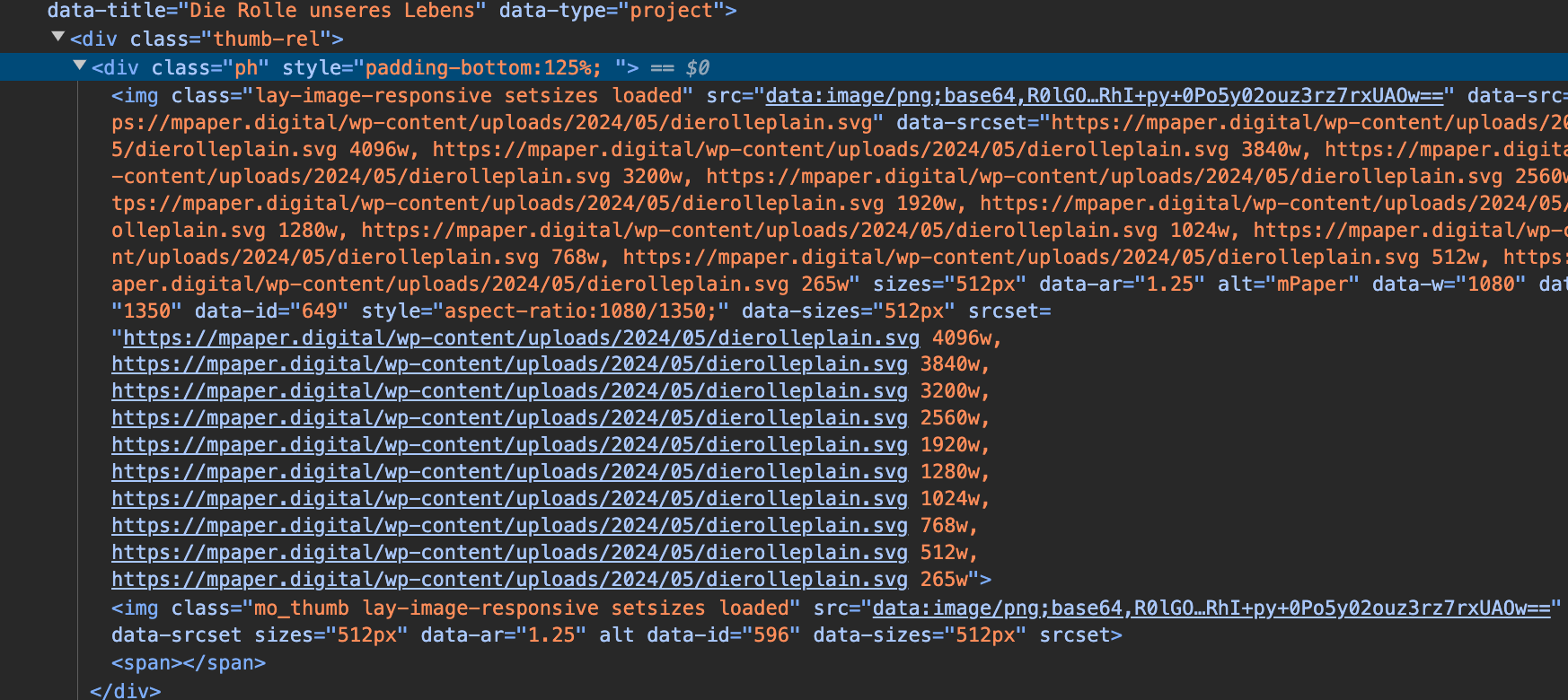
            Screenshot 2024-05-14 at 20.24.06.png

            the srcset is empty

            can u send your ftp login data and
            can you send your website address, /wp-admin/ username and password and a link to this topic to info@laytheme.com?

            1 Reply Last reply
            0
            • Sascha BenteS
              Sascha BenteS
              Sascha Bente
              wrote on last edited by
              #6

              Sent out via mail <3

              1 Reply Last reply
              0

              Hello! It looks like you're interested in this conversation, but you don't have an account yet.

              Getting fed up of having to scroll through the same posts each visit? When you register for an account, you'll always come back to exactly where you were before, and choose to be notified of new replies (either via email, or push notification). You'll also be able to save bookmarks and upvote posts to show your appreciation to other community members.

              With your input, this post could be even better 💗

              Register Login
              Reply
              • Reply as topic
              Log in to reply
              • Oldest to Newest
              • Newest to Oldest
              • Most Votes


              Online Users
              L
              lstark
              Forgot your key, lost your files, need a previous Lay Theme or Addon version? Go to www.laykeymanager.com
              laytheme.com
              • Login

              • Don't have an account? Register

              • Login or register to search.
              • First post
                Last post
              0
              • Recent
              • Tags
              • Popular
              • Users
              • Search