Skip to content
  • Recent
  • Tags
  • Popular
  • Users
  • Search
Skins
  • Light
  • Brite
  • Cerulean
  • Cosmo
  • Flatly
  • Journal
  • Litera
  • Lumen
  • Lux
  • Materia
  • Minty
  • Morph
  • Pulse
  • Sandstone
  • Simplex
  • Sketchy
  • Spacelab
  • United
  • Yeti
  • Zephyr
  • Dark
  • Cyborg
  • Darkly
  • Quartz
  • Slate
  • Solar
  • Superhero
  • Vapor

  • Default (No Skin)
  • No Skin
Collapse

Lay Theme Forum

  1. Home
  2. General Discussion
  3. Row as link to page

Row as link to page

Scheduled Pinned Locked Moved General Discussion
23 Posts 7 Posters 4.6k Views 2 Watching
  • Oldest to Newest
  • Newest to Oldest
  • Most Votes
Reply
  • Reply as topic
Log in to reply
This topic has been deleted. Only users with topic management privileges can see it.
  • edgrbnzE
    edgrbnzE
    edgrbnz
    wrote on last edited by
    #6

    Seems to work but does weird flickery stuff over here… 🤔

    ✦ ✦ ✦

    1 Reply Last reply
    0
    • C
      C
      cesarbourgeois
      wrote on last edited by
      #7

      @edgrbnz yeah, thanks for pointing out. It worked only on safari.
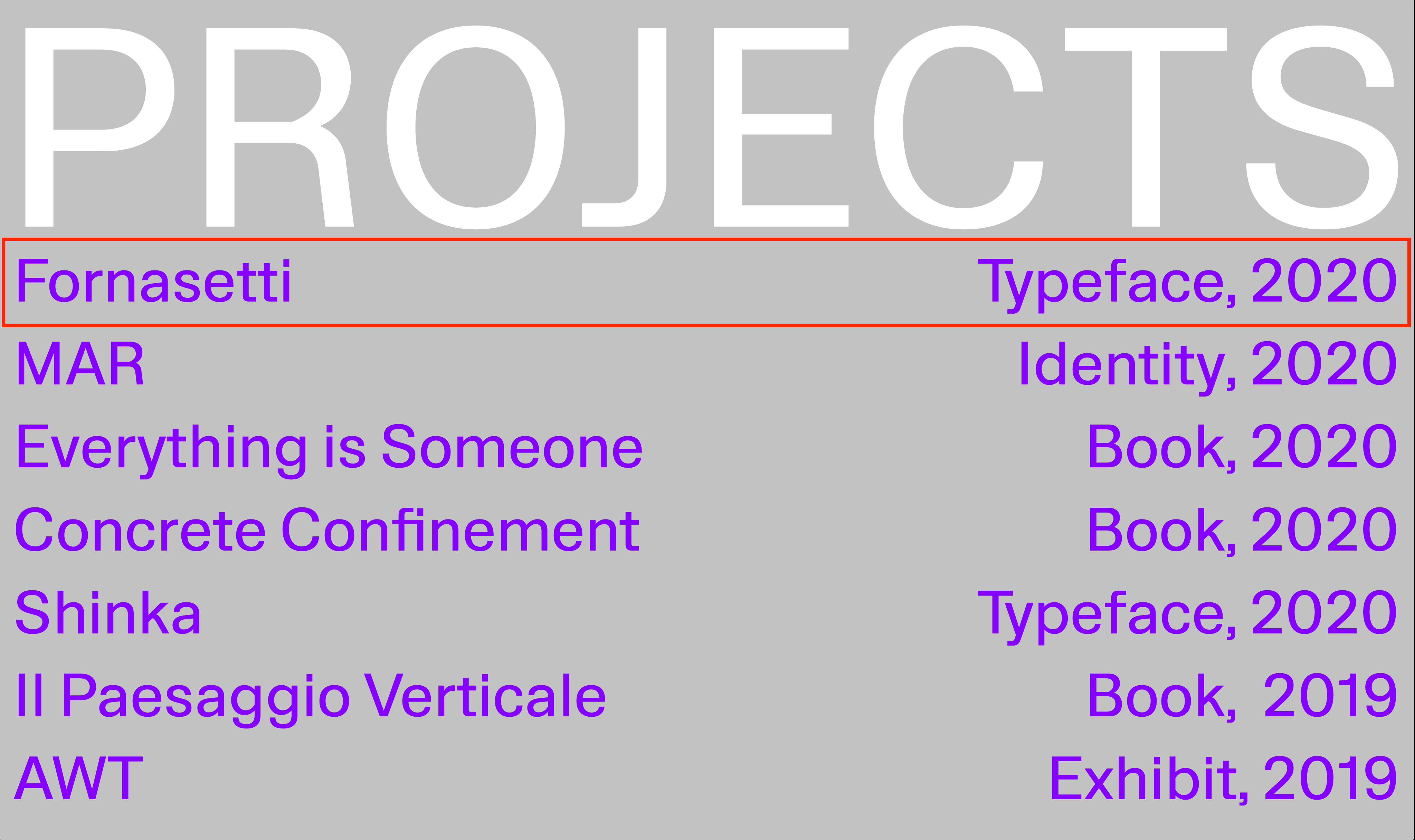
      So I made the page using a table, added the link to each text but I'm struggling to have the row linked as described on Stack.
      http://www.bourgeoiscesar.com/nh-3
      What I'm not understanding is where to add this snippet

      $('tr').click( function() {
          window.location = $(this).find('a').attr('href');
      }).hover( function() {
          $(this).toggleClass('hover');
      });
      

      Thanks for your help,
      Cheers

      C

      1 Reply Last reply
      0
      • RichardR
        RichardR
        Richard
        Global Moderator
        wrote on last edited by
        #8

        Dear @cesarbourgeois

        Following up :)
        Did you come to a solution along with @edgrbnz ?

        Thank you for using Lay Theme and making a healthy Forum
        Best wishes
        Richard

        1 Reply Last reply
        0
        • C
          C
          cesarbourgeois
          wrote on last edited by
          #9

          Dear @Richard-Keith thanks for asking!

          So, yes @edgrbnz's worked out and now the link trigger and works for the entire row, good news.

          The fact is that I can't make the entire row go blur, it applies only to the linked text, any idea how I can force this?
          Working on the same page as the last post: http://www.bourgeoiscesar.com/nh-3

          Cheers,
          César

          1 Reply Last reply
          0
          • RichardR
            RichardR
            Richard
            Global Moderator
            wrote on last edited by
            #10

            Dear @cesarbourgeois

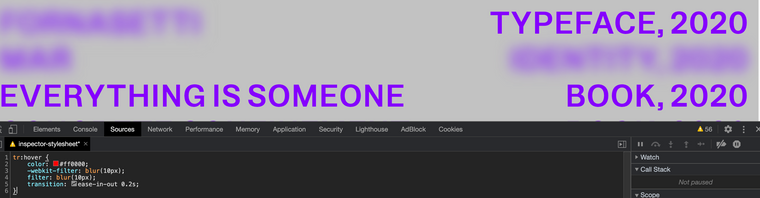
            Using "Custom CSS"

            You will need to apply the "blur" on hover to the "tr"

            tr:hover {
                color: #ff0000;
                -webkit-filter: blur(10px);
                filter: blur(10px);
                transition: ease-in-out 0.2s;
            }


            Screen Shot 2020-08-23 at 1.33.28 PM.png

            Best
            Richard

            1 Reply Last reply
            0
            • C
              C
              cesarbourgeois
              wrote on last edited by
              #11

              Works perfectly,

              Thanks a lot @edgrbnz & @Richard-Keith !

              Bests
              C

              1 Reply Last reply
              0
              • RichardR
                RichardR
                Richard
                Global Moderator
                wrote on last edited by
                #12

                Dear @cesarbourgeois

                Thats so great to hear! :)

                Good luck on the rest of your Lay Theme journey

                Sincerely
                Richard

                1 Reply Last reply
                0
                • E
                  E
                  ewantsleslie
                  wrote on last edited by
                  #13

                  @edgrbnz @cesarbourgeois @Richard-K

                  Hi all!

                  This is exactly what I am after myself. Reading the above, I am not exactly sure how to achieve this. How did you manage to get it to work in the end?

                  Thanks in advance!
                  E

                  1 Reply Last reply
                  0
                  • RichardR
                    RichardR
                    Richard
                    Global Moderator
                    wrote on last edited by
                    #14

                    Dear @ewantsleslie

                    Targeting the desired element e.g

                    .desired-element{
                    } 
                    

                    and then applying Custom CSS within 'Lay Options - Custom CSS & HTML' - So that on 'hover' the blur effect occurs.

                    .desired-element:hover {
                        color: #ff0000;
                        -webkit-filter: blur(10px);
                        filter: blur(10px);
                        transition: ease-in-out 0.2s;
                    }
                    

                    Best wishes! :)
                    Richard

                    1 Reply Last reply
                    0
                    • L
                      L
                      LenaW
                      wrote on last edited by
                      #15

                      Hi @Richard,
                      I am trying to achieve a similar thing, but as I have no experience with custom CSS I could not follow the last step from @edgrbnz. So far I thought working with the project Index would be my way to go, as this allows the entire row and text in the row to respond when hovering. The two problems I run into here are:

                      1. I would like to align the Tags to the right side of the page
                      2. Instead of a changing colour I would like the hovered row to be Italic.
                        In the image I hover over "Daylight Sequence"

                        Screenshot 2024-05-09 at 11.08.00 copy.jpg
                        Thank you very much in advance, and sorry for not being able to understand the tips above, L.
                      1 Reply Last reply
                      0
                      • arminunruhA
                        arminunruhA
                        arminunruh
                        Global Moderator
                        wrote on last edited by
                        #16

                        do u have a link

                        u can create a row for every line of text.
                        then right click on this row (on an empty part)
                        then choose "set link for row" and in here set a link and a hover image

                        then use custom css to change to italic when hovered

                        always post a link pls

                        1 Reply Last reply
                        0
                        • L
                          L
                          LenaW
                          wrote on last edited by
                          #17

                          hi @arminunruh
                          my apologies for not putting a link straight away. I had my site "under construction" but put it public now and created a separate link with just one row (and the previous project index underneath) to show that I understood the steps until custom css comes in for the italic row: https://lenawinterink.com/category/test-work-category/
                          Thanks a lot in advance and for Laytheme to exist!

                          1 Reply Last reply
                          0
                          • arminunruhA
                            arminunruhA
                            arminunruh
                            Global Moderator
                            wrote on last edited by
                            #18

                            you just used a projectindex element
                            yea thats better than what i suggested

                            .lay-projectindex-row{
                            font-style: italic!important;
                            }
                            
                            1 Reply Last reply
                            0
                            • L
                              L
                              LenaW
                              wrote on last edited by
                              #19

                              Thank you @arminunruh, I managed to make the row italic on hover. The last thing I would like to do is have the 'tags' of the project-index aligned to the right side of the page. So to have the entire tags-column aligned to the right side of the page (see screenshot of one row as an example) Is that possible?

                              Screenshot 2024-05-20 at 16.07.51.png

                              1 Reply Last reply
                              0
                              • arminunruhA
                                arminunruhA
                                arminunruh
                                Global Moderator
                                wrote on last edited by
                                #20

                                .lay-projectindex-col-tags{
                                text-align: right!important;
                                }

                                1 Reply Last reply
                                0
                                • L
                                  L
                                  LenaW
                                  wrote on last edited by
                                  #21

                                  This works perfectly, thank you so much!

                                  1 Reply Last reply
                                  0
                                  • C
                                    C
                                    camiprscott
                                    wrote on last edited by
                                    #22

                                    Hey @arminunruh @Richard

                                    I've been playing around to achieve a similar thing to where this thread started - where each row in a table acts as a single link to another page. After lots of trial and error (I am a novice with jQuery/html) I managed it with the following:

                                    <tr onclick="location.href='http://www.websitelink.com'" style="cursor: pointer">
                                    <td>...</td>
                                    <td>...</td>
                                    <td>...</td>
                                    </tr>

                                    What I'm stuck on is the mouseover/hover. I've managed to make it so all text in the whole row becomes italic, but I'd like for all the text in the row to become a colour at the same time.
                                    In the custom CSS I currently have:

                                    tr:hover
                                    {
                                    color: #B2AAE3;
                                    font-style: italic;
                                    cursor: pointer;
                                    }

                                    Here is the link to the page:
                                    https://www.vashtiali.com/writing-copy/

                                    Thanks!

                                    1 Reply Last reply
                                    0
                                    • arminunruhA
                                      arminunruhA
                                      arminunruh
                                      Global Moderator
                                      wrote on last edited by
                                      #23

                                      maybe try this:

                                      tr:hover
                                      {
                                      color: #B2AAE3!important;
                                      font-style: italic;
                                      cursor: pointer;
                                      }
                                      

                                      or try this:

                                      tr:hover{
                                      cursor: pointer;
                                      }
                                      tr:hover > *
                                      {
                                      color: #B2AAE3!important;
                                      font-style: italic;
                                      }

                                      
                                      1 Reply Last reply
                                      -1

                                      Hello! It looks like you're interested in this conversation, but you don't have an account yet.

                                      Getting fed up of having to scroll through the same posts each visit? When you register for an account, you'll always come back to exactly where you were before, and choose to be notified of new replies (either via email, or push notification). You'll also be able to save bookmarks and upvote posts to show your appreciation to other community members.

                                      With your input, this post could be even better 💗

                                      Register Login
                                      Reply
                                      • Reply as topic
                                      Log in to reply
                                      • Oldest to Newest
                                      • Newest to Oldest
                                      • Most Votes


                                      Online Users
                                      Forgot your key, lost your files, need a previous Lay Theme or Addon version? Go to www.laykeymanager.com
                                      laytheme.com
                                      • Login

                                      • Don't have an account? Register

                                      • Login or register to search.
                                      • First post
                                        Last post
                                      0
                                      • Recent
                                      • Tags
                                      • Popular
                                      • Users
                                      • Search

