Shipping rates do not work on mobile vesion
-
Hi all,
it seems shipping rates doesn't work on mobile version, they work fine on desktop version.here a product to test https://www.cripta747.it/ghost-semantics/
here the checkout page https://www.cripta747.it/checkout/Any help?
Thank you!!!!
-
when im in the checkout the billing state doesn't get updated when i choose a different country
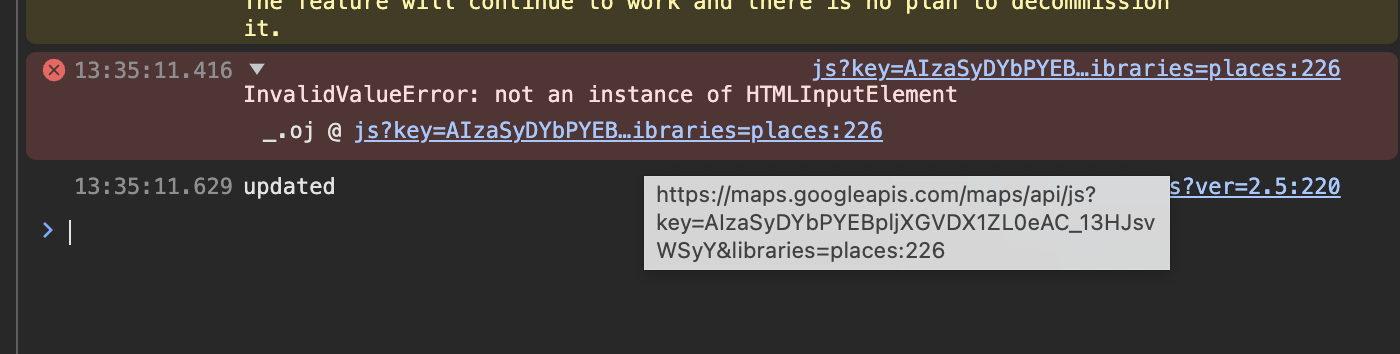
also there is a js error here
can you please do the steps in the blue box to the right? "Before you post:"
and see if it changes anything?
where are the shipping rates supposed to show up? i couldnt see them, do you have a screenshot?
-
This post is deleted!
-
This post is deleted!
-
Dear Armin,
Thank you so much for addressing the issue!
I hope I can provide all the necessary information below. Please bear with me, as I'm not a programmer, but I'm more than willing to provide any materials you need. And if you're ever in Turin, dinner is on me! 😉
I believe I may have resolved the issue you pointed out in the photo. Could you confirm this?
Here are the steps I followed in the blue box:
- I don't have a cache plugin.
- Everything is up to date.
- I disabled all plugins except for WooCommerce and all LayTheme plugins (carousel, lightbox, slider).
- I turned off all custom modes in CSS & HTML.
Of course, the site broke, but the issues persist:
- As you noticed, the billing state doesn't update when I select a different country.
- On the mobile version, the shipping cost doesn’t appear (i used firefox and chrome on an android device).
Below are some screenshots with custom mode off and plugins deactivated. Note: If I turn off custom mode, the country and state menus are blank, which seems to be a font-size issue solved with
.selectize-input {
    font-size: 20px;
}

.selectize-dropdown {
    font-size: 20px;
}
on custom css.
Here, you can see the blank country field:

Here, you can see the blank state field:

Here, you can see the shipping cost in the desktop version:

However, in the mobile version, the Shipping Cost section at the end of the form does not appear:

I hope this helps clarify the situation. Let me know if you need any additional information.
Thank You!All my best
Alexandro -
yes this is weird!
sorry for the late response.
i cant replicate the issue on my installation of lay themecan you send your website address, /wp-admin/ username and password and a link to this topic to info@laytheme.com? and your ftp login (server, username, password)
-
yes this is weird!
sorry for the late response.
i cant replicate the issue on my installation of lay themecan you send your website address, /wp-admin/ username and password and a link to this topic to info@laytheme.com? and your ftp login (server, username, password)
@arminunruh thanks a lot for your help. I just sent an email!
Thank you!!!! -
the issue was the shortcode [woocommerce_checkout] was inside the gridder instead of in the textfield at the top where it should be based on the documentation:
https://laytheme.com/documentation/shop-setup.html#preparation

Hello! It looks like you're interested in this conversation, but you don't have an account yet.
Getting fed up of having to scroll through the same posts each visit? When you register for an account, you'll always come back to exactly where you were before, and choose to be notified of new replies (either via email, or push notification). You'll also be able to save bookmarks and upvote posts to show your appreciation to other community members.
With your input, this post could be even better 💗
Register Login