Skip to content
  • Recent
  • Tags
  • Popular
  • Users
  • Search
Skins
  • Light
  • Brite
  • Cerulean
  • Cosmo
  • Flatly
  • Journal
  • Litera
  • Lumen
  • Lux
  • Materia
  • Minty
  • Morph
  • Pulse
  • Sandstone
  • Simplex
  • Sketchy
  • Spacelab
  • United
  • Yeti
  • Zephyr
  • Dark
  • Cyborg
  • Darkly
  • Quartz
  • Slate
  • Solar
  • Superhero
  • Vapor

  • Default (No Skin)
  • No Skin
Collapse

Lay Theme Forum

  1. Home
  2. General Discussion
  3. image hover with a color tint

image hover with a color tint

Scheduled Pinned Locked Moved General Discussion
6 Posts 3 Posters 1.2k Views 1 Watching
  • Oldest to Newest
  • Newest to Oldest
  • Most Votes
Reply
  • Reply as topic
Log in to reply
This topic has been deleted. Only users with topic management privileges can see it.
  • doorofperceptionD
    doorofperceptionD
    doorofperception
    wrote on last edited by
    #1

    Hello, I'm trying to tint the image hover pics with custom CSS.

    What I want is something resembling the gradient map effect from Photoshop (see screenshot attached). So far I only managed to make the pictures b&w :)

    If I understand correctly there's no very simple solution for this. You need to use a colored background and then layer the pic on top or something like that.

    If anybody could tell me how to do it. That would be awesome.
    Thank you — Ben

    blue.jpg

    1 Reply Last reply
    0
    • A
      A
      alasdair17
      Global Moderator
      wrote on last edited by alasdair17
      #2

      hey, could you not just add a gradient map to the image in photoshop and then upload it as the project thumbnail and then it would show up how you would like it on hover?

      1 Reply Last reply
      0
      • arminunruhA
        arminunruhA
        arminunruh
        Global Moderator
        wrote on last edited by
        #3

        you can combine css filters

        https://developer.mozilla.org/en-US/docs/Web/CSS/filter

        look i googled it:
        https://stackoverflow.com/questions/44023583/css3-grey-image-to-blue-color-using-filters

        this is what i googled:

        "use css filter to make image blue"

        img{
        filter: sepia(100%) hue-rotate(190deg) saturate(500%);
        }
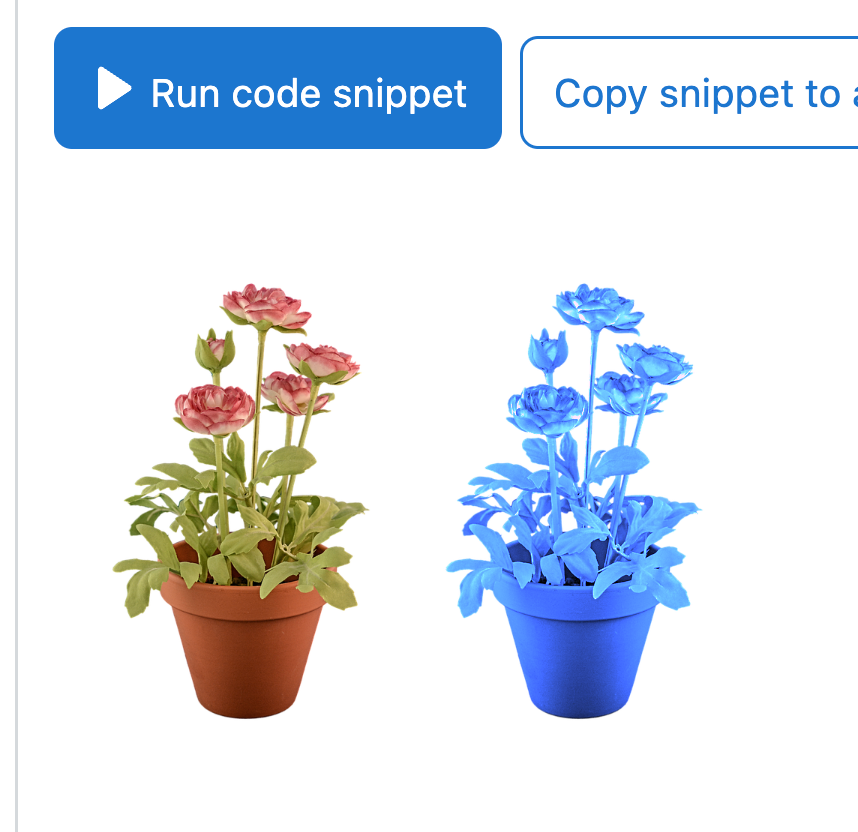
        

        Screenshot 2024-07-25 at 19.32.22.png

        1 Reply Last reply
        0
        • doorofperceptionD
          doorofperceptionD
          doorofperception
          wrote on last edited by
          #4

          Thank you, but this doesn't achieve the desired look. I found these examples too.
          Black is still black, unlike when using a gradient map that turns the black into a desired color too.

          But now I'm on the right track: https://cssduotone.com/

          This is what I needed.
          Still not sure on how many browsers this is displayed properly though.

          A 1 Reply Last reply
          0
          • doorofperceptionD doorofperception

            Thank you, but this doesn't achieve the desired look. I found these examples too.
            Black is still black, unlike when using a gradient map that turns the black into a desired color too.

            But now I'm on the right track: https://cssduotone.com/

            This is what I needed.
            Still not sure on how many browsers this is displayed properly though.

            A
            A
            alasdair17
            Global Moderator
            wrote on last edited by
            #5

            @doorofperception Can you definitely not just add the effect on the image in photoshop and upload it to wordpress, is that too simplistic to work haha?

            1 Reply Last reply
            0
            • arminunruhA
              arminunruhA
              arminunruh
              Global Moderator
              wrote on last edited by
              #6

              did you get it to work?
              if you dont want the black to be black you can add

              filter: brightness(1.2);

              or use opacity css on the image
              and then use css to have a blue color on the background? idk

              Screenshot 2024-07-29 at 19.12.59.png

              this "generate" button gives you the css, did you get it to work with that?

              @alasdair17 yea, maybe hes doing a website for a client and doesnt want the client to have to use PS


              1 Reply Last reply
              0

              Hello! It looks like you're interested in this conversation, but you don't have an account yet.

              Getting fed up of having to scroll through the same posts each visit? When you register for an account, you'll always come back to exactly where you were before, and choose to be notified of new replies (either via email, or push notification). You'll also be able to save bookmarks and upvote posts to show your appreciation to other community members.

              With your input, this post could be even better 💗

              Register Login
              Reply
              • Reply as topic
              Log in to reply
              • Oldest to Newest
              • Newest to Oldest
              • Most Votes


              Online Users
              D
              Dawid
              L
              lstark
              Forgot your key, lost your files, need a previous Lay Theme or Addon version? Go to www.laykeymanager.com
              laytheme.com
              • Login

              • Don't have an account? Register

              • Login or register to search.
              • First post
                Last post
              0
              • Recent
              • Tags
              • Popular
              • Users
              • Search