CTA button for multilingual
-
Re: call to action In the top bar
Armin, is there a solution to use this with Polylang? I tried this, it works, but is sme
for both languages... -
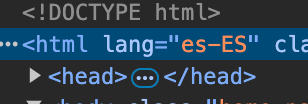
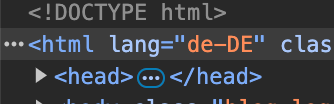
when u use polylang, the html tag has the language code
you'd basically create the buttons as i explained here:
http://laythemeforum.com/topic/9945/call-to-action-in-the-top-bar/2but then create multiple buttons:
<a href="https://google.com" class="call-to-action de-button">Kaufe Hier</a>
<a href="https://google.com" class="call-to-action en-button">Buy Here</a>
now basically use css to show and hide buttons based on what language we're on:
.call-to-action{
display: none;
}

html[lang="de-DE"] .call-to-action.de-button{
display: block;
}

html[lang="en-EN"] .call-to-action.en-button{
display: block;
}
sth like that
-
Thanks Armin, the result is below and works!
/* Style for Czech language button /
html[lang="cs-CZ"] .call-to-action.cs-button,
html[lang="cs-CZ"] .call-to-action.cs-button._BIG {
position: fixed;
top: 7px; / Distance from the top of the viewport /
right: 10%; / Position relative to the horizontal center /
z-index: 10;
display: block; / Ensure the button is visible */
}/* Hide the English button when Czech is active /
html[lang="cs-CZ"] .call-to-action.en-button {
display: none; / Hide the English button */
}/* Style for English language button /
html[lang="en-US"] .call-to-action.en-button,
html[lang="en-US"] .call-to-action.en-button._BIG {
position: fixed;
top: 7px; / Distance from the top of the viewport /
right: 10%; / Position relative to the horizontal center /
z-index: 10;
display: block; / Ensure the button is visible */
}/* Hide the Czech button when English is active /
html[lang="en-US"] .call-to-action.cs-button {
display: none; / Hide the Czech button */
} -
ok very good!

Hello! It looks like you're interested in this conversation, but you don't have an account yet.
Getting fed up of having to scroll through the same posts each visit? When you register for an account, you'll always come back to exactly where you were before, and choose to be notified of new replies (either via email, or push notification). You'll also be able to save bookmarks and upvote posts to show your appreciation to other community members.
With your input, this post could be even better 💗
Register Login