Skip to content
  • Recent
  • Tags
  • Popular
  • Users
  • Search
Skins
  • Light
  • Brite
  • Cerulean
  • Cosmo
  • Flatly
  • Journal
  • Litera
  • Lumen
  • Lux
  • Materia
  • Minty
  • Morph
  • Pulse
  • Sandstone
  • Simplex
  • Sketchy
  • Spacelab
  • United
  • Yeti
  • Zephyr
  • Dark
  • Cyborg
  • Darkly
  • Quartz
  • Slate
  • Solar
  • Superhero
  • Vapor

  • Default (No Skin)
  • No Skin
Collapse

Lay Theme Forum

  1. Home
  2. General Discussion
  3. make a project index unclickable

make a project index unclickable

Scheduled Pinned Locked Moved General Discussion
19 Posts 8 Posters 3.3k Views 2 Watching
  • Oldest to Newest
  • Newest to Oldest
  • Most Votes
Reply
  • Reply as topic
Log in to reply
This topic has been deleted. Only users with topic management privileges can see it.
  • S Stjopa

    @susan39 Hey did you found a solution?

    S
    S
    susan39
    wrote on last edited by
    #4

    @Stjopa hi Stjopa, not really. i have not had time yet to take a look how it works with CSS but in the meantime i have just rebuilt the the project-index-layout, its easy.

    1 Reply Last reply
    0
    • arminunruhA
      arminunruhA
      arminunruh
      Global Moderator
      wrote on last edited by arminunruh
      #5

      you can give the projectindex a class of "noclick"
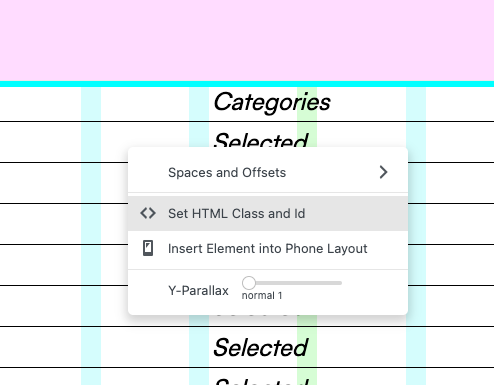
      Screenshot 2022-06-09 at 15.58.40.png Screenshot 2022-06-09 at 15.58.46.png

      then in lay options -> custom css:

      .noclick{
      pointer-events: none!important;
      }
      
      S 1 Reply Last reply
      0
      • V
        V
        vthevoz
        wrote on last edited by vthevoz
        #6

        Hey @arminunruh

        EDIT: sorry, I saw that you proposed a solution in another thread, my bad!

        do we have any updates about this feature?

        The .noclick CSS class tricks works, but prevents from having the image hover feature on projects.

        Having a huge list of projects that we don't necessarily want to have corresponding pages to, we'd love to have the options of just listing elements with the image hover function.

        Is there any new way of implementing this or can it possibly be done in the future?

        Thank you!

        shmooS 1 Reply Last reply
        1
        • arminunruhA
          arminunruhA
          arminunruh
          Global Moderator
          wrote on last edited by
          #7

          hey! yea i think i should add a feature for this one day

          1 Reply Last reply
          0
          • V vthevoz

            Hey @arminunruh

            EDIT: sorry, I saw that you proposed a solution in another thread, my bad!

            do we have any updates about this feature?

            The .noclick CSS class tricks works, but prevents from having the image hover feature on projects.

            Having a huge list of projects that we don't necessarily want to have corresponding pages to, we'd love to have the options of just listing elements with the image hover function.

            Is there any new way of implementing this or can it possibly be done in the future?

            Thank you!

            shmooS
            shmooS
            shmoo
            wrote on last edited by
            #8

            @vthevoz +1 a feature of switching off the //refs to work only aesthetically with the imagehover plugin would be very useful!

            1 Reply Last reply
            1
            • arminunruhA arminunruh

              you can give the projectindex a class of "noclick"
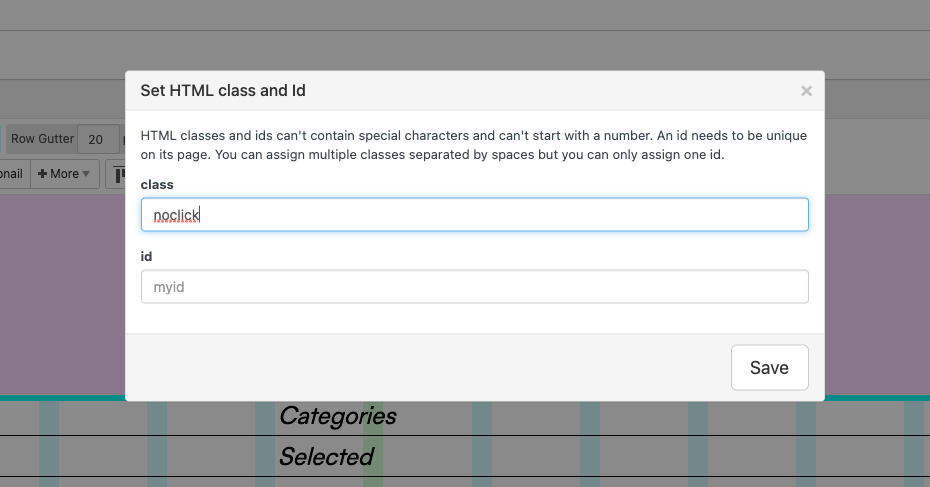
              Screenshot 2022-06-09 at 15.58.40.png Screenshot 2022-06-09 at 15.58.46.png

              then in lay options -> custom css:

              .noclick{
              pointer-events: none!important;
              }
              
              S
              S
              susan39
              wrote on last edited by
              #9

              @arminunruh

              Hi Armin,
              Your solution only works for the entire Project Index. My question was whether it is possible to make individual projects unclickable.
              Thank you :)

              1 Reply Last reply
              0
              • arminunruhA
                arminunruhA
                arminunruh
                Global Moderator
                wrote on last edited by
                #10
                <script>
                    var ids_to_ignore = [2817, 2829];
                    ids_to_ignore.forEach(function(id){
                        jQuery(document).off("click", 'a.projectindex-project-link[data-id="'+id+'"]');
                    })
                </script>
                

                this will make single projects in a projectindex unclickable. but it will still have the imagehover addon working. "ids_to_ignore" is a list of project ids you want to have not clickable.

                1 Reply Last reply
                0
                • B
                  B
                  brumistudio
                  wrote on last edited by
                  #11

                  Hi @arminunruh, i cant make it work on my project index.
                  this is what i type in:
                  script>
                  
 var ids_to_ignore: [177, 70];
                  
 ids_to_ignore.forEach(function(id){
                  
 jQuery(document).off("click", 'a.projectindex-project-link[data-id="'+id+'"]');
                  
 }
                  but it always gives me an error: expected IDENT at line 2, col 21. can,t find a solution for it..
                  i have a list of projects but just want to show some of them, and the rest of them keeping them in my index only
                  hope you can help me with this one. thanks!

                  1 Reply Last reply
                  0
                  • arminunruhA
                    arminunruhA
                    arminunruh
                    Global Moderator
                    wrote on last edited by
                    #12

                    well why did you write script>
                    has to be <script>
                    where is </script>, its missing

                    its easier for me to check if u post ur link

                    1 Reply Last reply
                    0
                    • R
                      R
                      rospax
                      wrote on last edited by
                      #13

                      Hey @arminunruh I am also trying to achieve this and the can't get the script working...

                      Here is my index, hope you can help?
                      (It's the first project in the index that I'm testing with the ID) https://primaryworks.com.au/index/

                      1 Reply Last reply
                      0
                      • arminunruhA
                        arminunruhA
                        arminunruh
                        Global Moderator
                        wrote on last edited by
                        #14
                        <script>
                            var ids_to_ignore = [1671];
                            ids_to_ignore.forEach(function(id){
                                jQuery(document).off("click", 'a.projectindex-project-link[data-id="'+id+'"]');
                            })
                        </script>
                        

                        you need to put this in "HTML at bottom" in lay options -> custom css & html

                        does it work?

                        1 Reply Last reply
                        0
                        • R
                          R
                          rospax
                          wrote on last edited by
                          #15

                          Thanks for your help @arminunruh , unfortunately it doesn't seem to be working, the link still behaves as per the others...

                          Any ideas?

                          1 Reply Last reply
                          0
                          • arminunruhA
                            arminunruhA
                            arminunruh
                            Global Moderator
                            wrote on last edited by arminunruh
                            #16

                            i tested it. this should work:

                            <script>
                                var ids_to_ignore = [3179];
                                // if you have more project ids that you want to ignore: 
                                // var ids_to_ignore = [3179, 3832, 334];
                            
                                window.laytheme.on('newpageshown', function(){
                                   ids_to_ignore.forEach(function(id){
                                        jQuery('a.projectindex-project-link[data-id="'+id+'"]').on("click", function(e){
                                            e.stopPropagation();
                                            e.preventDefault();
                                        });
                                    })
                                });
                            </script>
                            
                            1 Reply Last reply
                            0
                            • R
                              R
                              rospax
                              wrote on last edited by
                              #17

                              Thanks @arminunruh - it works!

                              One more thing with this, I've realised that I need to hide the "hand" link cursor so it doesn't look clickable - either keep the arrow or change to another symbol.

                              How would you recommend doing this?

                              1 Reply Last reply
                              0
                              • arminunruhA
                                arminunruhA
                                arminunruh
                                Global Moderator
                                wrote on last edited by
                                #18

                                css

                                a.projectindex-project-link[data-id="3179"]{
                                cursor: default!important;
                                }
                                
                                1 Reply Last reply
                                0
                                • R
                                  R
                                  rospax
                                  wrote on last edited by
                                  #19

                                  Thanks @arminunruh, that worked a treat :)

                                  1 Reply Last reply
                                  0

                                  Hello! It looks like you're interested in this conversation, but you don't have an account yet.

                                  Getting fed up of having to scroll through the same posts each visit? When you register for an account, you'll always come back to exactly where you were before, and choose to be notified of new replies (either via email, or push notification). You'll also be able to save bookmarks and upvote posts to show your appreciation to other community members.

                                  With your input, this post could be even better 💗

                                  Register Login
                                  Reply
                                  • Reply as topic
                                  Log in to reply
                                  • Oldest to Newest
                                  • Newest to Oldest
                                  • Most Votes


                                  Online Users
                                  Forgot your key, lost your files, need a previous Lay Theme or Addon version? Go to www.laykeymanager.com
                                  laytheme.com
                                  • Login

                                  • Don't have an account? Register

                                  • Login or register to search.
                                  • First post
                                    Last post
                                  0
                                  • Recent
                                  • Tags
                                  • Popular
                                  • Users
                                  • Search