Skip to content
  • Recent
  • Tags
  • Popular
  • Users
  • Search
Skins
  • Light
  • Brite
  • Cerulean
  • Cosmo
  • Flatly
  • Journal
  • Litera
  • Lumen
  • Lux
  • Materia
  • Minty
  • Morph
  • Pulse
  • Sandstone
  • Simplex
  • Sketchy
  • Spacelab
  • United
  • Yeti
  • Zephyr
  • Dark
  • Cyborg
  • Darkly
  • Quartz
  • Slate
  • Solar
  • Superhero
  • Vapor

  • Default (No Skin)
  • No Skin
Collapse

Lay Theme Forum

  1. Home
  2. General Discussion
  3. Any options for using an external CSS-editor?

Any options for using an external CSS-editor?

Scheduled Pinned Locked Moved General Discussion
9 Posts 5 Posters 1.2k Views 4 Watching
  • Oldest to Newest
  • Newest to Oldest
  • Most Votes
Reply
  • Reply as topic
Log in to reply
This topic has been deleted. Only users with topic management privileges can see it.
  • U
    U
    user-4'33''
    wrote on last edited by
    #1

    Did anyone managed to edit the custom CSS not within the wordpress interface but with an external editor like vs-code?

    1 Reply Last reply
    0
    • arminunruhA
      arminunruhA
      arminunruh
      Global Moderator
      wrote on last edited by
      #2

      why do u want to do that?
      mmh the input box could be better no

      fabiandraxlF 1 Reply Last reply
      0
      • arminunruhA arminunruh

        why do u want to do that?
        mmh the input box could be better no

        fabiandraxlF
        fabiandraxlF
        fabiandraxl
        wrote on last edited by
        #3

        @arminunruh

        Because your Interface does not include search and replace. What would be soooo helpful ... I always copy it to my editor, to search for something ...

        Also an Option for different Versions would be nice ... would be a lot easier for debugging ... etc.

        ✌️✌️✌️

        1 Reply Last reply
        1
        • arminunruhA
          arminunruhA
          arminunruh
          Global Moderator
          wrote on last edited by
          #4

          ah man
          i dont think i will include this
          there are many other more important things i need to improve / want to do

          fabiandraxlF U 2 Replies Last reply
          0
          • arminunruhA arminunruh

            ah man
            i dont think i will include this
            there are many other more important things i need to improve / want to do

            fabiandraxlF
            fabiandraxlF
            fabiandraxl
            wrote on last edited by
            #5

            @arminunruh

            For now, it would also be enough and super helpful, if only the search and replace already integrated in the browser would work ... :P

            1 Reply Last reply
            0
            • arminunruhA arminunruh

              ah man
              i dont think i will include this
              there are many other more important things i need to improve / want to do

              U
              U
              user-4'33''
              wrote on last edited by
              #6

              @arminunruh ... sure, for that reason I asked if someone is using an external program for editing the CSS.

              I know that this issue is not a major focus for Lay Theme but developing a quick workflow within the given text box is pretty hard.

              How is the Custom CSS being inserted into the main code? Maybe here could be a possible interface for an external editor?

              1 Reply Last reply
              1
              • arminunruhA
                arminunruhA
                arminunruh
                Global Moderator
                wrote on last edited by
                #7

                i understand!!

                in the folder "lay", open the file frontend.php in /lay/frontend/

                Screenshot 2023-10-26 at 13.18.49.png

                under line 772 add:
                wp_enqueue_style( 'frontend-custom-style', Setup::$uri."/mystyle.css", array(), Setup::$ver );

                so it looks like this:

                Screenshot 2023-10-26 at 13.19.38.png

                then add the file mystyle.css to the /lay/ folder like:

                /lay/mystyle.css

                use the app visual studio code
                and create a file mystyle.css on your computer

                then install and use the sftp extension:
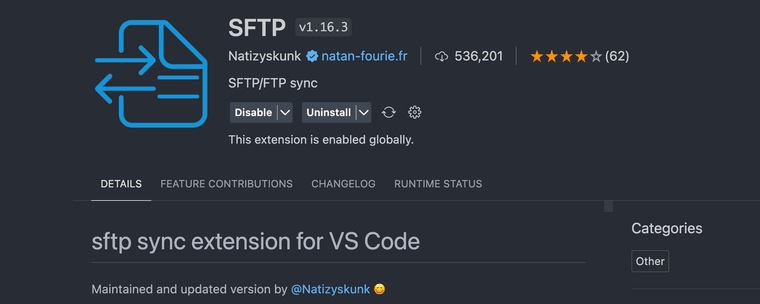
                Screenshot 2023-10-26 at 13.21.24.png

                configure the sftp extension to upload the file to your server to /lay/mystyle.css everytime you save the file ^^

                good luck

                every time you update lay theme, the code will be overwritten

                once you are happy with your custom css, put it in lay options → custom css instead

                1 Reply Last reply
                1
                • J
                  J
                  Jones
                  wrote on last edited by
                  #8

                  Wow, that's great! Thank's for that.

                  1 Reply Last reply
                  0
                  • D
                    D
                    dabu
                    wrote on last edited by
                    #9

                    for me this is way easier: insert the following line into the custom CSS field:

                    @import url('/wp-content/themes/mylay/additionalstyles.css');

                    Then you can save a css file named additionalstyles.css in the themes-folder /mylay/…, and this file you can open with for example Transmit (FTP-Client) & Sublime text (Editor), save, and in 2 seconds its done. then clean the browser cache and reload your website.

                    1 Reply Last reply
                    1

                    Hello! It looks like you're interested in this conversation, but you don't have an account yet.

                    Getting fed up of having to scroll through the same posts each visit? When you register for an account, you'll always come back to exactly where you were before, and choose to be notified of new replies (either via email, or push notification). You'll also be able to save bookmarks and upvote posts to show your appreciation to other community members.

                    With your input, this post could be even better 💗

                    Register Login
                    Reply
                    • Reply as topic
                    Log in to reply
                    • Oldest to Newest
                    • Newest to Oldest
                    • Most Votes


                    Online Users
                    I
                    itsbadjujuju
                    Forgot your key, lost your files, need a previous Lay Theme or Addon version? Go to www.laykeymanager.com
                    laytheme.com
                    • Login

                    • Don't have an account? Register

                    • Login or register to search.
                    • First post
                      Last post
                    0
                    • Recent
                    • Tags
                    • Popular
                    • Users
                    • Search
