cursor with more dpi
-
hey you can upload your own cursor. it seems it always has 72dpi. no matter what resolution we upload. the cursor looks blurry on hd screens. is there a way to have a bigger resolution? thanks dennis
-
would you be able to use a svg?
-
Ah okay. We will check it out. I asked my graphic designer for a svg file.
-
Okay, when you use the SVG file, make sure to open it in a text editor. The SVG needs to have a width and height attribute for it to be usable as a cursor, and it can't be bigger than 128x128 pixels.
-
-
Okay, when you use the SVG file, make sure to open it in a text editor. The SVG needs to have a width and height attribute for it to be usable as a cursor, and it can't be bigger than 128x128 pixels.
@arminunruh Yes, I had to remove the svg after posting because the cursor was not showing at all. Not very helpful when I ask for help :). Sorry about that.
The file is here: https://biografie.art/cursor2_adaption/
-
-
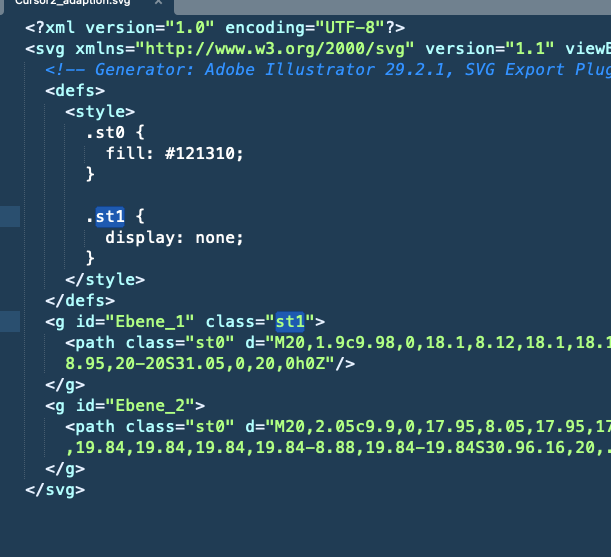
the svg contains a style that removes the visibility of an element inside your svg.
maybe use a simpler svg that doesnt hide sth in it?
otherwise it looks finei opened the svg with a texteditor
-
create a .svg file, open it with a texteditor and insert the following SVG markup. For me, this SVG works as a cursor.
<?xml version="1.0" encoding="utf-8"?>
<!-- Generator: Adobe Illustrator 18.0.0, SVG Export Plug-In . SVG Version: 6.00 Build 0)  -->
<!DOCTYPE svg PUBLIC "-//W3C//DTD SVG 1.1//EN" "http://www.w3.org/Graphics/SVG/1.1/DTD/svg11.dtd">
<svg width="32" height="32" version="1.1" id="Layer_1" xmlns="http://www.w3.org/2000/svg" xmlns:xlink="http://www.w3.org/1999/xlink" x="0px" y="0px"
	 viewBox="0 0 32 32" enable-background="new 0 0 32 32" xml:space="preserve">
<g>
	<defs>
		<rect id="SVGID_1_" width="32" height="32"/>
	</defs>
	<clipPath id="SVGID_2_">
		<use xlink:href="#SVGID_1_"  overflow="visible"/>
	</clipPath>
	<path clip-path="url(#SVGID_2_)" fill="#FFFFFF" d="M11.3,20.4c-0.3-0.4-0.6-1.1-1.2-2c-0.3-0.5-1.2-1.5-1.5-1.9
		c-0.2-0.4-0.2-0.6-0.1-1c0.1-0.6,0.7-1.1,1.4-1.1c0.5,0,1,0.4,1.4,0.7c0.2,0.2,0.5,0.6,0.7,0.8c0.2,0.2,0.2,0.3,0.4,0.5
		c0.2,0.3,0.3,0.5,0.2,0.1c-0.1-0.5-0.2-1.3-0.4-2.1c-0.1-0.6-0.2-0.7-0.3-1.1c-0.1-0.5-0.2-0.8-0.3-1.3c-0.1-0.3-0.2-1.1-0.3-1.5
		c-0.1-0.5-0.1-1.4,0.3-1.8c0.3-0.3,0.9-0.4,1.3-0.2c0.5,0.3,0.8,1,0.9,1.3c0.2,0.5,0.4,1.2,0.5,2c0.2,1,0.5,2.5,0.5,2.8
		c0-0.4-0.1-1.1,0-1.5c0.1-0.3,0.3-0.7,0.7-0.8c0.3-0.1,0.6-0.1,0.9-0.1c0.3,0.1,0.6,0.3,0.8,0.5c0.4,0.6,0.4,1.9,0.4,1.8
		c0.1-0.4,0.1-1.2,0.3-1.6c0.1-0.2,0.5-0.4,0.7-0.5c0.3-0.1,0.7-0.1,1,0c0.2,0,0.6,0.3,0.7,0.5c0.2,0.3,0.3,1.3,0.4,1.7
		c0,0.1,0.1-0.4,0.3-0.7c0.4-0.6,1.8-0.8,1.9,0.6c0,0.7,0,0.6,0,1.1c0,0.5,0,0.8,0,1.2c0,0.4-0.1,1.3-0.2,1.7
		c-0.1,0.3-0.4,1-0.7,1.4c0,0-1.1,1.2-1.2,1.8c-0.1,0.6-0.1,0.6-0.1,1c0,0.4,0.1,0.9,0.1,0.9s-0.8,0.1-1.2,0c-0.4-0.1-0.9-0.8-1-1.1
		c-0.2-0.3-0.5-0.3-0.7,0c-0.2,0.4-0.7,1.1-1.1,1.1c-0.7,0.1-2.1,0-3.1,0c0,0,0.2-1-0.2-1.4c-0.3-0.3-0.8-0.8-1.1-1.1L11.3,20.4z"/>

		<path clip-path="url(#SVGID_2_)" fill="none" stroke="#000000" stroke-width="0.75" stroke-linecap="round" stroke-linejoin="round" d="
		M11.3,20.4c-0.3-0.4-0.6-1.1-1.2-2c-0.3-0.5-1.2-1.5-1.5-1.9c-0.2-0.4-0.2-0.6-0.1-1c0.1-0.6,0.7-1.1,1.4-1.1c0.5,0,1,0.4,1.4,0.7
		c0.2,0.2,0.5,0.6,0.7,0.8c0.2,0.2,0.2,0.3,0.4,0.5c0.2,0.3,0.3,0.5,0.2,0.1c-0.1-0.5-0.2-1.3-0.4-2.1c-0.1-0.6-0.2-0.7-0.3-1.1
		c-0.1-0.5-0.2-0.8-0.3-1.3c-0.1-0.3-0.2-1.1-0.3-1.5c-0.1-0.5-0.1-1.4,0.3-1.8c0.3-0.3,0.9-0.4,1.3-0.2c0.5,0.3,0.8,1,0.9,1.3
		c0.2,0.5,0.4,1.2,0.5,2c0.2,1,0.5,2.5,0.5,2.8c0-0.4-0.1-1.1,0-1.5c0.1-0.3,0.3-0.7,0.7-0.8c0.3-0.1,0.6-0.1,0.9-0.1
		c0.3,0.1,0.6,0.3,0.8,0.5c0.4,0.6,0.4,1.9,0.4,1.8c0.1-0.4,0.1-1.2,0.3-1.6c0.1-0.2,0.5-0.4,0.7-0.5c0.3-0.1,0.7-0.1,1,0
		c0.2,0,0.6,0.3,0.7,0.5c0.2,0.3,0.3,1.3,0.4,1.7c0,0.1,0.1-0.4,0.3-0.7c0.4-0.6,1.8-0.8,1.9,0.6c0,0.7,0,0.6,0,1.1
		c0,0.5,0,0.8,0,1.2c0,0.4-0.1,1.3-0.2,1.7c-0.1,0.3-0.4,1-0.7,1.4c0,0-1.1,1.2-1.2,1.8c-0.1,0.6-0.1,0.6-0.1,1
		c0,0.4,0.1,0.9,0.1,0.9s-0.8,0.1-1.2,0c-0.4-0.1-0.9-0.8-1-1.1c-0.2-0.3-0.5-0.3-0.7,0c-0.2,0.4-0.7,1.1-1.1,1.1
		c-0.7,0.1-2.1,0-3.1,0c0,0,0.2-1-0.2-1.4c-0.3-0.3-0.8-0.8-1.1-1.1L11.3,20.4z"/>

		<line clip-path="url(#SVGID_2_)" fill="none" stroke="#000000" stroke-width="0.75" stroke-linecap="round" x1="19.6" y1="20.7" x2="19.6" y2="17.3"/>

		<line clip-path="url(#SVGID_2_)" fill="none" stroke="#000000" stroke-width="0.75" stroke-linecap="round" x1="17.6" y1="20.7" x2="17.5" y2="17.3"/>

		<line clip-path="url(#SVGID_2_)" fill="none" stroke="#000000" stroke-width="0.75" stroke-linecap="round" x1="15.6" y1="17.3" x2="15.6" y2="20.7"/>
</g>
</svg>

Hello! It looks like you're interested in this conversation, but you don't have an account yet.
Getting fed up of having to scroll through the same posts each visit? When you register for an account, you'll always come back to exactly where you were before, and choose to be notified of new replies (either via email, or push notification). You'll also be able to save bookmarks and upvote posts to show your appreciation to other community members.
With your input, this post could be even better 💗
Register Login