Skip to content
  • Recent
  • Tags
  • Popular
  • Users
  • Search
Skins
  • Light
  • Brite
  • Cerulean
  • Cosmo
  • Flatly
  • Journal
  • Litera
  • Lumen
  • Lux
  • Materia
  • Minty
  • Morph
  • Pulse
  • Sandstone
  • Simplex
  • Sketchy
  • Spacelab
  • United
  • Yeti
  • Zephyr
  • Dark
  • Cyborg
  • Darkly
  • Quartz
  • Slate
  • Solar
  • Superhero
  • Vapor

  • Default (No Skin)
  • No Skin
Collapse

Lay Theme Forum

  1. Home
  2. General Discussion
  3. Two mobile menus?

Two mobile menus?

Scheduled Pinned Locked Moved General Discussion
5 Posts 3 Posters 570 Views 2 Watching
  • Oldest to Newest
  • Newest to Oldest
  • Most Votes
Reply
  • Reply as topic
Log in to reply
This topic has been deleted. Only users with topic management privileges can see it.
  • M
    M
    magdalena
    wrote on last edited by
    #1

    I wanted to translate the page to English and worked without an extra plugin so far.
    It works well on the desktop version.
    www.psychotherapiefischer.at

    Is there a way to have a second (English) mobile menu to switch to? So far I only see the option to have more desktop menus but not mobile ones.

    Thank u so much!
    Magdalena

    1 Reply Last reply
    0
    • arminunruhA
      arminunruhA
      arminunruh
      Global Moderator
      wrote on last edited by
      #2

      no,
      probably its better and easier to use qtranslateXT:
      https://laytheme.com/documentation/multilanguage.html

      but what u can do is:
      in appearance -> menus:

      if u click screen options in the top right:
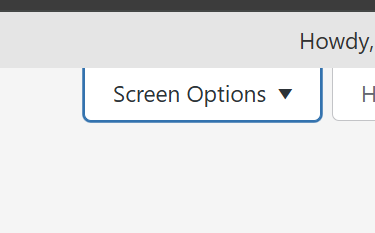
      image.png

      check:

      6e181685-1b87-4643-b85b-53439cf5f8f5-image.png

      then for any menupoint that is english, enter the CSS class "english":
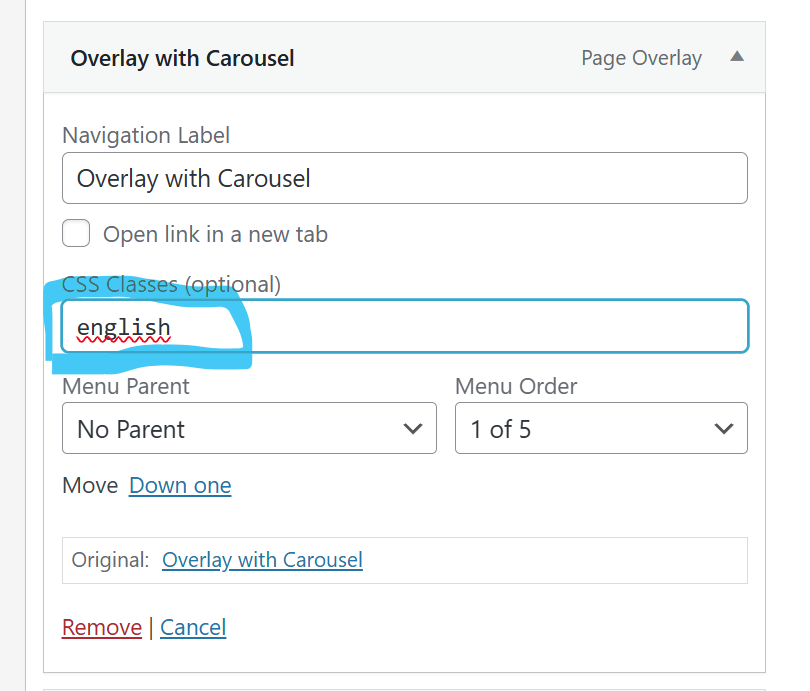
      923f01fd-8c18-43a9-82a4-37689fb680f4-image.png

      now with custom css you can hide those when you're on a different language.
      with css based on current page (read this): https://laytheme.com/documentation/custom-css-styling.html#css-based-on-current-page

      1 Reply Last reply
      0
      • R
        R
        robsdonatini
        wrote on last edited by
        #3

        Dear @arminunruh

        I'm trying to display a second menu on mobile on certain pages.

        I tried the following:

        • creating a second menu and use this code

        .slug-progetti_gd_ita .menu-1
        {
        display: none!important;
        }

        .slug-progetti_gd_ita .menu-2
        {
        display: block!important;
        }

        Also this:

        .slug-progetti_gd_ita nav.primay
        {
        display: none!important;
        }

        .slug-progetti_gd_ita second.menu
        {
        display: block!important;
        }

        I also tried to create just one menu and give CSS classes to some pages and hide them like this, as you suggested here

        .slug-progetti_pm_ita .menugd1 {
        display: none !important;
        }

        But nothing changes.

        Do you think there's a solution? I’m trying to find a workaround since I have built a double website, with 2 different menus

        www.robertadonatini.com/homepage_ita

        I also answered to your recent email, but I think this is the topic where I can continue the discussion

        Thanks a lot

        1 Reply Last reply
        0
        • R
          R
          robsdonatini
          wrote on last edited by
          #4

          Ehi! Apparenlty the solution of CSS classes worked!
          It was just a matter of Wordpress cache not updating the menu. I used "WP Fastest Cache" to clear it and the change appeared.

          So the solution was: assigning css classes to elements of the menu, just use one menu and hide some elements on certains page and other elements on others.

          1 Reply Last reply
          1
          • arminunruhA
            arminunruhA
            arminunruh
            Global Moderator
            wrote on last edited by
            #5

            wow actually u did this really well, very clever! <3

            1 Reply Last reply
            0

            Hello! It looks like you're interested in this conversation, but you don't have an account yet.

            Getting fed up of having to scroll through the same posts each visit? When you register for an account, you'll always come back to exactly where you were before, and choose to be notified of new replies (either via email, or push notification). You'll also be able to save bookmarks and upvote posts to show your appreciation to other community members.

            With your input, this post could be even better 💗

            Register Login
            Reply
            • Reply as topic
            Log in to reply
            • Oldest to Newest
            • Newest to Oldest
            • Most Votes


            Online Users
            Forgot your key, lost your files, need a previous Lay Theme or Addon version? Go to www.laykeymanager.com
            laytheme.com
            • Login

            • Don't have an account? Register

            • Login or register to search.
            • First post
              Last post
            0
            • Recent
            • Tags
            • Popular
            • Users
            • Search