hide specific menu from specific page
-
hey all - i'm trying to hide specific menus from certain pages. for example i would like to hide third menu from all my project pages, and also to interchangeably hide primary and fourth menus depending on what page it is: if i am on the clients page then hide fourth menu and if i am on about page then hide the primary. this might sound confusing - what i'm ultimately trying to achieve is to have alternating menus showing the active page at the topright corner. i've seen that this can be done with css, however i couldn't see how to hide only one menu at a time.
here's my page as it is: https://www.senoglu.co/
many thanks! -
sure no problem
basically you check what id or what slug your body has.
google "how to use google chrome inspector to find a HTML class"
check out the classes of your menus:
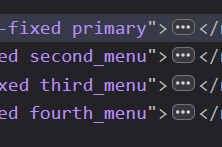
read this please:
https://laytheme.com/documentation/custom-css-styling.html
so it would be for example:
body.slug-home-2 .second_menu{
display: none;
}
add this in:
lay options -> custom css & html -> custom css for desktopthat would hide the second menu on the page that has a slug of home-2
if for example you want to hide one menu for all project pages, use:

body.type-project .second_menu{ display: none; } -
fantastic thanks a lot armin!! i will give this a try. keep on the good work.
*edit. works perfectly thank you very much.

Hello! It looks like you're interested in this conversation, but you don't have an account yet.
Getting fed up of having to scroll through the same posts each visit? When you register for an account, you'll always come back to exactly where you were before, and choose to be notified of new replies (either via email, or push notification). You'll also be able to save bookmarks and upvote posts to show your appreciation to other community members.
With your input, this post could be even better 💗
Register Login