Skip to content
  • Recent
  • Tags
  • Popular
  • Users
  • Search
Skins
  • Light
  • Brite
  • Cerulean
  • Cosmo
  • Flatly
  • Journal
  • Litera
  • Lumen
  • Lux
  • Materia
  • Minty
  • Morph
  • Pulse
  • Sandstone
  • Simplex
  • Sketchy
  • Spacelab
  • United
  • Yeti
  • Zephyr
  • Dark
  • Cyborg
  • Darkly
  • Quartz
  • Slate
  • Solar
  • Superhero
  • Vapor

  • Default (No Skin)
  • No Skin
Collapse

Lay Theme Forum

  1. Home
  2. General Discussion
  3. Activate styllistic sets

Activate styllistic sets

Scheduled Pinned Locked Moved General Discussion
webfontsfavorit
11 Posts 3 Posters 2.8k Views 2 Watching
  • Oldest to Newest
  • Newest to Oldest
  • Most Votes
Reply
  • Reply as topic
Log in to reply
This topic has been deleted. Only users with topic management privileges can see it.
  • arminunruhA
    arminunruhA
    arminunruh
    Global Moderator
    wrote on last edited by
    #2

    Ah you mean you want to use that font. I think there is a specific .woff font file just for that font, no?

    1 Reply Last reply
    0
    • Y
      Y
      yourlocalboy
      wrote on last edited by
      #3

      Yes, But it has 9 different stylistic sets. The real cool one needs to be activated through open type when I use it in InDesign. Is that possible to get that activated in Lay theme somehow?

      1 Reply Last reply
      0
      • arminunruhA
        arminunruhA
        arminunruh
        Global Moderator
        wrote on last edited by
        #4

        :O humm, I'm not sure, do you have the webfont or only the desktop font? maybe you would need the webfont to do this.

        1 Reply Last reply
        0
        • Y
          Y
          yourlocalboy
          wrote on last edited by
          #5

          Yes, I got the web version. Goddammit :-/

          1 Reply Last reply
          0
          • arminunruhA
            arminunruhA
            arminunruh
            Global Moderator
            wrote on last edited by
            #6

            Hey, so after playing around with it on http://www.abcdinamo.com/specimen/olicLd
            I found out they use the css:

            font-feature-settings: "ss09";
            

            Ok so what you can do is create a textformat that uses the font.
            Each textformat has a "HTML class"
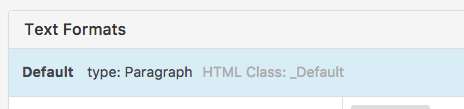
            0_1485334217249_Screen Shot 2017-01-25 at 09.48.53.png

            Here it is "_Default" for example.

            Ok now go to "Lay Options" -> "Custom CSS & HTML" and in "Custom <head> content" put:

            <style>
            ._Default{
            font-feature-settings: "ss09";
            }
            </style>
            

            Of course instead of _Default, there should be the html class of your textformat.

            1 Reply Last reply
            0
            • R
              R
              radovanvasak
              wrote on last edited by radovanvasak
              #7

              Hello @arminunruh I can't manage to get this working with tabular numbers.

              I am putting this in the <head> content:

              <style>
              ._Default{
              font-feature-settings: "ss01", "case", "tnum";
              }
              </style>

              I have this in my Custom CSS:

              body {
              -moz-font-feature-settings: "ss01", "case", "tnum";
              -ms-font-feature-settings: "ss01", "case", "tnum";
              -o-font-feature-settings: "ss01", "case", "tnum";
              -webkit-font-feature-settings: "ss01", "case", "tnum";
              font-feature-settings: "ss01", "case", "tnum";
              }

              Am I doing something wrong? Thanks in advance.

              1 Reply Last reply
              0
              • arminunruhA
                arminunruhA
                arminunruh
                Global Moderator
                wrote on last edited by
                #8

                hey what is the font you use?
                do you have a link to the page/website where u experience the issue?

                1 Reply Last reply
                0
                • R
                  R
                  radovanvasak
                  wrote on last edited by
                  #9

                  It is a Suisse Int’l from Swiss Typefaces available here: https://www.swisstypefaces.com/fonts/suisse/#font The numbers don't turn tabular here https://vasak.sk The tabular numbers function works fine in design softwares such as InDesign or Figma.

                  1 Reply Last reply
                  0
                  • R
                    R
                    radovanvasak
                    wrote on last edited by
                    #10

                    EDIT: The problem has been solved. I was using a desktop version of the font .otf instead of web version .woff2 Now it works.

                    1 Reply Last reply
                    0
                    • arminunruhA
                      arminunruhA
                      arminunruh
                      Global Moderator
                      wrote on last edited by
                      #11

                      ok very good!

                      1 Reply Last reply
                      0

                      Hello! It looks like you're interested in this conversation, but you don't have an account yet.

                      Getting fed up of having to scroll through the same posts each visit? When you register for an account, you'll always come back to exactly where you were before, and choose to be notified of new replies (either via email, or push notification). You'll also be able to save bookmarks and upvote posts to show your appreciation to other community members.

                      With your input, this post could be even better 💗

                      Register Login
                      Reply
                      • Reply as topic
                      Log in to reply
                      • Oldest to Newest
                      • Newest to Oldest
                      • Most Votes


                      Online Users
                      Forgot your key, lost your files, need a previous Lay Theme or Addon version? Go to www.laykeymanager.com
                      laytheme.com
                      • Login

                      • Don't have an account? Register

                      • Login or register to search.
                      • First post
                        Last post
                      0
                      • Recent
                      • Tags
                      • Popular
                      • Users
                      • Search
