Animated overlay menu
-
Hello,
I tried to recreate the menu effect used on https://samyrio.fr , but I can’t seem to make it work properly. (It's not a laytheme website)
Could someone help me understand how to achieve this effect with Lay Theme?Thank you in advance!
-
Hello! First of all, you would need to create a site title and a menu and position them both on the top left in the customizer.
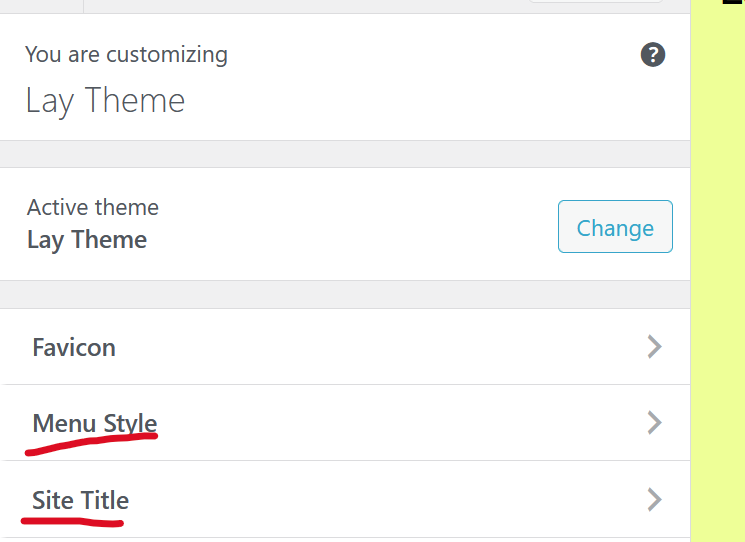
In Customize, you can place the site title and the menu to the top left.
-
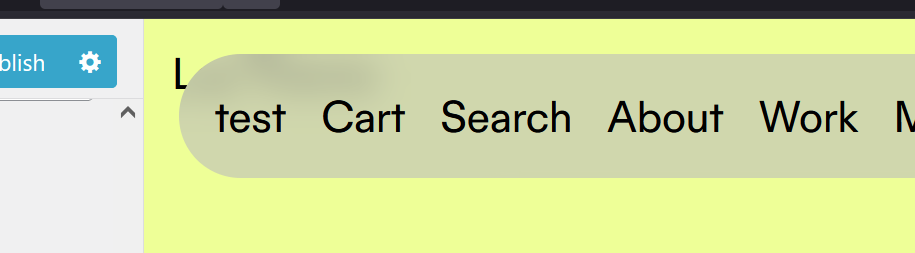
Now it would look something like this. The menu in the side title is in the top left and right now they are overlapping.
-
add this in:
lay options -> custom css & html -> custom css for desktop/*this will hide the primary menu*/ .laynav.primary{ display: none; } /* this will show the menu and hide the site title if the class "shownav-and-hide-sitetitle" is added to body */ body.shownav-and-hide-sitetitle{ .laynav.primary{ display: block; } .sitetitle{ display: none; } }now add this javascript
add this in:
lay options -> custom css & html -> Custom HTML at bottom<script> jQuery(document).on('mousemove', function(e){ let y = e.clientY; if(y < 100){ jQuery('body').addClass('shownav-and-hide-sitetitle'); } else { jQuery('body').removeClass('shownav-and-hide-sitetitle'); } }) </script>this will check for your mouse movement and if its less than 100px from the top of the browser, we add the class 'shownav-and-hide-sitetitle'
-
 A arminunruh referenced this topic on
Hello! It looks like you're interested in this conversation, but you don't have an account yet.
Getting fed up of having to scroll through the same posts each visit? When you register for an account, you'll always come back to exactly where you were before, and choose to be notified of new replies (either via email, or push notification). You'll also be able to save bookmarks and upvote posts to show your appreciation to other community members.
With your input, this post could be even better 💗
Register Login