custom Switch button in footer
-
ok. if you could create a page where you just have like 2 or 3 rows in there. and make the bug happen in this simpler case.
then i can try and fix it. cause this example case is too complex. -
I've made a test page with the same footer operation, let me know if this is better for you: https://benoitlefeuvre.com/test/
thanks!
-
hi
up 🧌 -
hey oh yea i need to check this out sry
-
in this case, the switch button should be on Artworks, as the page category is data-catid=“[3]” and should display the correct content as if Artworks had been clicked.
-
im checking it out now
-
ok it seems like i had a really hard time to understand what the problem was :O
i misunderstood youbasically you just need to trigger a click on one of the buttons
u got two buttons:
.artworks-button
and
.overview-button
and as far as i understand this would be the way to do it:
when you go to a page where you want overview-button to be auto-activated:
window.laytheme.on('newpageshown', function(){
if(jQuery("body").hasClass("slug-home"){
jQuery(".overview-button").click();
}
})
basically when you visit the homepage, this will click the overview button using javascript:
but maybe u need to remove this custom js u got here:
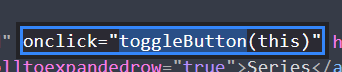
this could be in conflict with that click js
i think u just add "selected" classmaybe for styling, instead use the class "expand-link-clicked" cause thats the "active" class
so basically with newpageshown and checking the body class you can find out which page u just landed on.
and then either calljQuery(".overview-button").click();or
jQuery(".artworks-button").click();if my previous code was checking the right pages (no idea), it could for example look like
window.laytheme.on('newpageshown', function(){
	if(jQuery('body').attr('data-catid') == '[3]'){
		jQuery(".artworks-button").click();
	} else if(jQuery('body').attr('data-catid') == '[1]'){
		jQuery(".overview-button").click();
	}
})
but basically this was no lay theme bug, you just needed help with your custom code
-
Thanks for your reply. You're right, it's probably not a Lay bug but rather that I need help with my code. I tested it, but unfortunately it doesn't work.
-
:/
can you tell me:
which page should have what button activated??and can u gimme your /wp-admin/ login
can you send your website address, /wp-admin/ username and password and a link to this topic to info@laytheme.com?
-
<script>
    window.laytheme.on('newpageshown', function(){
        setTimeout(function(){
        	if(jQuery('body').attr('data-catid') == '[3]'){
        	    if( window.utility.isDesktopOrTabletSize ) {
            		jQuery("#footer .artworks-button").click().addClass("selected");
            		jQuery("#footer .overview-button").removeClass("selected");
        	    } else {
        	        jQuery("#footer-custom-phone-grid .artworks-button").click().addClass("selected");
        	        jQuery("#footer-custom-phone-grid .overview-button").removeClass("selected");
        	    }
        	} else if(jQuery('body').attr('data-catid') == '[1]'){
        	    if( window.utility.isDesktopOrTabletSize ) {
        		    jQuery("#footer .overview-button").click().addClass("selected");
        		    jQuery("#footer .artworks-button").removeClass("selected");
        	    } else {
        	        jQuery("#footer-custom-phone-grid .overview-button").click().addClass("selected");
        	        jQuery("#footer-custom-phone-grid .artworks-button").removeClass("selected");
        	    }
        	}
        }, 1000)
    })
</script>
seems like this code is what was needed
-
Thank you very much for your help and your time. That's exactly what I was looking for 🙏

Hello! It looks like you're interested in this conversation, but you don't have an account yet.
Getting fed up of having to scroll through the same posts each visit? When you register for an account, you'll always come back to exactly where you were before, and choose to be notified of new replies (either via email, or push notification). You'll also be able to save bookmarks and upvote posts to show your appreciation to other community members.
With your input, this post could be even better 💗
Register Login