Skip to content
  • Recent
  • Tags
  • Popular
  • Users
  • Search
Skins
  • Light
  • Brite
  • Cerulean
  • Cosmo
  • Flatly
  • Journal
  • Litera
  • Lumen
  • Lux
  • Materia
  • Minty
  • Morph
  • Pulse
  • Sandstone
  • Simplex
  • Sketchy
  • Spacelab
  • United
  • Yeti
  • Zephyr
  • Dark
  • Cyborg
  • Darkly
  • Quartz
  • Slate
  • Solar
  • Superhero
  • Vapor

  • Default (No Skin)
  • No Skin
Collapse

Lay Theme Forum

  1. Home
  2. General Discussion
  3. project index Image hover mix-blend-mode

project index Image hover mix-blend-mode

Scheduled Pinned Locked Moved General Discussion
7 Posts 2 Posters 1.5k Views 2 Watching
  • Oldest to Newest
  • Newest to Oldest
  • Most Votes
Reply
  • Reply as topic
Log in to reply
This topic has been deleted. Only users with topic management privileges can see it.
  • J
    J
    jacobtegel
    wrote on last edited by
    #1

    I would like to apply the

    mix-blend-mode difference
    

    to a column in the project overview, since we are using the imagehover addon with images in the background

    https://www.blila.de/projektindex/

    however

    .lay-projectindex-col {
    	mix-blend-mode: difference !important;
    }
    

    doesn’t seem to be working; is there any technical restrictions to that or do i just have an error in the code? thanks!

    1 Reply Last reply
    0
    • arminunruhA
      arminunruhA
      arminunruh
      Global Moderator
      wrote on last edited by
      #2
      .type-projectindex{
      mix-blend-mode: difference !important;
      }
      

      it needs to be this css instead of your css!

      additionally, you might want to make the color of the right hand texts white on hover:

      .lay-projectindex-row:hover .lay-projectindex-col-tags{
      color: white!important;
      }
      
      .lay-projectindex-row:hover .lay-projectindex-col-year{
      color: white!important;
      }
      

      or black maybe.

      cause atm they are purple and because they are mix blend mode difference, they become green on white bg:

      2aa3acc1-8c8f-4d94-9393-20fa94db31e7-image.png

      1 Reply Last reply
      0
      • J
        J
        jacobtegel
        wrote on last edited by
        #3

        amazing! thank you so much! @arminunruh

        1 Reply Last reply
        0
        • J
          J
          jacobtegel
          wrote on last edited by
          #4

          hey @arminunruh briefly coming back to this, just wondering if it would therefore not be possible to have only a single row change blend mode? while your solution works well, every other row will turn invisible because the black text will turn white.

          1 Reply Last reply
          0
          • arminunruhA
            arminunruhA
            arminunruh
            Global Moderator
            wrote on last edited by
            #5

            Can you please send:

            • a link to this forum topic
            • your website address
            • /wp-admin/ username and password
              to: info@laytheme.com

            i need to try this out by changing ur css, im not sure if i can write the correct css on the fly

            1 Reply Last reply
            0
            • arminunruhA
              arminunruhA
              arminunruh
              Global Moderator
              wrote on last edited by
              #6

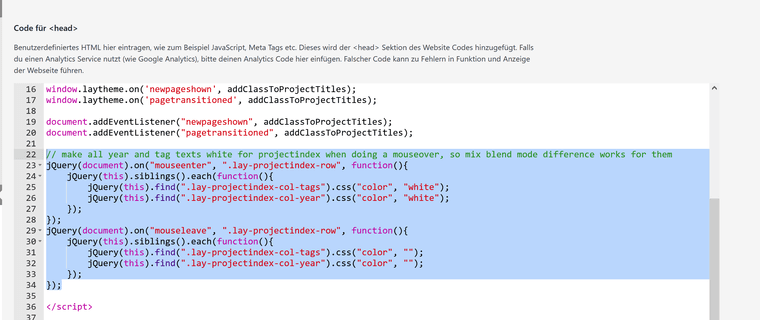
              hey so i had to write js to make this work:

              <script>
              // make all year and tag texts white for projectindex when doing a mouseover, so mix blend mode difference works for them
              jQuery(document).on("mouseenter", ".lay-projectindex-row", function(){
                  jQuery(this).siblings().each(function(){
                      jQuery(this).find(".lay-projectindex-col-tags").css("color", "white");
                      jQuery(this).find(".lay-projectindex-col-year").css("color", "white");
                  });
              });
              jQuery(document).on("mouseleave", ".lay-projectindex-row", function(){
                  jQuery(this).siblings().each(function(){
                      jQuery(this).find(".lay-projectindex-col-tags").css("color", "");
                      jQuery(this).find(".lay-projectindex-col-year").css("color", "");
                  });
              });
              </script>
              

              this will make it work in combination with the css you already have:
              http://laythemeforum.com/topic/11125/project-index-image-hover-mix-blend-mode/2

              i added it to

              image.png

              1 Reply Last reply
              0
              • J
                J
                jacobtegel
                wrote on last edited by
                #7

                amazing, thank you so much!

                1 Reply Last reply
                0

                Hello! It looks like you're interested in this conversation, but you don't have an account yet.

                Getting fed up of having to scroll through the same posts each visit? When you register for an account, you'll always come back to exactly where you were before, and choose to be notified of new replies (either via email, or push notification). You'll also be able to save bookmarks and upvote posts to show your appreciation to other community members.

                With your input, this post could be even better đź’—

                Register Login
                Reply
                • Reply as topic
                Log in to reply
                • Oldest to Newest
                • Newest to Oldest
                • Most Votes


                Online Users
                D
                Dawid
                L
                lstark
                Forgot your key, lost your files, need a previous Lay Theme or Addon version? Go to www.laykeymanager.com
                laytheme.com
                • Login

                • Don't have an account? Register

                • Login or register to search.
                • First post
                  Last post
                0
                • Recent
                • Tags
                • Popular
                • Users
                • Search