Questions : text
-
Hello!
I've got two questions : how can I justify a text? I see the other options (align left, align right and center) but not this one.
Second question : my text column and my menu overlap when I scroll down.
https://main.juliehmmitchell.com/disposable-buildings/
I would like to create a column which naturally disappears behind the menu when I scroll down, as on this website : https://www.charlotteabramow.com/le-petit-manuel-de-sex-education/Could you please tell me how to do this?
Thank you very much in advance!
Have a good evening -
hey!!
1:
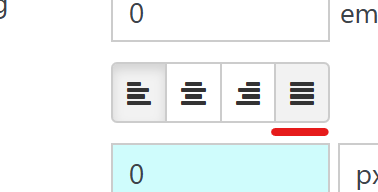
in general, people don't use justified text in web, cause it causes big gaps between words. because word blocks often have very variable sizes depending on the % width of the textblock, the font size and deviceif you really want to use justified text, you can create a textformat in "Textformats":

and use this button:
https://laytheme.com/documentation/textformats-and-webfonts.html2:
https://www.charlotteabramow.com/on this website, they use a menubar.
you can enable it in customize -> menu style -> menubar (uncheck "hide") -
Thank you very much! It works perfectly

Hello! It looks like you're interested in this conversation, but you don't have an account yet.
Getting fed up of having to scroll through the same posts each visit? When you register for an account, you'll always come back to exactly where you were before, and choose to be notified of new replies (either via email, or push notification). You'll also be able to save bookmarks and upvote posts to show your appreciation to other community members.
With your input, this post could be even better 💗
Register Login