Anchor does does not scroll to correct position
-
On this page, the anchor for the (contact) menu does not scroll to the correct position. It only scrolls a little bit, so I would need to click multiple times to achieve accurate scrolling.
The (contact) menu is the first row of a footer, present on each page. This first row has a text element linking to #contact as well as it is sticky and straight visible at initial visit. Because of this, the element with the #contact ID itself is in the row below which was the cause of an earlier issue of the same kind.
It was working correctly previously when I did not write this contact section as a footer. So I think it has sth to do with the footer architecture since, for example, the (works) menu has expected behaviour....
-
Hi luis!
Yeah, I think this is just some more complications with custom code.
Now that part of your website relies on a lot of custom coding, other parts of Lay Theme may not be compatible with it so well.Can you please send:
- a link to this forum topic
- your website address
- /wp-admin/ username and password
to: info@laytheme.com
I wanted to add some code to your custom code that we already have to probably fix this, but it seems like you changed your login info to your admin panel.
-
Okay, so basically for your contact anchor, I removed the anchor: #contact
And instead I just wrote some JavaScript that will scroll your page to the bottom when this button is clicked.
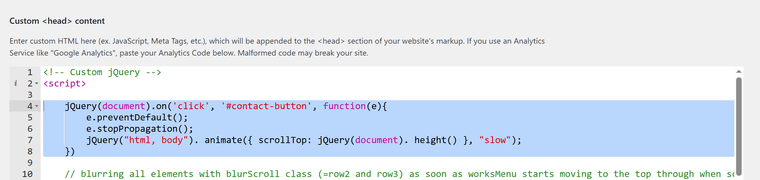
jQuery(document).on('click', '#contact-button', function(e){ e.preventDefault(); e.stopPropagation(); jQuery("html, body"). animate({ scrollTop: jQuery(document). height() }, "slow"); }) -
Okay, so basically for your contact anchor, I removed the anchor: #contact
And instead I just wrote some JavaScript that will scroll your page to the bottom when this button is clicked.
jQuery(document).on('click', '#contact-button', function(e){ e.preventDefault(); e.stopPropagation(); jQuery("html, body"). animate({ scrollTop: jQuery(document). height() }, "slow"); })@arminunruh
Many thanks for that, Armin! =))It works nicely on Desktop, but on mobile it did not work on either Firefox, Chrome or Safari...
What could be the issue?
-
@arminunruh
Many thanks for that, Armin! =))It works nicely on Desktop, but on mobile it did not work on either Firefox, Chrome or Safari...
What could be the issue?
@user-4-33 Ah I see, it – it's the anchor that's still there...
-
ah yea maybe u can change that
bascially you just remove #contact from the href=""
so the href is just empty, then give the contact button id="contact-button"

Hello! It looks like you're interested in this conversation, but you don't have an account yet.
Getting fed up of having to scroll through the same posts each visit? When you register for an account, you'll always come back to exactly where you were before, and choose to be notified of new replies (either via email, or push notification). You'll also be able to save bookmarks and upvote posts to show your appreciation to other community members.
With your input, this post could be even better 💗
Register Login