disabling scroll bar when images at the bottom and browser height at 100vh
-
Hey there,
I'm currently facing a problem when I place images at the bottom of my front page. Even though I've set the browser height to 100vh, I keep getting the scrollbar on the side, both on mobile and on desktop. I know it must be super simple to solve, but I can't seem to figure it out. Can anyone help me here? All images should be aligned at the bottom so scrolling should be prevented.Link:
colinjaeck.comThanks in advance!
-
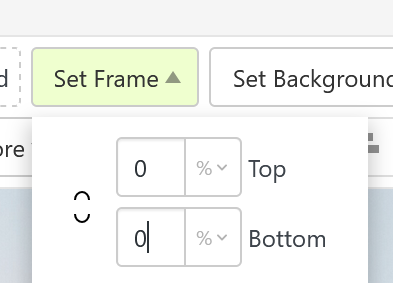
you need to set frame top and frame bottom to 0!
-
you need to set frame top and frame bottom to 0!
@arminunruh Almost! The frame should still exist, but I want it to always adapt to the browser size, sorry for not being clear enough.
-
-
to hide the scrollbar you could use this css:
Enter this css in "lay options" -> "custom css & html" -> "custom css for desktop"
html, body {
  /* Hide scrollbar for Chrome, Safari, and Opera */
  scrollbar-width: none;        /* Firefox */
  -ms-overflow-style: none;     /* IE and Edge */
  overflow: auto;               /* Still allow scrolling */
}

/* Chrome, Safari, Opera */
html::-webkit-scrollbar,
body::-webkit-scrollbar {
  display: none;
}

Hello! It looks like you're interested in this conversation, but you don't have an account yet.
Getting fed up of having to scroll through the same posts each visit? When you register for an account, you'll always come back to exactly where you were before, and choose to be notified of new replies (either via email, or push notification). You'll also be able to save bookmarks and upvote posts to show your appreciation to other community members.
With your input, this post could be even better 💗
Register Login