Skip to content
  • Recent
  • Tags
  • Popular
  • Users
  • Search
Skins
  • Light
  • Brite
  • Cerulean
  • Cosmo
  • Flatly
  • Journal
  • Litera
  • Lumen
  • Lux
  • Materia
  • Minty
  • Morph
  • Pulse
  • Sandstone
  • Simplex
  • Sketchy
  • Spacelab
  • United
  • Yeti
  • Zephyr
  • Dark
  • Cyborg
  • Darkly
  • Quartz
  • Slate
  • Solar
  • Superhero
  • Vapor

  • Default (No Skin)
  • No Skin
Collapse

Lay Theme Forum

  1. Home
  2. General Discussion
  3. mouse cursor does not work
mouse cursor does not work

Scheduled Pinned Locked Moved General Discussion
21 Posts 2 Posters 457 Views 2 Watching
  • Oldest to Newest
  • Newest to Oldest
  • Most Votes
Reply
  • Reply as topic
Log in to reply
This topic has been deleted. Only users with topic management privileges can see it.
  • arminunruhA Offline
    arminunruhA Offline
    arminunruh
    Global Moderator
    wrote on last edited by
    #8

    i released it yesterday

    1 Reply Last reply
    0
    • arminunruhA Offline
      arminunruhA Offline
      arminunruh
      Global Moderator
      wrote on last edited by
      #9

      https://laytheme.com/version-history.html

      u can see it here

      1 Reply Last reply
      0
      • D Offline
        D Offline
        danny
        wrote on last edited by
        #10

        thanks @arminunruh it works now. I re-sized the png in "Edit Media" to 56 x 24 px but somehow it doesn't seem to apply. And the cursor does not really work with the links. Is that happening because of its form?

        1 Reply Last reply
        0
        • arminunruhA Offline
          arminunruhA Offline
          arminunruh
          Global Moderator
          wrote on last edited by
          #11

          hello!

          mouse cursor shows up forf me, on links too!
          please upload a new file that has the correct dimensions instead of resizing it in edit media.

          1 Reply Last reply
          0
          • arminunruhA Offline
            arminunruhA Offline
            arminunruh
            Global Moderator
            wrote on last edited by
            #12

            if the mouse cursor doesn't show up: what browser are you using?

            1 Reply Last reply
            0
            • D Offline
              D Offline
              danny
              wrote last edited by
              #13

              hi @arminunruh thanks! i changed the size and made it transparent, so the signature appears. but the cursor doesn't react to the links. nothing happens when I move over the links. I tried from two different desktops.

              do you have an idea why it does not work?

              https://axellestiefel.com/test6-copy/

              1 Reply Last reply
              0
              • arminunruhA Offline
                arminunruhA Offline
                arminunruh
                Global Moderator
                wrote last edited by
                #14

                hey there is no custom cursor setting for links only

                what did you expect for links?
                did you write css that changes the cursor on links?

                1 Reply Last reply
                0
                • D Offline
                  D Offline
                  danny
                  wrote last edited by
                  #15

                  thanks. no, I didn't write any css concerning the cursor. I guess the cursor does not react to the links because of its form, right?

                  1 Reply Last reply
                  0
                  • arminunruhA Offline
                    arminunruhA Offline
                    arminunruh
                    Global Moderator
                    wrote last edited by
                    #16

                    i mean the cursor is your custom cursor. even when the cursor is on top of a link, it stays your custom image.

                    thats how i see it. is this what you wanted?
                    im actually not too sure about how you want the cursor to be.

                    or did you want the custom cursor to turn into a normal one like this:

                    image.png

                    if you wanted that behaviour, you can use this css:

                    a, .lay-textformat-parent a{
                    cursor: pointer!important;
                    }

                    i added this css to your site in lay options -> custom css & html now

                    if i was you, i would also adjust the 2 values here that are currently set to 0:
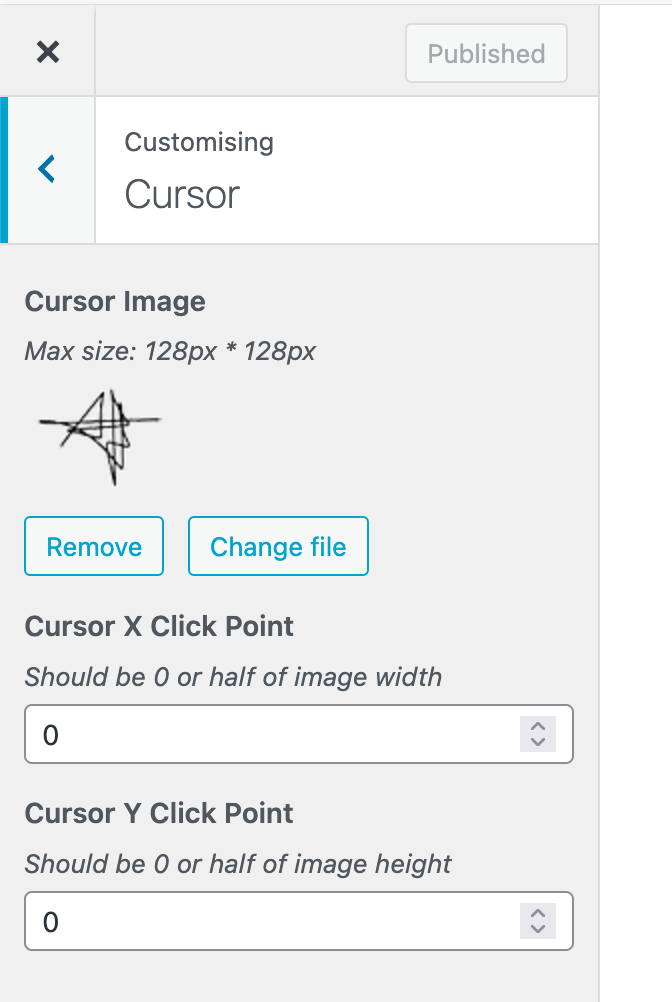
                    7b32b13e-2cc1-4221-ad2f-1ae141fd10c5-image.png

                    so the cursor feels more natural. cause now you will see the cursor jumps quite a lot when it switches to the normal pointer cursor on mac.

                    1 Reply Last reply
                    0
                    • arminunruhA Offline
                      arminunruhA Offline
                      arminunruh
                      Global Moderator
                      wrote last edited by
                      #17

                      i will actually add this setting to the customizer section for the next update:
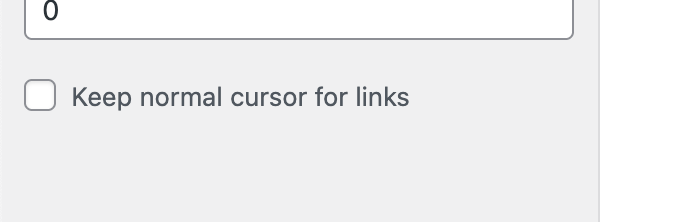
                      image.png

                      1 Reply Last reply
                      0
                      • D Offline
                        D Offline
                        danny
                        wrote last edited by
                        #18

                        hi @arminunruh danke dir. Ich meinte nicht, das der Cursor eine andere Form bekommt. Anscheinend funktioniert diese Strichzeichnung als Cursor nicht, da sie nur aus Linien besteht. Meine Frage war ja nur, dass dieser Cursor-Form (die Strichzeichnung) nicht auf die Links reagiert, also die Links sich nicht klicken lassen. Macht das Sinn? Müsst der Cursor also eine geschlossene Form (wie die Hand) sein, damit sich die Links klicken lassen? Danke dir !

                        1 Reply Last reply
                        0
                        • arminunruhA Offline
                          arminunruhA Offline
                          arminunruh
                          Global Moderator
                          wrote last edited by
                          #19

                          you mean the links are not clickable?
                          can you create a video of that, i cant reproduce this, the links are clickable for me:

                          https://www.dropbox.com/scl/fi/ya15z7qbzpql5mvtojfpi/click.mov?rlkey=nsp682mc2i5vdtd0p1a3tes3l&st=sw9tot6m&dl=0

                          1 Reply Last reply
                          0
                          • D Offline
                            D Offline
                            danny
                            wrote last edited by
                            #20

                            yes. now it works actually :) but I think it doesn't work if we would take out the css for the cursor. then the cursor would always be the signature (die Strichzeichnung) and not change to the hand.

                            1 Reply Last reply
                            0
                            • arminunruhA Offline
                              arminunruhA Offline
                              arminunruh
                              Global Moderator
                              wrote last edited by
                              #21

                              yea u need to enable this setting

                              Screenshot 2026-04-01 at 10.52.55.png

                              1 Reply Last reply
                              0
                              Reply
                              • Reply as topic
                              Log in to reply
                              • Oldest to Newest
                              • Newest to Oldest
                              • Most Votes


                              I also code custom websites or custom Lay features.
                              💿 Email me here: 💿
                              info@laytheme.com

                              Our Web Development company: 100k.studio

                              Want to tip me? https://www.paypal.com/paypalme/arminunruh

                              Before you post:
                              1. When using a WordPress Cache plugin, disable it or clear your cache.
                              2. Update Lay Theme and all Lay Theme Addons
                              3. Disable all Plugins
                              4. Go to Lay Options → Custom CSS & HTML, click "Turn Off All Custom Code", click "Save Changes"

                              This often solves issues you might run into

                              When you post:
                              1. Post a link to where the problem is
                              2. Does the problem happen on Chrome, Firefox, Safari or iPhone or Android?
                              3. If the problem is difficult to explain, post screenshots / link to a video to explain it
                              Online Users
                              Forgot your key, lost your files, need a previous Lay Theme or Addon version? Go to www.laykeymanager.com
                              laytheme.com
                              • Login

                              • Don't have an account? Register

                              • Login or register to search.
                              • First post
                                Last post
                              0
                              • Recent
                              • Tags
                              • Popular
                              • Users
                              • Search