Skip to content
  • Recent
  • Tags
  • Popular
  • Users
  • Search
Skins
  • Light
  • Brite
  • Cerulean
  • Cosmo
  • Flatly
  • Journal
  • Litera
  • Lumen
  • Lux
  • Materia
  • Minty
  • Morph
  • Pulse
  • Sandstone
  • Simplex
  • Sketchy
  • Spacelab
  • United
  • Yeti
  • Zephyr
  • Dark
  • Cyborg
  • Darkly
  • Quartz
  • Slate
  • Solar
  • Superhero
  • Vapor

  • Default (No Skin)
  • No Skin
Collapse

Lay Theme Forum

  1. Home
  2. General Discussion
  3. project thumbnails Vertical alignment / tile view


project thumbnails Vertical alignment / tile view

Scheduled Pinned Locked Moved General Discussion
3 Posts 2 Posters 286 Views 2 Watching
  • Oldest to Newest
  • Newest to Oldest
  • Most Votes
Reply
  • Reply as topic
Log in to reply
This topic has been deleted. Only users with topic management privileges can see it.
  • A
    A
    AD
    wrote on last edited by AD
    #1

    Hi,

    I'm trying to figure out how to arrange project thumbnails on a photography "work" page so they show as a tile view, but it seems to work only inconsistently.

    Place freely doesn't seem to work consistently for this either, so my approach right now is to set Col Gutter to 2 and Row Gutter to 0 and using the horizontal grid, arriving at a layout like this:

    Bildschirmfoto 2026-03-28 um 15.57.46.jpg

    The gridder view looks like this:

    Bildschirmfoto 2026-03-28 um 15.58.24.jpg

    The project titles overlap depending on browser and resolution, also it's quite hard to actually place the thumbnails in the gridder - I'm frequently getting a "Can't put element there" error.

    Is there a better approach? Is it possible to achieve a proper tile view with Lay Theme? If so, how?

    Thanks for any tips!

    1 Reply Last reply
    0
    • arminunruhA
      arminunruhA
      arminunruh
      Global Moderator
      wrote on last edited by
      #2

      yes! use the thumbnailgrid element or elementgrid element
      then use masonry layout type!
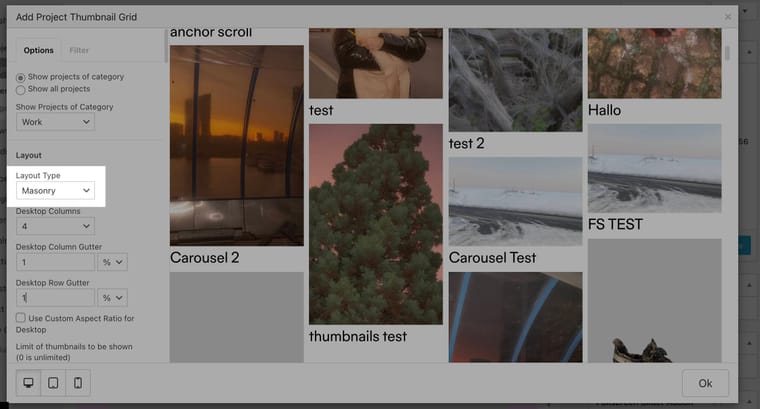
      Screenshot 2026-03-31 at 10.54.44.jpg

      1 Reply Last reply
      0
      • A
        A
        AD
        wrote on last edited by
        #3

        Thank you so much, @arminunruh ! :)

        1 Reply Last reply
        0

        Hello! It looks like you're interested in this conversation, but you don't have an account yet.

        Getting fed up of having to scroll through the same posts each visit? When you register for an account, you'll always come back to exactly where you were before, and choose to be notified of new replies (either via email, or push notification). You'll also be able to save bookmarks and upvote posts to show your appreciation to other community members.

        With your input, this post could be even better 💗

        Register Login
        Reply
        • Reply as topic
        Log in to reply
        • Oldest to Newest
        • Newest to Oldest
        • Most Votes


        Online Users
        Forgot your key, lost your files, need a previous Lay Theme or Addon version? Go to www.laykeymanager.com
        laytheme.com
        • Login

        • Don't have an account? Register

        • Login or register to search.
        • First post
          Last post
        0
        • Recent
        • Tags
        • Popular
        • Users
        • Search