Skip to content
  • Recent
  • Tags
  • Popular
  • Users
  • Search
Skins
  • Light
  • Brite
  • Cerulean
  • Cosmo
  • Flatly
  • Journal
  • Litera
  • Lumen
  • Lux
  • Materia
  • Minty
  • Morph
  • Pulse
  • Sandstone
  • Simplex
  • Sketchy
  • Spacelab
  • United
  • Yeti
  • Zephyr
  • Dark
  • Cyborg
  • Darkly
  • Quartz
  • Slate
  • Solar
  • Superhero
  • Vapor

  • Default (No Skin)
  • No Skin
Collapse

Lay Theme Forum

  1. Home
  2. General Discussion
  3. Row Video Background from Vimeo?

Row Video Background from Vimeo?

Scheduled Pinned Locked Moved General Discussion
22 Posts 3 Posters 2.5k Views 2 Watching
  • Oldest to Newest
  • Newest to Oldest
  • Most Votes
Reply
  • Reply as topic
Log in to reply
This topic has been deleted. Only users with topic management privileges can see it.
  • arminunruhA
    arminunruhA
    arminunruh
    Global Moderator
    wrote on last edited by
    #12

    do u have a link?

    1 Reply Last reply
    0
    • arminunruhA
      arminunruhA
      arminunruh
      Global Moderator
      wrote on last edited by
      #13

      and are u sure u entered the right url?

      image.png

      it shouldnt be a embed url, but if u have a vimeo pro account, you should be able to get a streaming link or download link of the video that looks similar to:

      https://player.vimeo.com/progressive_redirect/playback/1126128470/rendition/1080p/file.mp4?loc=external&log_user=0&signature=ee8134cc70b92de5d4917e390d7877728073cc02d9132aee4b2768c9c1ffd517

      1 Reply Last reply
      0
      • G
        G
        Giusepe
        wrote on last edited by
        #14

        Aaaah, i think i get why is not working. My client pays vimeo, but the standard suscription, not premium. Maybe that's the issue. Thanks!!

        1 Reply Last reply
        0
        • arminunruhA
          arminunruhA
          arminunruh
          Global Moderator
          wrote on last edited by
          #15

          ah i understand, yes thats probably it

          1 Reply Last reply
          0
          • G
            G
            Giusepe
            wrote on last edited by
            #16

            Hey! I got my client to upgrade to Vimeo Premium, now i can get this type of link.

            https://player.vimeo.com/progressive_redirect/playback/1161954692/rendition/1080p/file.mp4 (1080p).mp4?loc=external&signature=f1007cd65dda7682088442809c6dcb14b9630ee96efa633d4ade0d5628ec5e44

            I have done as you kindly explained here and the video plays with sound, but it disenables the fullscreen slider navigation, and it just seems to get stuck on the video row... any idea of what i could have done wrong?

            Here is a link to my site. https://www.polvorafilms.es/

            Thanks!

            1 Reply Last reply
            0
            • G
              G
              Giusepe
              wrote on last edited by
              #17

              Okey... it was absolutely my fault as i thought. Now it works perfectly fine.
              I'd like to know if there is a way of having a custom mute/unmute icon, and a way of having it in a custom position, like in the upper left corner.

              Thank you Armin!

              1 Reply Last reply
              0
              • arminunruhA
                arminunruhA
                arminunruh
                Global Moderator
                wrote on last edited by
                #18

                pro tip:

                instead of using vimeo pro, you can upload the video to bunny cdn
                https://bunny.net/

                and get the mp4 link from there. apparently thats cheaper than vimeo pro.

                ok let me think about that

                1 Reply Last reply
                0
                • arminunruhA
                  arminunruhA
                  arminunruh
                  Global Moderator
                  wrote on last edited by
                  #19

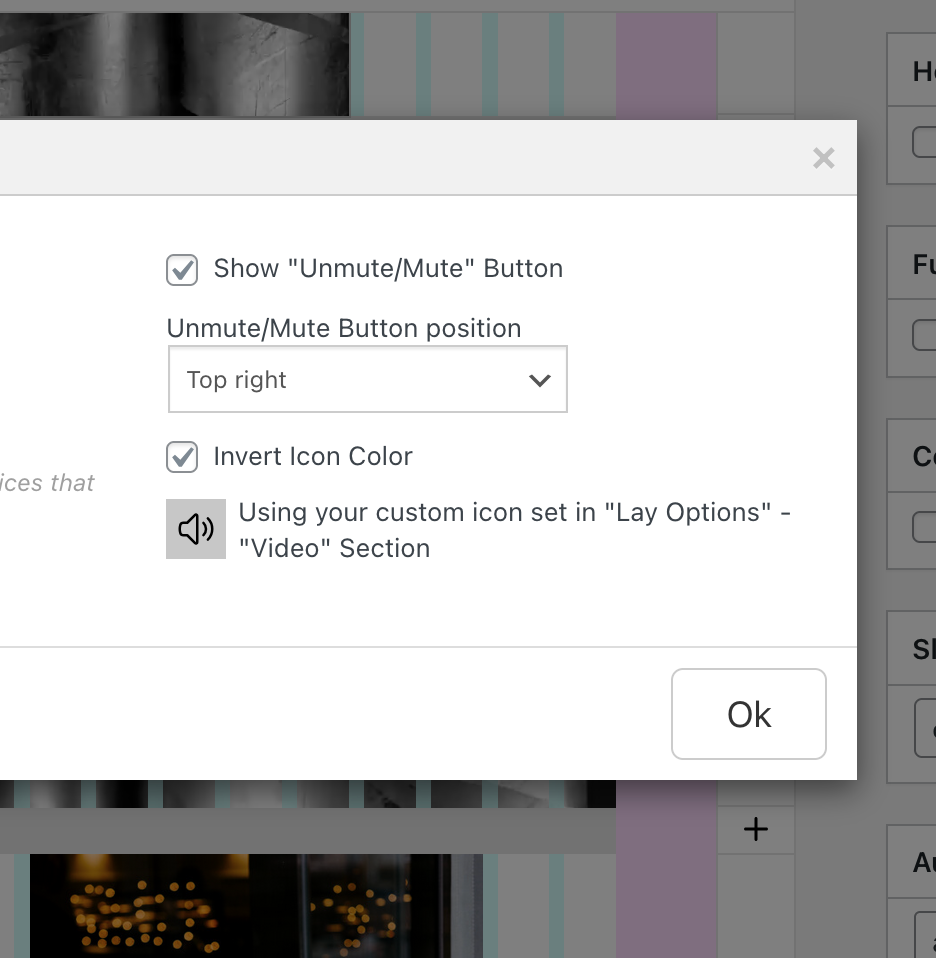
                  next update will get this:

                  grafik.png

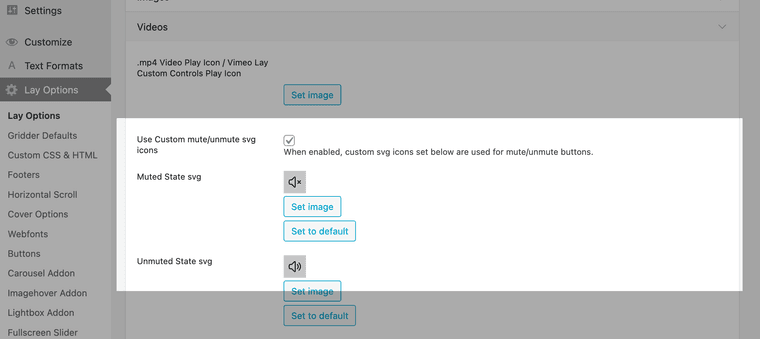
                  and in the next version you'll need to enable this setting and set custom icons, in lay options, new video section:
                  Screenshot 2026-04-01 at 14.55.26.png

                  1 Reply Last reply
                  0
                  • G
                    G
                    Giusepe
                    wrote on last edited by
                    #20

                    That's amazing! Thanks a lot!

                    1 Reply Last reply
                    0
                    • G
                      G
                      Giusepe
                      wrote on last edited by
                      #21

                      Hey! I checked the new update, and i think that having the option for customising the size and position of the mute/unmute icon could be super helpful, just as in every other icon. Anyway, this is a huge improvement!

                      Meanwhile, is there any way of making this with code?

                      Thank you so much :)

                      1 Reply Last reply
                      0
                      • arminunruhA
                        arminunruhA
                        arminunruh
                        Global Moderator
                        wrote on last edited by
                        #22

                        but now you can already position this with the settings? if you want a different size i think you can just upload a smaller icon?

                        1 Reply Last reply
                        0

                        Hello! It looks like you're interested in this conversation, but you don't have an account yet.

                        Getting fed up of having to scroll through the same posts each visit? When you register for an account, you'll always come back to exactly where you were before, and choose to be notified of new replies (either via email, or push notification). You'll also be able to save bookmarks and upvote posts to show your appreciation to other community members.

                        With your input, this post could be even better 💗

                        Register Login
                        Reply
                        • Reply as topic
                        Log in to reply
                        • Oldest to Newest
                        • Newest to Oldest
                        • Most Votes


                        Online Users
                        Forgot your key, lost your files, need a previous Lay Theme or Addon version? Go to www.laykeymanager.com
                        laytheme.com
                        • Login

                        • Don't have an account? Register

                        • Login or register to search.
                        • First post
                          Last post
                        0
                        • Recent
                        • Tags
                        • Popular
                        • Users
                        • Search