Skip to content
  • Recent
  • Tags
  • Popular
  • Users
  • Search
Skins
  • Light
  • Brite
  • Cerulean
  • Cosmo
  • Flatly
  • Journal
  • Litera
  • Lumen
  • Lux
  • Materia
  • Minty
  • Morph
  • Pulse
  • Sandstone
  • Simplex
  • Sketchy
  • Spacelab
  • United
  • Yeti
  • Zephyr
  • Dark
  • Cyborg
  • Darkly
  • Quartz
  • Slate
  • Solar
  • Superhero
  • Vapor

  • Default (No Skin)
  • No Skin
Collapse

Lay Theme Forum

  1. Home
  2. General Discussion
  3. How to animate a background using text lines with the Typewriter animation
How to animate a background using text lines with the Typewriter animation

Scheduled Pinned Locked Moved General Discussion
13 Posts 2 Posters 721 Views 1 Watching
  • Oldest to Newest
  • Newest to Oldest
  • Most Votes
Reply
  • Reply as topic
Log in to reply
This topic has been deleted. Only users with topic management privileges can see it.
  • AntoineA Offline
    AntoineA Offline
    Antoine
    wrote on last edited by
    #3

    Hi Armin,
    thank you for your quick reply.

    OK, I see – I hadn’t thought of that solution with the text style; thank you.

    I’ve carried out all the settings and steps you told me to, as well as the latest update.

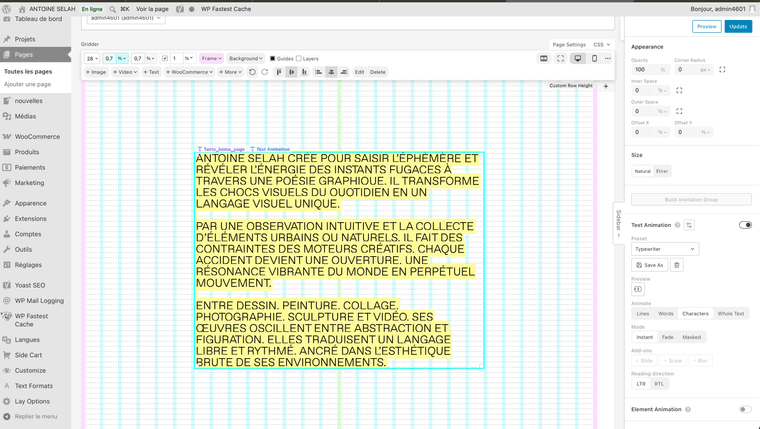
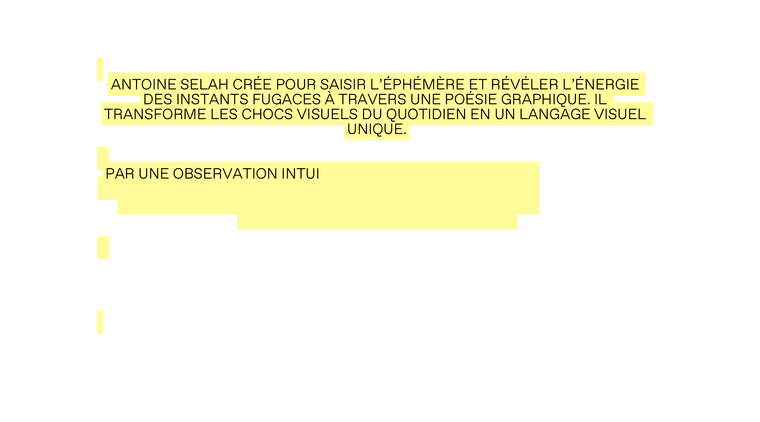
    Unfortunately, I’m still having two problems: I can’t centre my text with a background font (the text style doesn’t seem to support it), and the text animation with the background isn’t working properly. I’ve included a link to my test here so you can see for yourself.

    https://selah.fr/accueil/

    Thanks for your help!
    Antoine

    Capture d’écran, le 2026-06-29 à 20.25.59.png

    1 Reply Last reply
    0
    • AntoineA Offline
      AntoineA Offline
      Antoine
      wrote on last edited by
      #4

      Capture d’écran, le 2026-07-08 à 11.09.16.png

      1 Reply Last reply
      0
      • arminunruhA Offline
        arminunruhA Offline
        arminunruh
        Global Moderator
        wrote on last edited by
        #5

        hello can you please create a test page for me where i can see this?
        cause now the texts on the page have no background color

        1 Reply Last reply
        0
        • AntoineA Offline
          AntoineA Offline
          Antoine
          wrote on last edited by
          #6

          Hi Armin,

          Great, thanks for your feedback.
          I’ve copied the page with the effect so you can see it: https://selah.fr/en/home-copy/

          1 Reply Last reply
          0
          • arminunruhA Offline
            arminunruhA Offline
            arminunruh
            Global Moderator
            wrote on last edited by
            #7

            thank you so much. I'm gonna work on it.

            1 Reply Last reply
            0
            • arminunruhA Offline
              arminunruhA Offline
              arminunruh
              Global Moderator
              wrote on last edited by
              #8

              ok it will be fixed with the next update!

              1 Reply Last reply
              0
              • AntoineA Offline
                AntoineA Offline
                Antoine
                wrote last edited by
                #9

                Super ! Merci beaucoup Armin !

                1 Reply Last reply
                0
                • AntoineA Offline
                  AntoineA Offline
                  Antoine
                  wrote last edited by
                  #10

                  Hi Armin, I’ve installed the latest update and the text display effect is working perfectly. The problem is, I made a mistake and deleted the pre-saved ‘typewriters’ effect – is it possible to restore the default settings? Many thanks. Antoine

                  1 Reply Last reply
                  0
                  • arminunruhA Offline
                    arminunruhA Offline
                    arminunruh
                    Global Moderator
                    wrote last edited by
                    #11

                    there is no way to restore this.

                    you can try

                    animation type: typewriter
                    duration: 0 ms
                    stagger: 40 ms
                    stagger easing: linear
                    delay: 0 ms

                    1 Reply Last reply
                    0
                    • AntoineA Offline
                      AntoineA Offline
                      Antoine
                      wrote last edited by
                      #12

                      Hello Armin,
                      Thank you for your reply!

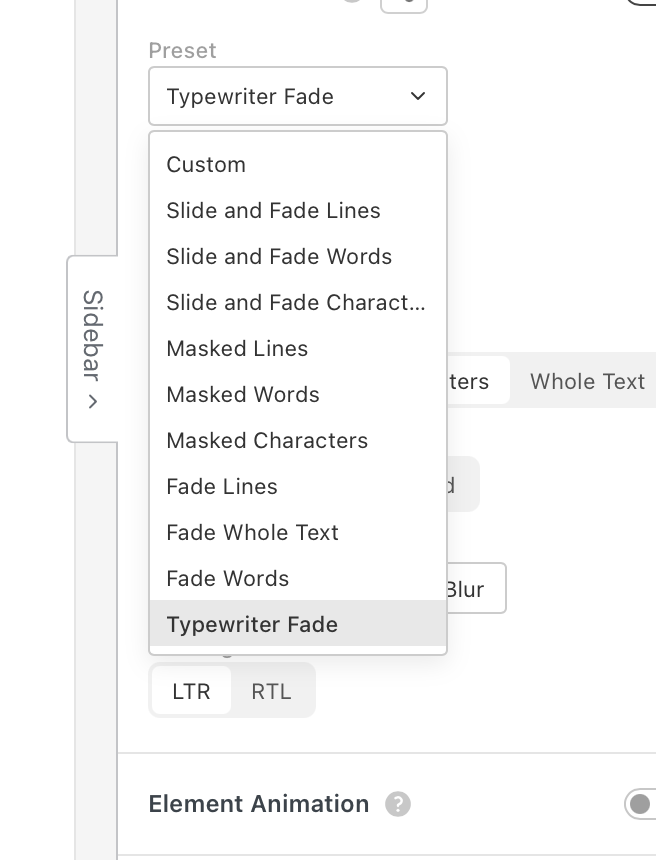
                      I think I didn’t express myself clearly – I meant that I’ve removed the basic typewriter effect; it’s no longer available in the settings. Thank you for your help.
                      Capture d’écran, le 2026-07-27 à 12.02.19.png

                      1 Reply Last reply
                      0
                      • arminunruhA Offline
                        arminunruhA Offline
                        arminunruh
                        Global Moderator
                        wrote last edited by arminunruh
                        #13

                        hey, in my last answer I described how to recreate the typewriter effect.

                        with all the settings that you have in the text animation section, you can recreate the same typewriter effect and then just click Save As and then just save it as typewriter.

                        <3
                        1 Reply Last reply
                        0
                        Reply
                        • Reply as topic
                        Log in to reply
                        • Oldest to Newest
                        • Newest to Oldest
                        • Most Votes


                        Online Users
                        Forgot your key, lost your files, need a previous Lay Theme or Addon version? Go to www.laykeymanager.com
                        laytheme.com
                        • Login

                        • Don't have an account? Register

                        • Login or register to search.
                        • First post
                          Last post
                        0
                        • Recent
                        • Tags
                        • Popular
                        • Users
                        • Search