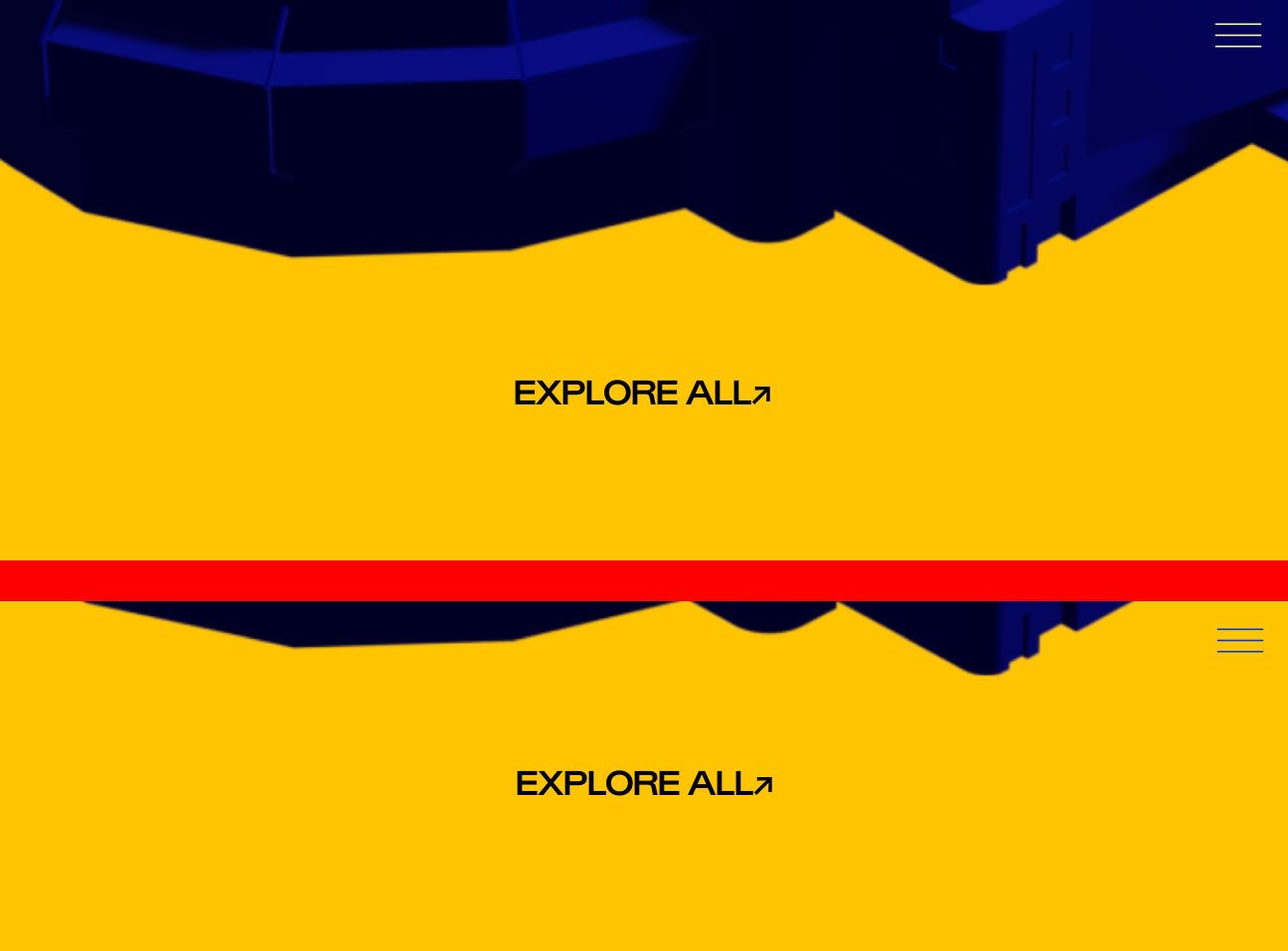
burger/menu dynamic color adaptation
-
@mr-do this effect is called "mix-blend-mode" with the setting "difference" and a white color for the icon that you can apply with custom css.
-
yes very good @felix_rabe !
for page overlay burger:
.standard-overlay-burger{
   mix-blend-mode: difference !important;
   /*if your icon is black, use this:*/
   filter: invert(100%);
}
for desktop nav:
.desktop-nav{
   mix-blend-mode: difference !important;
   /*if your icon is black, use this:*/
   filter: invert(100%);
}
for desktop site title:
.sitetitle{ mix-blend-mode: difference !important; /*if your icon is black, use this:*/ filter: invert(100%); } -
-
yes very good @felix_rabe !
for page overlay burger:
.standard-overlay-burger{
   mix-blend-mode: difference !important;
   /*if your icon is black, use this:*/
   filter: invert(100%);
}
for desktop nav:
.desktop-nav{
   mix-blend-mode: difference !important;
   /*if your icon is black, use this:*/
   filter: invert(100%);
}
for desktop site title:
.sitetitle{ mix-blend-mode: difference !important; /*if your icon is black, use this:*/ filter: invert(100%); }I'm trying to apply a "difference" blending mode for the mobile version of my site, specifically to a custom SVG burger icon. However, I can't get it to work. I'm also unsure how to properly target the site title on mobile to apply the same effect.
The "difference" blending mode works perfectly on the desktop version, but not on mobile so far.
-
I'm trying to apply a "difference" blending mode for the mobile version of my site, specifically to a custom SVG burger icon. However, I can't get it to work. I'm also unsure how to properly target the site title on mobile to apply the same effect.
The "difference" blending mode works perfectly on the desktop version, but not on mobile so far.
@OLVVDB for mobile its .mobile-title{ ... } etc. use the inspection tool of your browser to find the classes. and I would dramatically decrease the size and quality of the thumbnail videos. the frontage has a load of over 100 MB. https://handbrake.fr is a good app for that.
-
@OLVVDB for mobile its .mobile-title{ ... } etc. use the inspection tool of your browser to find the classes. and I would dramatically decrease the size and quality of the thumbnail videos. the frontage has a load of over 100 MB. https://handbrake.fr is a good app for that.
@felix_rabe allright thanks for informing me about the heavy page load. need to take care of that. as for the custom burger Icon I was able to find the class but the blending mode does not seem to work on the SVG files i uploaded in the custom icons. I exported the SVGs as styling = presentation attributes and its object IDs as minimal and decimals: 2, responsive from illustrator. Is there something I am doing wrong here or is this a knows issue that blending modes might not work on custom SVG files?
this is the CSS i used:
/* Mobile burger menu icon blend */
.mobile-menu-icon {
mix-blend-mode: exclusion;
filter: invert(100%);
} -
@felix_rabe allright thanks for informing me about the heavy page load. need to take care of that. as for the custom burger Icon I was able to find the class but the blending mode does not seem to work on the SVG files i uploaded in the custom icons. I exported the SVGs as styling = presentation attributes and its object IDs as minimal and decimals: 2, responsive from illustrator. Is there something I am doing wrong here or is this a knows issue that blending modes might not work on custom SVG files?
this is the CSS i used:
/* Mobile burger menu icon blend */
.mobile-menu-icon {
mix-blend-mode: exclusion;
filter: invert(100%);
}I would make the svg white by file, not by filter.
-
Oh, thanks for the great answers Felix. Yeah, I too think the SVG needs to be white. And then remove the filter invert.
-
hello everyone! I am trying to do a similar thing with my logo and burger icon (for mobile version). Le logo and the burger icons are made by me (two svg file). For the logo icon I used this CSS (that is working):
.mobile-title {
mix-blend-mode: difference !important;
filter: invert(100%);
}for the burger icon I don't know what to do. Can you help me?
-
do u have a link bialla? to your website


Hello! It looks like you're interested in this conversation, but you don't have an account yet.
Getting fed up of having to scroll through the same posts each visit? When you register for an account, you'll always come back to exactly where you were before, and choose to be notified of new replies (either via email, or push notification). You'll also be able to save bookmarks and upvote posts to show your appreciation to other community members.
With your input, this post could be even better 💗
Register Login