Skip to content
  • Recent
  • Tags
  • Popular
  • Users
  • Search
Skins
  • Light
  • Brite
  • Cerulean
  • Cosmo
  • Flatly
  • Journal
  • Litera
  • Lumen
  • Lux
  • Materia
  • Minty
  • Morph
  • Pulse
  • Sandstone
  • Simplex
  • Sketchy
  • Spacelab
  • United
  • Yeti
  • Zephyr
  • Dark
  • Cyborg
  • Darkly
  • Quartz
  • Slate
  • Solar
  • Superhero
  • Vapor

  • Default (No Skin)
  • No Skin
Collapse

Lay Theme Forum

  1. Home
  2. General Discussion
  3. WP Google Map Plugin shortcode not working

WP Google Map Plugin shortcode not working

Scheduled Pinned Locked Moved General Discussion
16 Posts 5 Posters 4.1k Views 1 Watching
  • Oldest to Newest
  • Newest to Oldest
  • Most Votes
Reply
  • Reply as topic
Log in to reply
This topic has been deleted. Only users with topic management privileges can see it.
  • S
    S
    sampittman
    wrote on last edited by sampittman
    #1

    Hey Armin,

    I'm using the Pro version of the WP Google Maps plugin with the shortcode [wpgmza id="1"] but the map is not displaying.
    I saw in another post you mentioned that the plugin might no work if the API code or License Key was missing but I have both of these.

    Any thoughts?

    Thanks in advance.

    1 Reply Last reply
    0
    • mariusjopenM
      mariusjopenM
      mariusjopen
      Global Moderator
      wrote on last edited by
      #2

      Hey sampittman,

      so the API code is connected to one of your Google accounts?

      Can you provide a link to your website. In the best case the page where the gmaps does not get displayed correctly.

      All the best!

      Marius

      www.mariusjopen.world

      S 1 Reply Last reply
      0
      • mariusjopenM mariusjopen

        Hey sampittman,

        so the API code is connected to one of your Google accounts?

        Can you provide a link to your website. In the best case the page where the gmaps does not get displayed correctly.

        All the best!

        Marius

        S
        S
        sampittman
        wrote on last edited by sampittman
        #3

        @mariusjopen

        Hi Marius,

        Sorry for the delay.
        Yes that's correct the API code is connected to my Google account.

        Here's the link to the problem page!
        http://nbeta.site/contact

        Thanks
        Sam

        1 Reply Last reply
        0
        • mariusjopenM
          mariusjopenM
          mariusjopen
          Global Moderator
          wrote on last edited by
          #4

          Hey Sam,

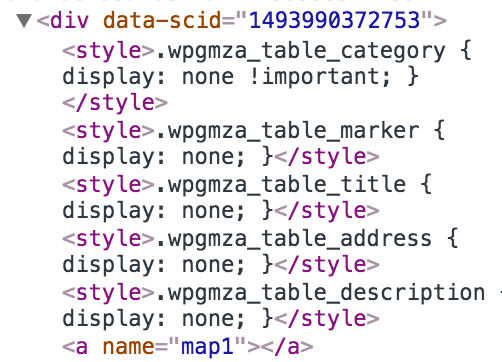
          I looked into your code and see that your Custom CSS is hiding a lot of things like images etc.

          But that does not directly influence the Gmaps.

          Did you embed it with the shortcode?

          If you look into the HTML some things look a bit strange like this here for example:0_1495101089128_Bildschirmfoto 2017-05-18 um 15.21.15.png

          Can you try to install the plugin in an empty Wordpress version? If it works you can compare and see what is the difference.

          All the best!

          Marius

          www.mariusjopen.world

          S 1 Reply Last reply
          0
          • mariusjopenM mariusjopen

            Hey Sam,

            I looked into your code and see that your Custom CSS is hiding a lot of things like images etc.

            But that does not directly influence the Gmaps.

            Did you embed it with the shortcode?

            If you look into the HTML some things look a bit strange like this here for example:0_1495101089128_Bildschirmfoto 2017-05-18 um 15.21.15.png

            Can you try to install the plugin in an empty Wordpress version? If it works you can compare and see what is the difference.

            All the best!

            Marius

            S
            S
            sampittman
            wrote on last edited by
            #5

            @mariusjopen Hey,

            Thanks for looking into this, I've uninstalled the theme and reuploaded it and the code you found doesn't feature any more but I still can't see the map.

            Thanks
            Sam

            1 Reply Last reply
            0
            • mariusjopenM
              mariusjopenM
              mariusjopen
              Global Moderator
              wrote on last edited by
              #6

              Hi Sam,
              oh, this was a misunderstanding. I am sorry for not being clear.

              Try to install the plugin in an completely fresh Wordpress without Laytheme.
              If it works there – the problem must be connected to Laytheme.

              Let me know :-)

              Marius

              www.mariusjopen.world

              1 Reply Last reply
              0
              • D
                D
                dingdong
                wrote on last edited by dingdong
                #7
                This post is deleted!
                1 Reply Last reply
                0
                • mariusjopenM
                  mariusjopenM
                  mariusjopen
                  Global Moderator
                  wrote on last edited by
                  #8

                  Dear @dingdong
                  can you try the same google-maps-code when a different theme is activated?
                  Best!
                  Marius

                  www.mariusjopen.world

                  1 Reply Last reply
                  0
                  • D
                    D
                    dingdong
                    wrote on last edited by
                    #9

                    hey @mariusjopen
                    i pasted the short code in a different theme and it worked:

                    alt text

                    1 Reply Last reply
                    0
                    • D
                      D
                      dingdong
                      wrote on last edited by
                      #10

                      @mariusjopen any idea how to fix that? :/

                      1 Reply Last reply
                      0
                      • mariusjopenM
                        mariusjopenM
                        mariusjopen
                        Global Moderator
                        wrote on last edited by
                        #11

                        Dear @dingdong
                        honestly. No idea.
                        We are sorry!

                        Marius

                        www.mariusjopen.world

                        1 Reply Last reply
                        0
                        • D
                          D
                          dingdong
                          wrote on last edited by dingdong
                          #12

                          @mariusjopen when i click on the button (inspector) and remove "position: relative;" the "+" and - appears?!
                          and maybe u can have a closer look to this, because it seems to be a theme related issue?! would be very nice :)

                          1 Reply Last reply
                          0
                          • D
                            D
                            dingdong
                            wrote on last edited by
                            #13

                            ok, if anybody is interessted:

                            .col img" has top/left : 0, and overwrites top/left: 50% from ".gm-control-active>img".
                            not elegant but fixed it with:

                            .gm-control-active>img {
                            left: 50% !important;
                            top: 50% !important;
                            }

                            1 Reply Last reply
                            0
                            • mariusjopenM
                              mariusjopenM
                              mariusjopen
                              Global Moderator
                              wrote on last edited by
                              #14

                              Dedar @sampittman
                              Ah great! Thank you for sharing and using LayTheme!
                              Best!
                              Marius

                              www.mariusjopen.world

                              1 Reply Last reply
                              0
                              • C
                                C
                                cschm.tz
                                wrote on last edited by
                                #15

                                @mariusjopen
                                Hi all, I am also using WP Google Maps as a plugin for my site.
                                Do you by any chance know if it allows you to have text over the map?

                                The idea was to have the map as a full size background and some descriptive text on top, instead of underneath as I have now.
                                https://lasalbercas.com/como-llegar-2-2

                                Any suggestions are great at this stage!!!
                                Thanks so much in advance,

                                Christian

                                1 Reply Last reply
                                0
                                • RichardR
                                  RichardR
                                  Richard
                                  Global Moderator
                                  wrote on last edited by Richard
                                  #16

                                  Hi Christian @cschm-tz

                                  Have addressed your other thread :)
                                  http://laythemeforum.com/topic/6289/google-maps-and-text/2

                                  Best
                                  Richard

                                  1 Reply Last reply
                                  0

                                  Hello! It looks like you're interested in this conversation, but you don't have an account yet.

                                  Getting fed up of having to scroll through the same posts each visit? When you register for an account, you'll always come back to exactly where you were before, and choose to be notified of new replies (either via email, or push notification). You'll also be able to save bookmarks and upvote posts to show your appreciation to other community members.

                                  With your input, this post could be even better 💗

                                  Register Login
                                  Reply
                                  • Reply as topic
                                  Log in to reply
                                  • Oldest to Newest
                                  • Newest to Oldest
                                  • Most Votes


                                  Online Users
                                  R
                                  robertobarbes
                                  Forgot your key, lost your files, need a previous Lay Theme or Addon version? Go to www.laykeymanager.com
                                  laytheme.com
                                  • Login

                                  • Don't have an account? Register

                                  • Login or register to search.
                                  • First post
                                    Last post
                                  0
                                  • Recent
                                  • Tags
                                  • Popular
                                  • Users
                                  • Search