Position of rotated textbox

-
Hi Laytheme Forum, Hi Armin.
I have a problem with the position of a textbox i rotated using the following CSS:
Now i want the textbox to be positioned on the right side of my website.
But if i put it in that way like this: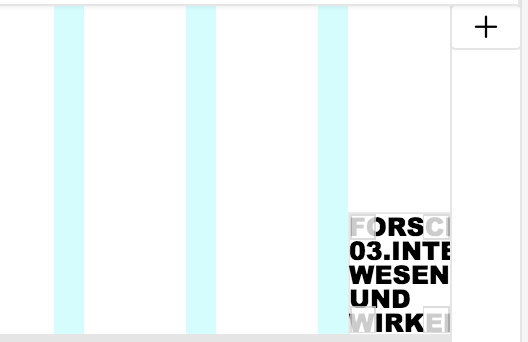
The column brakes in the frontend are all messed up, as you can see here:

and if i position it like this to give enough space for the text to break normal, it appears to far away from the right side in the frontend:
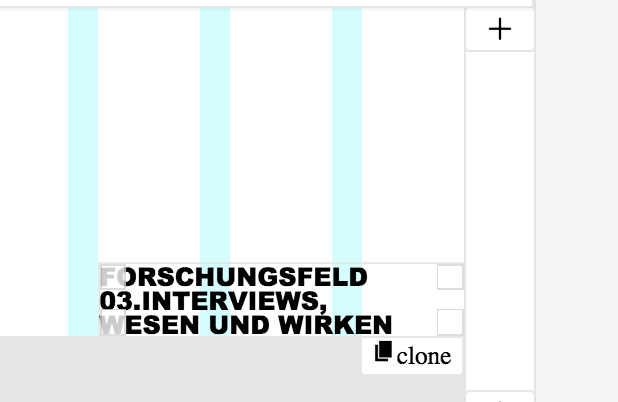

Do you have any solution on how to get proper column brakes and the right position?
You can find the page here: http://heikoschulz.de/interview
Greets, Paul
-
Hi Paul,
there is not a very clean solution.
You can try to add a
margin: -1vw;to your CSS. That will move it more to the right.I hope I could help!
Best!
Marius
-
@mariusjopen said in Position of rotated textbox:
margin: -1vw;
Hey Marius! First of all thanks for your reply! Unfortunately the code didn't work.. I think the problem might be that 'margin: -1vw' and every other code that refers to the position of the textbox only affects the position inside the row. but if I place the textbox in the right row, the columns break as if there was not enough space for the text to go on. Do you know what i mean?
Greets, Paul
-
Hi @Paul_Moxie
I would give the box you want to rotate a special class (you did that already, right?)
And then I would just giver it a fixed width and height.
That should be not a problem.Let me know if that works for you!
Best!
Marius
-
Hi @Paul_Moxie
I would give the box you want to rotate a special class (you did that already, right?)
And then I would just giver it a fixed width and height.
That should be not a problem.Let me know if that works for you!
Best!
Marius
@mariusjopen Yeah right, i rotated it by using CSS and then giving a class to the textbox.
How is possible to give a certain width and height? Do i also need custom CSS for this? Cheers, Paul -
Hi @Paul_Moxie
exactly. In the Custom CSS you wrote you can add a width an a height:.forschungsfeld { -ms-transform: rotate(-90deg); -webkit-transform: rotate(-90deg); transform: rotate(-90deg); z-index: 5; margin: -1vw; width: 300px; height: 200px; }Let me know if that works for you!
Best!
Marius
-
Hi @Paul_Moxie
exactly. In the Custom CSS you wrote you can add a width an a height:.forschungsfeld { -ms-transform: rotate(-90deg); -webkit-transform: rotate(-90deg); transform: rotate(-90deg); z-index: 5; margin: -1vw; width: 300px; height: 200px; }Let me know if that works for you!
Best!
Marius
@mariusjopen Thanks for your reply. Unfortunately it didn't work :-(
What i forgot to tell you is that I also added CSS to fix the textbox on the page. so the whole code looks like this:.forschungsfeld {
-ms-transform: rotate(-90deg);
-webkit-transform: rotate(-90deg);
transform: rotate(-90deg);
z-index: 5;
margin: -5vw;
width: 600px;
height: 200px;
}
.fixed{
position: fixed;
top: 180px;
right: 0;
z-index: 0;
}I already tried adding the width/height part to the other CSS as well but it didn't work either.
Do you have any other ideas how to fix it?Greets and thanks a lt for your help, Paul
-
Hi @Paul_Moxie
so until now it looks like this:
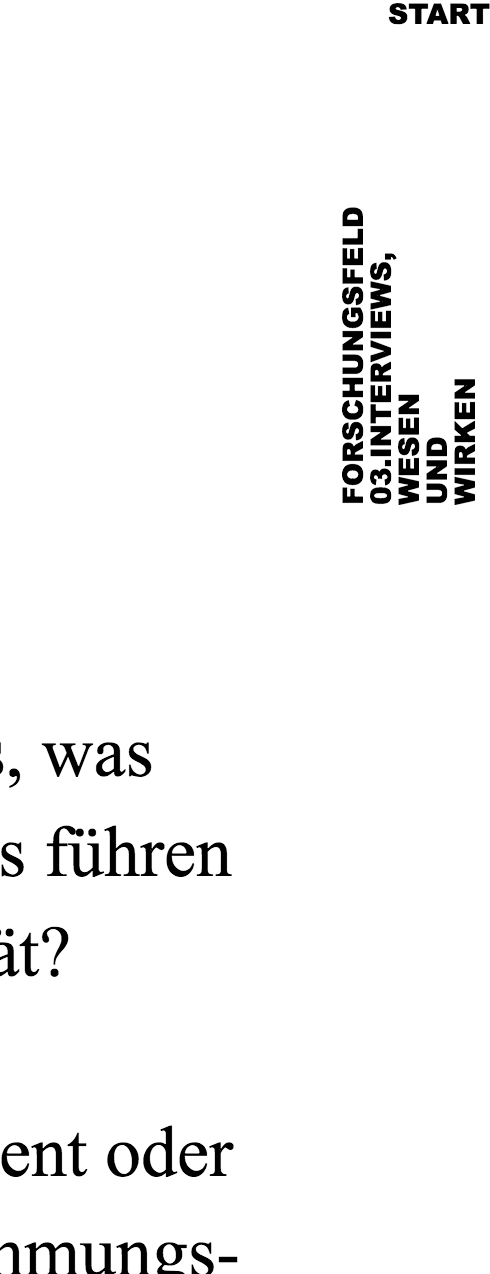
Can you make a quick mockup of how you want it to look like?
Best!
Marius
-
Hi @Paul_Moxie
so until now it looks like this:
Can you make a quick mockup of how you want it to look like?
Best!
Marius
Hi @mariusjopen,
sorry for the late reply and thanks again for your help.
It's supposed to look something like this: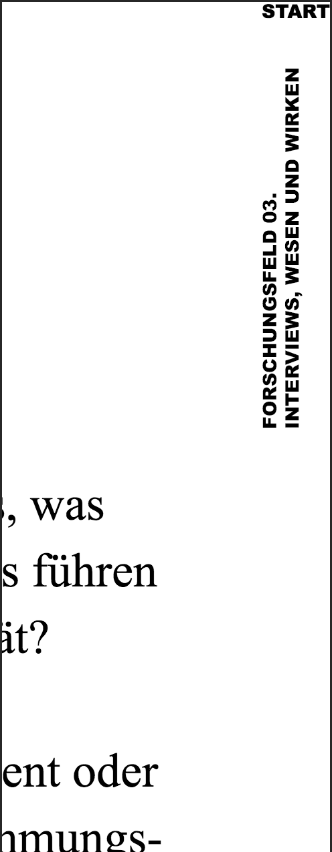
Do you have any more ideas how to make that happen?
Cheers, Paul -
Hi @Paul_Moxie
Can you try to use this code here:
.fixed {
    position: fixed;
    top: 0px !important;
    z-index: 0;
    width: 600px !important;
    right: -26vh;
}
Also this is a workaround.
I hope that helps!
Best!
Marius

Hello! It looks like you're interested in this conversation, but you don't have an account yet.
Getting fed up of having to scroll through the same posts each visit? When you register for an account, you'll always come back to exactly where you were before, and choose to be notified of new replies (either via email, or push notification). You'll also be able to save bookmarks and upvote posts to show your appreciation to other community members.
With your input, this post could be even better 💗
Register Login